136 KiB
Coingecko - Coins
Pages: 65
👑 Total Supply Chart by ID
URL: llms-txt#👑-total-supply-chart-by-id
Source: https://docs.coingecko.com/reference/coins-id-total-supply-chart
reference/api-reference/coingecko-pro.json get /coins/{id}/total_supply_chart This endpoint allows you to query historical total supply of a coin by number of days away from now based on provided coin ID
- You may leave the interval params as empty for automatic granularity:
- 1 day from now = 5-minutely data
- 2-90 days from now = hourly data
- 91 days & above from now = daily data (00:00 UTC)
- Data Availability: from 22 June 2019
- Cache/Update Frequency: 5 minutes.
- The last completed UTC day (00:00) is available 35 minutes after midnight on the next UTC day (00:35).
- Exclusive for Enterprise Plan Subscribers only.
Trending Search List
URL: llms-txt#trending-search-list
Source: https://docs.coingecko.com/v3.0.1/reference/trending-search
v3.0.1/reference/api-reference/coingecko-demo.json get /search/trending This endpoint allows you query trending search coins, NFTs and categories on CoinGecko in the last 24 hours
- The endpoint currently supports:
- Top 15 trending coins (sorted by the most popular user searches)
- Top 7 trending NFTs (sorted by the highest percentage change in floor prices)
- Top 5 trending categories (sorted by the most popular user searches)
- Cache / Update Frequency: every 10 minutes for all the API plans.
Coins List with Market Data
URL: llms-txt#coins-list-with-market-data
Source: https://docs.coingecko.com/v3.0.1/reference/coins-markets
v3.0.1/reference/api-reference/coingecko-demo.json get /coins/markets This endpoint allows you to query all the supported coins with price, market cap, volume and market related data
-
You can retrieve specific coins using their unique
ids,names, orsymbolsinstead of returning the whole list.- To filter results based on the coin's category, use the
categoryparam (refer to/coins/categories/listfor available categories). - Use the
per_pageandpageparams to manage the number of results you receive and navigate through the data.
- To filter results based on the coin's category, use the
-
When multiple lookup params are provided, the following priority order is applied:
category(highest) >ids>names>symbols(lowest).- When searching by
name, you need to URL-encode any spaces (e.g. "Binance Coin" becomes "Binance%20Coin"). - The
include_tokens=allparam is exclusively for use with thesymbolslookup and is limited to maximum of 50 symbols per request. - Wildcard searches are not supported for lookup params (
ids,names,symbols). - Cache/Update Frequency:
- Every 60 seconds for Public API.
- Every 45 seconds for Pro API (Analyst, Lite, Pro, Enterprise).
- When searching by
Coin Historical Chart Data within Time Range by Token Address
URL: llms-txt#coin-historical-chart-data-within-time-range-by-token-address
Source: https://docs.coingecko.com/v3.0.1/reference/contract-address-market-chart-range
v3.0.1/reference/api-reference/coingecko-demo.json get /coins/{id}/contract/{contract_address}/market_chart/range This endpoint allows you to get the historical chart data within certain time range in UNIX along with price, market cap and 24hr volume based on asset platform and particular token contract address
-
You may obtain the asset platform and contract address via several ways:
- refers to respective coin page and find 'contract address'.
- refers to
/coins/listendpoint (include platform = true).
-
You may leave the interval params as empty for automatic granularity:
- 1 day from current time = 5-minutely data
- 1 day from any time (except current time) = hourly data
- 2 - 90 days from any time = hourly data
- above 90 days from any time = daily data (00:00 UTC)
- Cache / Update Frequency:
Based on days range (all the API plans)- 1 day = 30 seconds cache
- 2 -90 days = 30 minutes cache
- 90 days = 12 hours cache
- The last completed UTC day (00:00) is available 35 minutes after midnight on the next UTC day (00:35). The cache will always expire at 00:40 UTC.
- Access to historical data via the Public API (Demo plan) is restricted to the past 365 days only. To access the complete range of historical data, please subscribe to one of our paid plans to obtain a Pro-API key.
💼 Categories List
URL: llms-txt#💼-categories-list
Source: https://docs.coingecko.com/reference/categories-list
reference/api-reference/onchain-pro.json get /categories This endpoint allows you to query all the supported categories on GeckoTerminal
-
You can retrieve pools or tokens of a specific category with this endpoint: Pools by Category ID.
- GeckoTerminal categories are different from CoinGecko categories.
-
This endpoint returns 50 categories per page.
- GeckoTerminal Equivalent Page: https://www.geckoterminal.com/category
- Cache/Update frequency: every 60 seconds.
- Exclusive for all Paid Plan Subscribers (Analyst, Lite, Pro and Enterprise).
Search Pools
URL: llms-txt#search-pools
Source: https://docs.coingecko.com/v3.0.1/reference/search-pools
v3.0.1/reference/api-reference/onchain-demo.json get /search/pools This endpoint allows you to search for pools on a network
-
You may use this endpoint to search for query such as pool contract address, token contract address or token symbol. The endpoint will return matching pools as response.
- You may include values such as
pageto specify which page of responses you would like to show.
- You may include values such as
-
If the token's market cap is not verified by the team, the API response will return
nullfor its market cap value, even though it has a displayed value on GeckoTerminal, which might not be accurate as it often matches the Fully Diluted Valuation (FDV).- Attributes specified in the
includeparam will be returned under the top-level "included" key. - This endpoint returns up to 20 pools per page. Use the
pageparam to navigate more results. page: Pagination beyond 10 pages is available for Paid Plan subscribers (Analyst plan or above).- Cache/Update frequency: every 60 seconds.
- Attributes specified in the
Crypto Treasury Holdings by Entity ID
URL: llms-txt#crypto-treasury-holdings-by-entity-id
Source: https://docs.coingecko.com/v3.0.1/reference/public-treasury-entity
v3.0.1/reference/api-reference/coingecko-demo.json get /public_treasury/{entity_id} This endpoint allows you query public companies & governments' cryptocurrency holdings by Entity ID
- CoinGecko equivalent page: https://www.coingecko.com/en/treasuries/bitcoin
- Cache / Update Frequency: every 5 minutes for all the API plans.
Coins Categories List with Market Data
URL: llms-txt#coins-categories-list-with-market-data
Source: https://docs.coingecko.com/v3.0.1/reference/coins-categories
v3.0.1/reference/api-reference/coingecko-demo.json get /coins/categories This endpoint allows you to query all the coins categories with market data (market cap, volume, ...) on CoinGecko
- CoinGecko Equivalent Page: https://www.coingecko.com/en/categories
- Cache / Update Frequency: every 5 minutes for all the API plans.
OnchainSimpleTokenPrice
URL: llms-txt#onchainsimpletokenprice
Contents:
- Data Payload
-
- Establish Connection to Websocket
-
- Subscribe to a specific channel - OnchainSimpleTokenPrice
-
- Stream OnchainSimpleTokenPrice data
- Tips:
- Un-subscribe to stop streaming OnchainSimpleTokenPrice data
Source: https://docs.coingecko.com/websocket/onchainsimpletokenprice
Subscribe to receive real-time price updates for tokens, as seen on GeckoTerminal.com
This Websocket channel allows you to subscribe to real-time updates of price changes for token.
- Lookup by Network + Token Address
- It will return price and market data of the top pool of the specified token
Update Frequency: as fast as 1s, for actively traded tokens.
| Field | Type | Description | Example | |
|---|---|---|---|---|
c |
channel_type |
string | Indicates the type of channel subscribed to. | G1 |
n |
network_id |
string | Identifier of the blockchain network. Check full list of IDs here. | eth |
ta |
token_address |
string | Contract address of the token on the blockchain. | 0xc02aaa39b223fe8d0a0e5c4f27ead9083c756cc2 |
p |
usd_price |
float | Current token price in USD. | 3639.78228844745 |
pp |
usd_price_24h_change_percentage |
float | Percentage change in token price over the last 24 hours. | 3.566 |
m |
usd_market_cap |
float | Market capitalization in USD. | 123 |
v |
usd_24h_vol |
float | 24-hour trading volume in USD. | 31233333.33 |
t |
last_updated_at |
integer | Timestamp of the last data update in UNIX time. | 1709542750 |
Tips: The Websocket payload will use the value null when specific data is unavailable. Ensure your application is capable of handling null values for fields that may not always have data.
1. Establish Connection to Websocket
2. Subscribe to a specific channel - OnchainSimpleTokenPrice
3. Stream OnchainSimpleTokenPrice data
The output keys will be in random order.
Un-subscribe to stop streaming OnchainSimpleTokenPrice data
Input Example: Unsubscribe for 1 specific token data:
Input Example: Unsubscribe from OnchainSimpleTokenPrice channel and all token data:
Examples:
Example 1 (unknown):
</CodeGroup>

## 2. Subscribe to a specific channel - OnchainSimpleTokenPrice

**Input Example:**

<CodeGroup>
Example 2 (unknown):
</CodeGroup>

**Output Example**:

<CodeGroup>
Example 3 (unknown):
</CodeGroup>

## 3. Stream OnchainSimpleTokenPrice data

**Input Example:**

<CodeGroup>
Example 4 (unknown):
</CodeGroup>

**Output Example**:

<CodeGroup>
OnchainOHLCV
URL: llms-txt#onchainohlcv
Contents:
- Data Payload
-
- Establish Connection to Websocket
-
- Subscribe to a specific channel - OnchainOHLCV
-
- Stream OnchainOHLCV data
- Tips:
- Un-subscribe to stop streaming OnchainOHLCV data
Source: https://docs.coingecko.com/websocket/wssonchainohlcv
Subscribe to receive real-time OHLCV updates for pools, as seen on GeckoTerminal.com
This Websocket channel allows you to subscribe to real-time OHLCV updates of a pool.
- Lookup by Network + Pool Address
- It will return Open, High, Low, Close price and Volume data the specified pool.
Update Frequency: as fast as 1s, for actively traded pools.
Tips: use this Rest API endpoint Top Pools by Token Address to obtain contract address of the most liquid pool.
### **Notes**- Interval options: 1s / 1m / 5m / 1h / 2h / 4h / 8h
- You may stream the pool ohlcv data based on
baseorquotetoken of a pool. - Please note that your subscription quota is based on the number of unique data streams you request. Each unique combination of an interval and token for a given pool is considered a distinct subscription and will count towards your max subscription limit.
- You may stream the pool ohlcv data based on
| Field | Type | Description | Example | |
|---|---|---|---|---|
ch |
channel_type |
string | Indicates the type of channel subscribed to. | G3 |
n |
network_id |
string | Identifier of the blockchain network. Check full list of IDs here. | eth |
pa |
pool_address |
string | Contract address of the pool. | 0x88e6a0c2dd6fcb..3f5640 |
to |
token |
string | base or quote token |
base |
i |
interval |
string | Interval or resolution of the candle: 1s / 1m / 5m / 1h / 2h / 4h / 8h | 1m |
o |
open |
float | Open price in USD | 3539 |
h |
high |
float | High price in USD | 3541 |
l |
low |
float | Low price in USD | 3530 |
c |
close |
float | Close price in USD | 3531 |
v |
volume |
float | Volume in USD | 323333 |
t |
timestamp |
integer | Opening timestamp of candle interval | 1753803600 |
Tips: The Websocket payload will use the value null when specific data is unavailable. Ensure your application is capable of handling null values for fields that may not always have data.
1. Establish Connection to Websocket
2. Subscribe to a specific channel - OnchainOHLCV
3. Stream OnchainOHLCV data
Input Example: (1 minute interval and base token of a pool)
Intervaloptions: 1s / 1m / 5m / 1h / 2h / 4h / 8h- You may stream the pool ohlcv data of 'base' or 'quote'
token.
The output keys will be in random order.
Un-subscribe to stop streaming OnchainOHLCV data
Input Example: Unsubscribe for 1 specific pool data:
Input Example: Unsubscribe from OnchainOHLCV channel and all pools data:
Examples:
Example 1 (unknown):
</CodeGroup>

## 2. Subscribe to a specific channel - OnchainOHLCV

**Input Example:**

<CodeGroup>
Example 2 (unknown):
</CodeGroup>

**Output Example**:

<CodeGroup>
Example 3 (unknown):
</CodeGroup>

## 3. Stream OnchainOHLCV data

**Input Example:** (1 minute interval and base token of a pool)

* `Interval` options: 1s / 1m / 5m / 1h / 2h / 4h / 8h
* You may stream the pool ohlcv data of 'base' or 'quote' `token`.

<CodeGroup>
Example 4 (unknown):
</CodeGroup>

**Output Example**:

<CodeGroup>
Coin Historical Data by ID
URL: llms-txt#coin-historical-data-by-id
Source: https://docs.coingecko.com/v3.0.1/reference/coins-id-history
v3.0.1/reference/api-reference/coingecko-demo.json get /coins/{id}/history This endpoint allows you to query the historical data (price, market cap, 24hrs volume, ...) at a given date for a coin based on a particular coin ID
-
You may obtain the coin ID (API ID) via several ways:
- refers to respective coin page and find 'API ID'.
- refers to
/coins/listendpoint. - refers to Google Sheets here.
-
The data returned is at
00:00:00 UTC.- The last completed UTC day (00:00) is available 35 minutes after midnight on the next UTC day (00:35).
- Access to historical data via the Public API (Demo plan) is restricted to the past 365 days only. To access the complete range of historical data, please subscribe to one of our paid plans to obtain a Pro-API key.
Coin Historical Chart Data by Token Address
URL: llms-txt#coin-historical-chart-data-by-token-address
Source: https://docs.coingecko.com/v3.0.1/reference/contract-address-market-chart
v3.0.1/reference/api-reference/coingecko-demo.json get /coins/{id}/contract/{contract_address}/market_chart This endpoint allows you to get the historical chart data including time in UNIX, price, market cap and 24hr volume based on asset platform and particular token contract address
-
You may obtain the asset platform and contract address via several ways:
- refers to respective coin page and find 'contract address'.
- refers to
/coins/listendpoint (include platform = true).
-
You may leave the interval as empty for automatic granularity:
- 1 day from current time = 5-minutely data
- 2 - 90 days from current time = hourly data
- above 90 days from current time = daily data (00:00 UTC)
- Cache / Update Frequency:
- Every 5 minutes for all the API plans.
- The last completed UTC day (00:00) is available 35 minutes after midnight on the next UTC day (00:35). The cache will always expire at 00:40 UTC.
- Access to historical data via the Public API (Demo plan) is restricted to the past 365 days only. To access the complete range of historical data, please subscribe to one of our paid plans to obtain a Pro-API key.
CoinGecko MCP Server (Beta)
URL: llms-txt#coingecko-mcp-server-(beta)
Source: https://docs.coingecko.com/docs/mcp-server
MCP Server for Crypto Price & Market Data. MCP (Model Context Protocol) is an open standard that allows Large Language Model (LLM) and other AI agents to securely and intelligently interact with external data sources and tools.
 ### Welcome to the CoinGecko MCP Server!
CoinGecko MCP Server is currently in Beta. We're constantly improving, and your feedback is crucial. Please share any thoughts or suggestions via this feedback form.
Token Data by Token Address
URL: llms-txt#token-data-by-token-address
Source: https://docs.coingecko.com/v3.0.1/reference/token-data-contract-address
v3.0.1/reference/api-reference/onchain-demo.json get /networks/{network}/tokens/{address} This endpoint allows you to query specific token data based on the provided token contract address on a network
-
You may add values such as
top_poolsin the include param to include top pools along with the pools information.- If you would like to query token information such as socials, websites, description and etc. You can go to this endpoint
/networks/{network}/tokens/{address}/infoinstead.
- If you would like to query token information such as socials, websites, description and etc. You can go to this endpoint
-
If the token's market cap is not verified by the team, the API response will return
nullfor its market cap value, even though it has a displayed value on GeckoTerminal, which might not be accurate as it often matches the Fully Diluted Valuation (FDV).- Market Cap can be verified by and sourced from CoinGecko, and the number may be higher than FDV as it may include Market Cap of tokens issued on other blockchain network.
- Attributes specified in the
includeparam will be returned under the top-level "included" key. - Set
include_composition=trueto surface the balance and liquidity value of the pool's base and quote tokens. (requiresinclude=top_pools) - For tokens on a bonding curve (i.e. non-graduated tokens from launchpads), the response will include a
launchpad_detailsobject containing their graduation status and details. - Cache/Update frequency: every 60 seconds.
Crypto Global Market Data
URL: llms-txt#crypto-global-market-data
Source: https://docs.coingecko.com/v3.0.1/reference/crypto-global
v3.0.1/reference/api-reference/coingecko-demo.json get /global This endpoint allows you query cryptocurrency global data including active cryptocurrencies, markets, total crypto market cap and etc
- Cache / Update Frequency: every 10 minutes for all the API plans.
Pool Tokens Info by Pool Address
URL: llms-txt#pool-tokens-info-by-pool-address
Source: https://docs.coingecko.com/v3.0.1/reference/pool-token-info-contract-address
v3.0.1/reference/api-reference/onchain-demo.json get /networks/{network}/pools/{pool_address}/info This endpoint allows you to query pool metadata (base and quote token details, image, socials, websites, description, contract address, etc.) based on a provided pool contract address on a network
-
If you would like to query pool data such as price, transactions, volume and etc. You can go to this endpoint
/networks/{network}/pools/{address}instead.- Cache/Update frequency: every 60 seconds.
- Learn more about GT score here.
- Metadata (image, websites, description, socials) may be sourced on-chain and is not vetted by the CoinGecko team. If you wish to get metadata reviewed by CoinGecko team, you may use the following endpoints:
-
holdersdata is currently in Beta, with ongoing improvements to data quality, coverage, and update frequency.- Supported chains include: Solana, EVM (Ethereum, Polygon, BNB, Arbitrum, Optimism, Base), Sui, TON, and Ronin.
distribution_percentagecoverage:- Solana:
top_10,11_20,21_40,rest - Other chains:
top_10,11_30,31_50,rest
- Solana:
- For tokens on a bonding curve (i.e. non-graduated tokens from launchpads), the response will include a
launchpad_detailsobject containing their graduation status and details.
Search Queries
URL: llms-txt#search-queries
Source: https://docs.coingecko.com/v3.0.1/reference/search-data
v3.0.1/reference/api-reference/coingecko-demo.json get /search This endpoint allows you to search for coins, categories and markets listed on CoinGecko
- The responses are sorted in descending order by market cap.
- Cache / Update Frequency: every 15 minutes for all the API plans.
Unlock the Power of CoinGecko API with Unprecedented Ease
URL: llms-txt#unlock-the-power-of-coingecko-api-with-unprecedented-ease
Contents:
- Designed to make your life easier: Common Benefits of Our SDKs
The official CoinGecko Typescript and Python SDK are now available for all developers! These SDKs dramatically streamline your integration process, enabling you to build powerful crypto applications faster and more reliably than ever before, regardless of your preferred language.
Designed to make your life easier: Common Benefits of Our SDKs
- Official Support: Both SDKs are maintained by the CoinGecko team, ensuring up-to-date features, reliable access, and dedicated support.
- Reduced Boilerplate: Say goodbye to manual request construction and parsing. Our SDKs handle the complexities, allowing you to focus on your application logic.
- Faster Development: Build and iterate quicker with intuitive methods, clear documentation, and pre-built functionalities tailored for each language.
- Seamless Integration: Effortlessly incorporate CoinGecko data into your existing Python or TypeScript projects.
Coin Historical Chart Data by ID
URL: llms-txt#coin-historical-chart-data-by-id
Source: https://docs.coingecko.com/v3.0.1/reference/coins-id-market-chart
v3.0.1/reference/api-reference/coingecko-demo.json get /coins/{id}/market_chart This endpoint allows you to get the historical chart data of a coin including time in UNIX, price, market cap and 24hr volume based on particular coin ID
-
You may obtain the coin ID (API ID) via several ways:
- refers to respective coin page and find 'API ID'.
- refers to
/coins/listendpoint. - refers to google sheets here.
- You may use tools like epoch converter to convert human readable date to UNIX timestamp.
-
You may leave the interval as empty for automatic granularity:
- 1 day from current time = 5-minutely data
- 2 - 90 days from current time = hourly data
- above 90 days from current time = daily data (00:00 UTC)
- Cache / Update Frequency:
- Every 30 seconds for all the API plans (for last data point).
- The last completed UTC day (00:00) data is now available 10 minutes after midnight on the next UTC day (00:10).
- Access to historical data via the Public API (Demo plan) is restricted to the past 365 days only. To access the complete range of historical data, please subscribe to one of our paid plans to obtain a Pro-API key.
Coin Price by IDs
URL: llms-txt#coin-price-by-ids
Source: https://docs.coingecko.com/v3.0.1/reference/simple-price
v3.0.1/reference/api-reference/coingecko-demo.json get /simple/price This endpoint allows you to query the prices of one or more coins by using their unique Coin API IDs
-
You may obtain the coin ID (API ID) via several ways:
- refers to respective coin page and find 'API ID'.
- refers to
/coins/listendpoint. - refers to Google Sheets here.
- You can retrieve specific coins using their unique
ids,names, orsymbols. - You may flag to include more data such as market cap, 24hr volume, 24hr change, last updated time etc.
- To verify if a price is stale, you may flag
include_last_updated_at=truein your request to obtain the latest updated time. Alternatively, you may flaginclude_24hr_change=trueto determine if it returns anullvalue.
-
You may cross-check the price on CoinGecko and learn more about our price methodology here.
- When multiple lookup params are provided, the following priority order is applied:
ids(highest) >names>symbols(lowest). - When searching by
name, you need to URL-encode any spaces (e.g. "Binance Coin" becomes "Binance%20Coin"). - The
include_tokens=allparam is exclusively for use with thesymbolslookup and is limited to maximum of 50 symbols per request. - Wildcard searches are not supported for lookup params (
ids,names,symbols). - Cache/Update Frequency: every 60 seconds for Public API.
- Every 20 seconds for Pro-API (Analyst, Lite, Pro, Enterprise).
- When multiple lookup params are provided, the following priority order is applied:
Specific Pool Data by Pool Address
URL: llms-txt#specific-pool-data-by-pool-address
Source: https://docs.coingecko.com/v3.0.1/reference/pool-address
v3.0.1/reference/api-reference/onchain-demo.json get /networks/{network}/pools/{address} This endpoint allows you to query the specific pool based on the provided network and pool address
- Address not found in GeckoTerminal will be ignored.
- If the token's market cap is not verified by the team, the API response will return
nullfor its market cap value, even though it has a displayed value on GeckoTerminal, which might not be accurate as it often matches the Fully Diluted Valuation (FDV). - Market Cap can be verified by and sourced from CoinGecko, and the number may be higher than FDV as it may include Market Cap of tokens issued on other blockchain network.
- Attributes specified in the
includeparam will be returned under the top-level "included" key. locked_liquidity_percentagewill be updated on daily basis.- Set
include_composition=trueto surface the balance and liquidity value of the pool's base and quote tokens. - Pools on a bonding curve (e.g. non-graduated pools from launchpads) will return
launchpad_detailsobject with their graduation status and migration details. - Cache/Update Frequency: every 60 seconds.
- If the token's market cap is not verified by the team, the API response will return
Coin Data by Token Address
URL: llms-txt#coin-data-by-token-address
Source: https://docs.coingecko.com/v3.0.1/reference/coins-contract-address
v3.0.1/reference/api-reference/coingecko-demo.json get /coins/{id}/contract/{contract_address} This endpoint allows you to query all the metadata (image, websites, socials, description, contract address, etc.) and market data (price, ATH, exchange tickers, etc.) of a coin from the CoinGecko coin page based on an asset platform and a particular token contract address
### Notice-
Please note that the
twitter_followersdata field will no longer be supported by our API starting on May 15, 2025. Please refer to changelog for more details. -
You may obtain the asset platform and contract address via several ways:
- refers to respective coin page and find 'contract address'.
- refers to
/coins/listendpoint (include platform = true).
-
Coin descriptions may include newline characters represented as
\r\n(escape sequences), which may require processing for proper formatting.- Cache / Update Frequency: every 60 seconds for all the API plans.
Coin Data by ID
URL: llms-txt#coin-data-by-id
Source: https://docs.coingecko.com/v3.0.1/reference/coins-id
v3.0.1/reference/api-reference/coingecko-demo.json get /coins/{id} This endpoint allows you to query all the metadata (image, websites, socials, description, contract address, etc.) and market data (price, ATH, exchange tickers, etc.) of a coin from the CoinGecko coin page based on a particular coin ID
-
You may obtain the coin
id(API ID) via several ways:- refers to respective coin page and find "API ID".
- refers to
/coins/listendpoint. - refers to Google Sheets here.
- You may also flag to include more data such as tickers, market data, community data, developer data and sparkline.
- You may refer to
last_updatedin the endpoint response to check whether the price is stale.
-
Tickers are limited to 100 items, to get more tickers, please go to /coins/{id}/tickers.
- Coin descriptions may include newline characters represented as
\r\n(escape sequences), which may require processing for proper formatting. - When
dex_pair_format=symbol, the DEX pairbaseandtargetare displayed in symbol format (e.g.WETH,USDC) instead of as contract addresses. - Cache/Update Frequency:
- Every 60 seconds for all the API plans.
- Community data for Telegram will be updated on weekly basis (Reddit & Twitter community data are no longer supported).
- Coin descriptions may include newline characters represented as
1. Get data by ID or Address
URL: llms-txt#1.-get-data-by-id-or-address
Contents:
- Methods to query price & market data of coins
- a. Coin ID
- b. Contract Address
- Specify target currency to return
- Other way to obtain coin prices & market data
Source: https://docs.coingecko.com/docs/1-get-data-by-id-or-address
Methods to query price & market data of coins
Using /simple/price endpoint as example:
-
https://pro-api.coingecko.com/api/v3/simple/price?ids=bitcoin&vs_currencies=usd&x_cg_pro_api_key=YOUR_API_KEY -
The provided endpoint URL includes parameters such as
ids=bitcoinandvs_currencies=usd, indicating that the intention to retrieve the current price of Bitcoin in US Dollars.
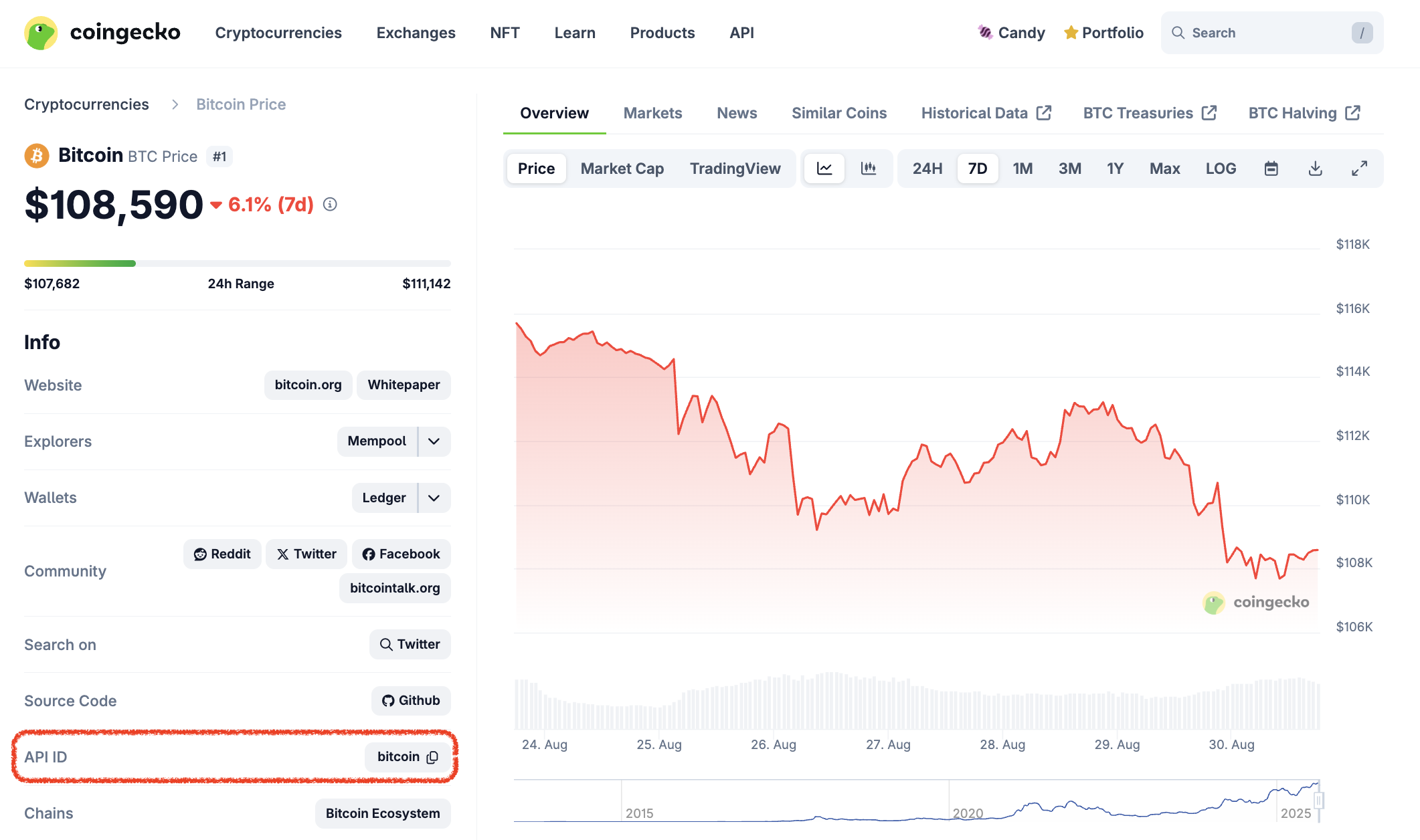
How to obtain Coin ID aka API ID? There are 3 options:
- Use /coins/list endpoint, example of responses:
-
View the full list of coins with API ID, symbol and name using this Google Sheet.
-
Look for the "API ID“ by visiting the info section of a coin page on CoinGecko:
b. Contract Address
Other than using Coin ID, you may also query price & market data of a coin using contract address, using /simple/token_price/{id} endpoint as example:
https://pro-api.coingecko.com/api/v3/simple/token_price/ethereum?contract_addresses=0xa0b86991c6218b36c1d19d4a2e9eb0ce3606eb48&vs_currencies=usd&x_cg_pro_api_key=YOUR_API_KEY
There are 3 parameters values required to apply for this endpoint:
id:Ethereum(Asset Platform ID)contract_addresses:0xa0b86991c6218b36c1d19d4a2e9eb0ce3606eb48(Contract Address)vs_currencies:usd(Target Currencies)
How to obtain Coins/Tokens Contract Address
-
Use /coins/list endpoint (
include_platform=true), example of responses: -
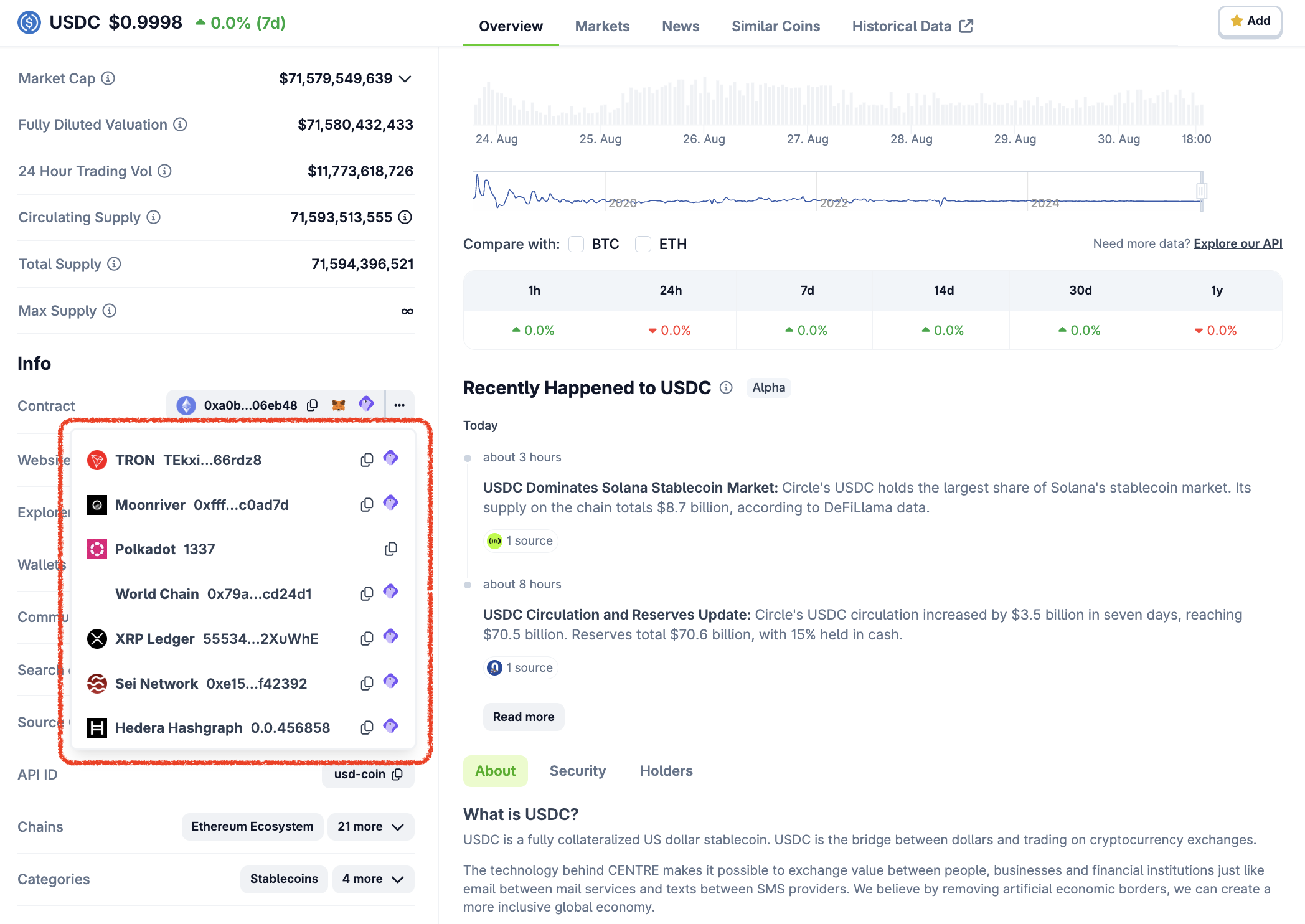
Look for the "Contract“ by visiting the info section of a coin page on CoinGecko.
-
Not all coins will have a contract address listed on the CoinGecko site.
- If an address is not shown on the CoinGecko page, you will not be able to query the coin by its contract address via the API.
- The contract addresses are curated by the CoinGecko team, if you find out any missing contract address, feel free to share with us to review.
-
Get the token contract address from project website, white-paper, documentation, or block explorer site:
Specify target currency to return
In the 2 examples above, both queries for Coin ID and Contract Address contain vs_currencies=usd. Most of the CoinGecko API endpoints will require you to specify the currency.
CoinGecko API data supports all major fiat currencies and some famous crypto currencies like the following:
| Type | Currency | vs_currencies (Param value) |
|---|---|---|
| Fiat | US Dollar | usd |
| Fiat | Japanese Yen | jpy |
| Fiat | Euro | eur |
| Cryptocurrency | Bitcoin | btc |
| Cryptocurrency | Ether | eth |
| Cryptocurrency | Binance Coin | bnb |
For full list of supported currencies, please go to /simple/supported_vs_currencies endpoint
Other way to obtain coin prices & market data
Using /coins/market endpoint as example to query prices and market data of coins in bulk
https://pro-api.coingecko.com/api/v3/coins/markets?vs_currency=usd&order=market_cap_desc&per_page=100&page=1&x_cg_pro_api_key=YOUR_API_KEY
There are 4 parameters values applied for this endpoint:
vs_currency:usdorder:market_cap_desc— The endpoint response will be sorted in descending order, from the coins with the largest market cap to those with the smallest.per_page:100— The results of coins per page are set at 100 in this case (maximum is 250).page:1— The page number of the results is determined by the parameterper_page. In the case ofper_page=100andpage=2, the responses will include coins ranked 101 to 200 on CoinGecko, sorted by market cap, as per the specified endpoint.
Examples:
Example 1 (unknown):
</CodeGroup>

* View the full list of coins with API ID, symbol and name using this [Google Sheet](https://docs.google.com/spreadsheets/d/1wTTuxXt8n9q7C4NDXqQpI3wpKu1_5bGVmP9Xz0XGSyU/edit?usp=sharing).

* Look for the "API ID“ by visiting the info section of a coin page on CoinGecko:

  <Frame>
    <img src="https://mintcdn.com/coingecko/a7cplMjqO5fc2v5e/images/docs/7bf604e-image.png?fit=max&auto=format&n=a7cplMjqO5fc2v5e&q=85&s=ca1093ad1577a2160c53ee6ea3c9de8c" data-og-width="2122" width="2122" data-og-height="1256" height="1256" data-path="images/docs/7bf604e-image.png" data-optimize="true" data-opv="3" srcset="https://mintcdn.com/coingecko/a7cplMjqO5fc2v5e/images/docs/7bf604e-image.png?w=280&fit=max&auto=format&n=a7cplMjqO5fc2v5e&q=85&s=58b6818eb39f1cc1cb13bfb1b827e9ef 280w, https://mintcdn.com/coingecko/a7cplMjqO5fc2v5e/images/docs/7bf604e-image.png?w=560&fit=max&auto=format&n=a7cplMjqO5fc2v5e&q=85&s=debd856f53bd0349a94586da15246140 560w, https://mintcdn.com/coingecko/a7cplMjqO5fc2v5e/images/docs/7bf604e-image.png?w=840&fit=max&auto=format&n=a7cplMjqO5fc2v5e&q=85&s=4995bc412246ed062435c7700fce33b0 840w, https://mintcdn.com/coingecko/a7cplMjqO5fc2v5e/images/docs/7bf604e-image.png?w=1100&fit=max&auto=format&n=a7cplMjqO5fc2v5e&q=85&s=54503566448e1f70bfd6e3938ff18830 1100w, https://mintcdn.com/coingecko/a7cplMjqO5fc2v5e/images/docs/7bf604e-image.png?w=1650&fit=max&auto=format&n=a7cplMjqO5fc2v5e&q=85&s=45f0c1afb1803886ff058fe7682a3a2a 1650w, https://mintcdn.com/coingecko/a7cplMjqO5fc2v5e/images/docs/7bf604e-image.png?w=2500&fit=max&auto=format&n=a7cplMjqO5fc2v5e&q=85&s=f3d3d13f19af39c3c2918e06f9552bd6 2500w" />
  </Frame>

### b. Contract Address

Other than using Coin ID, you may also query price & market data of a coin using contract address, using [/simple/token\_price/\{id](/reference/simple-token-price)} endpoint as example:

* `https://pro-api.coingecko.com/api/v3/simple/token_price/ethereum?contract_addresses=0xa0b86991c6218b36c1d19d4a2e9eb0ce3606eb48&vs_currencies=usd&x_cg_pro_api_key=YOUR_API_KEY`

There are 3 parameters values required to apply for this endpoint:

* `id`: `Ethereum` (Asset Platform ID)
* `contract_addresses`: `0xa0b86991c6218b36c1d19d4a2e9eb0ce3606eb48` (Contract Address)
* `vs_currencies`: `usd` (Target Currencies)

**How to obtain Coins/Tokens Contract Address**

* Use [/coins/list](/reference/coins-list) endpoint (`include_platform=true`), example of responses:
  <CodeGroup>
💼 Top Token Holders by Token Address
URL: llms-txt#💼-top-token-holders-by-token-address
Source: https://docs.coingecko.com/reference/top-token-holders-token-address
reference/api-reference/onchain-pro.json get /networks/{network}/tokens/{address}/top_holders This endpoint allows you to query top token holders based on the provided token contract address on a network
- The top holders data is currently in Beta, with ongoing improvements to data quality, coverage, and update frequency.
- Supported chains include: Solana, EVM (Ethereum, Polygon, BNB, Arbitrum, Optimism, Base), Sui, TON, and Ronin.
- Max
holdersvalue:- Maximum 50 for non-Solana networks, 40 for Solana network.
- 💼 Exclusive for Paid Plan subscribers (Analyst plan or above).
- Cache/Update frequency: every 60 seconds.
💼 Recently Added Coins
URL: llms-txt#💼-recently-added-coins
Source: https://docs.coingecko.com/reference/coins-list-new
reference/api-reference/coingecko-pro.json get /coins/list/new This endpoint allows you to query the latest 200 coins that recently listed on CoinGecko
- CoinGecko equivalent page: https://www.coingecko.com/en/new-cryptocurrencies.
- Cache/Update Frequency: Every 30 seconds.
- Exclusive for Paid Plan Subscribers (Analyst, Lite, Pro and Enterprise).
3. Get Exchanges & NFT Data
URL: llms-txt#3.-get-exchanges-&-nft-data
Source: https://docs.coingecko.com/docs/3-get-exchanges-nft-data
You can get Exchange and NFT data just like how you get the coins data:
- Get the ID (exchange or NFT) from
/listendpoint. - Use the ID to query latest or historical market data
| Type | Coins | NFTs | Exchanges | Derivatives |
|---|---|---|---|---|
| Get Full List with IDs | /coins/list | /nfts/list | /exchanges/list | /derivatives/exchanges/list |
| Get latest market data | /coins/{id} | /nfts/{id} | /exchanges/{id} | /derivatives/exchanges/{id} |
| Get Historical Data | /coins/{id}/market_chart | /nfts/{id}/market_chart | /exchanges/{id}/volume_chart | /exchanges/{id}/volume_chart |
Coin Price by Token Addresses
URL: llms-txt#coin-price-by-token-addresses
Source: https://docs.coingecko.com/v3.0.1/reference/simple-token-price
v3.0.1/reference/api-reference/coingecko-demo.json get /simple/token_price/{id} This endpoint allows you to query one or more token prices using their token contract addresses
-
You may obtain the asset platform and contract address via several ways:
- refers to respective coin page and find 'contract address'.
- refers to
/coins/listendpoint (include platform = true). - You may flag to include more data such as market cap, 24hr volume, 24hr change, last updated time etc.
-
The endpoint returns the global average price of the coin that is aggregated across all active exchanges on CoinGecko.
CoinGecko SDK (Beta)
URL: llms-txt#coingecko-sdk-(beta)
Source: https://docs.coingecko.com/docs/sdk
Official CoinGecko Typescript and Python SDKs — Crypto Price & Market Data API
💼 Top Gainers & Losers
URL: llms-txt#💼-top-gainers-&-losers
Source: https://docs.coingecko.com/reference/coins-top-gainers-losers
reference/api-reference/coingecko-pro.json get /coins/top_gainers_losers This endpoint allows you to query the top 30 coins with largest price gain and loss by a specific time duration
- The endpoint response only includes coins with a 24-hour trading volume of at least $50,000.
- CoinGecko equivalent page: https://www.coingecko.com/en/crypto-gainers-losers.
- Cache/Update Frequency: Every 5 minutes.
- Exclusive for Paid Plan Subscribers (Analyst, Lite, Pro and Enterprise).
💼 Pools by Category ID
URL: llms-txt#💼-pools-by-category-id
Source: https://docs.coingecko.com/reference/pools-category
reference/api-reference/onchain-pro.json get /categories/{category_id}/pools This endpoint allows you to query all the pools based on the provided category ID
-
You can retrieve full list of categories id via this endpoint: Categories List.
- You can retrieve tokens of a specific category, by flagging
include=base_token. - GeckoTerminal categories are different from CoinGecko categories.
- You can retrieve tokens of a specific category, by flagging
-
Trending rankings are determined by a combination of factors:
- User engagement on geckoterminal.com
- Market activity, such as trading volume and transactions
- Pool security and credibility, including liquidity and honeypot checks
- This endpoint returns up to 20 pools per page. Use the
pageparam to navigate more results. page: Pagination beyond 10 pages is available for Paid Plan subscribers (Analyst plan or above).- GeckoTerminal equivalent page example: https://www.geckoterminal.com/category/pump-fun
- Cache/Update frequency: every 30 seconds.
- Exclusive for all Paid Plan Subscribers (Analyst, Lite, Pro and Enterprise).
💡 Example Prompts
URL: llms-txt#💡-example-prompts
Contents:
- Simple Queries
- Advanced Queries
- Creative and Fun Ideas
Tap into the full potential of CoinGecko data — use these prompts to kickstart your next AI build.
- What is the current price of Bitcoin in USD?
- What is the market cap of Ethereum?
- What are the top 3 trending coins on CoinGecko right now?
- What are the top AI coins on GeckoTerminal now?
- What is the floor price of the Pudgy Penguins NFT collection?
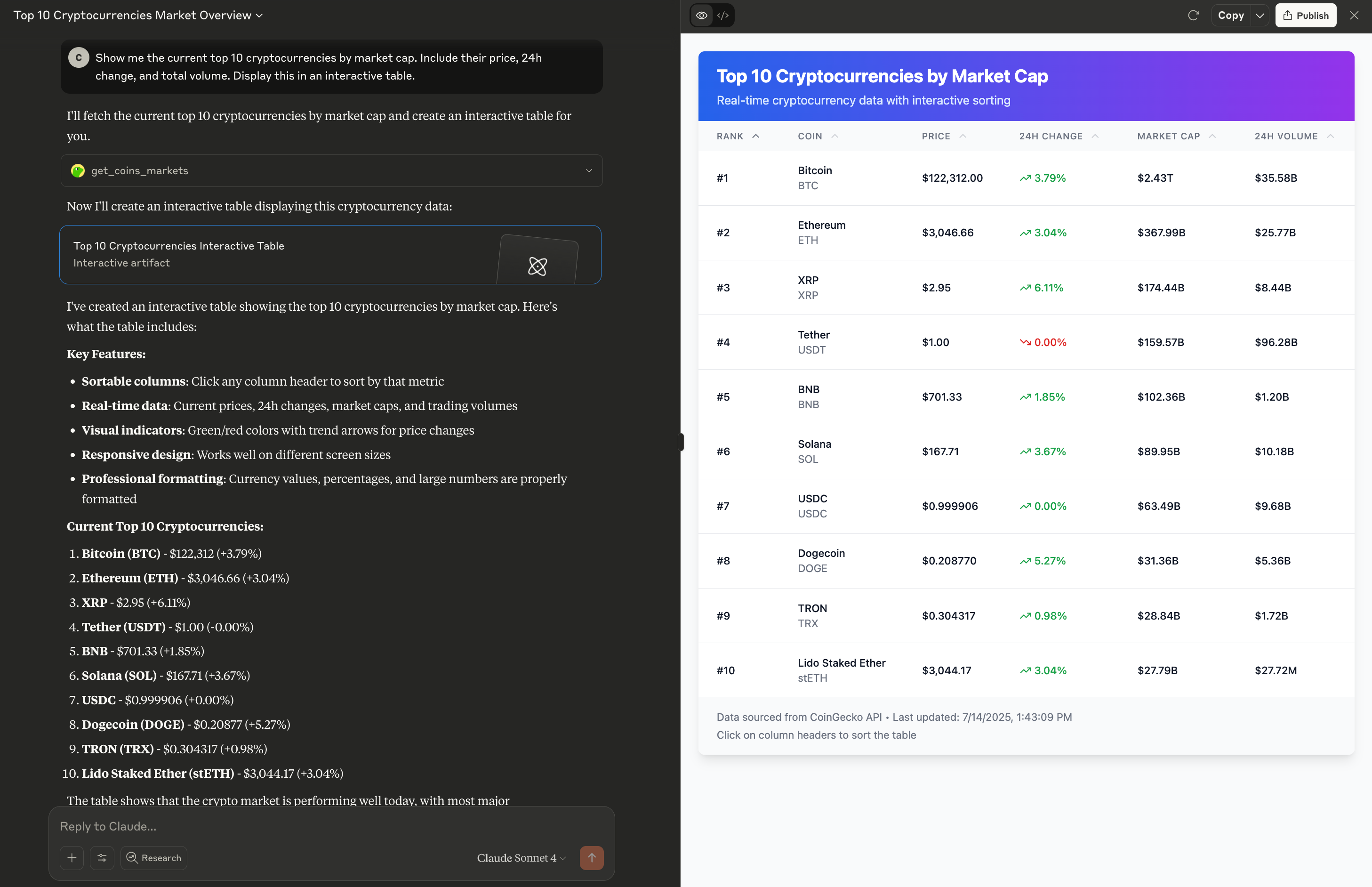
Show me the current top 10 cryptocurrencies by market cap. Include their price, 24h change, and total volume. Display this in an interactive table.
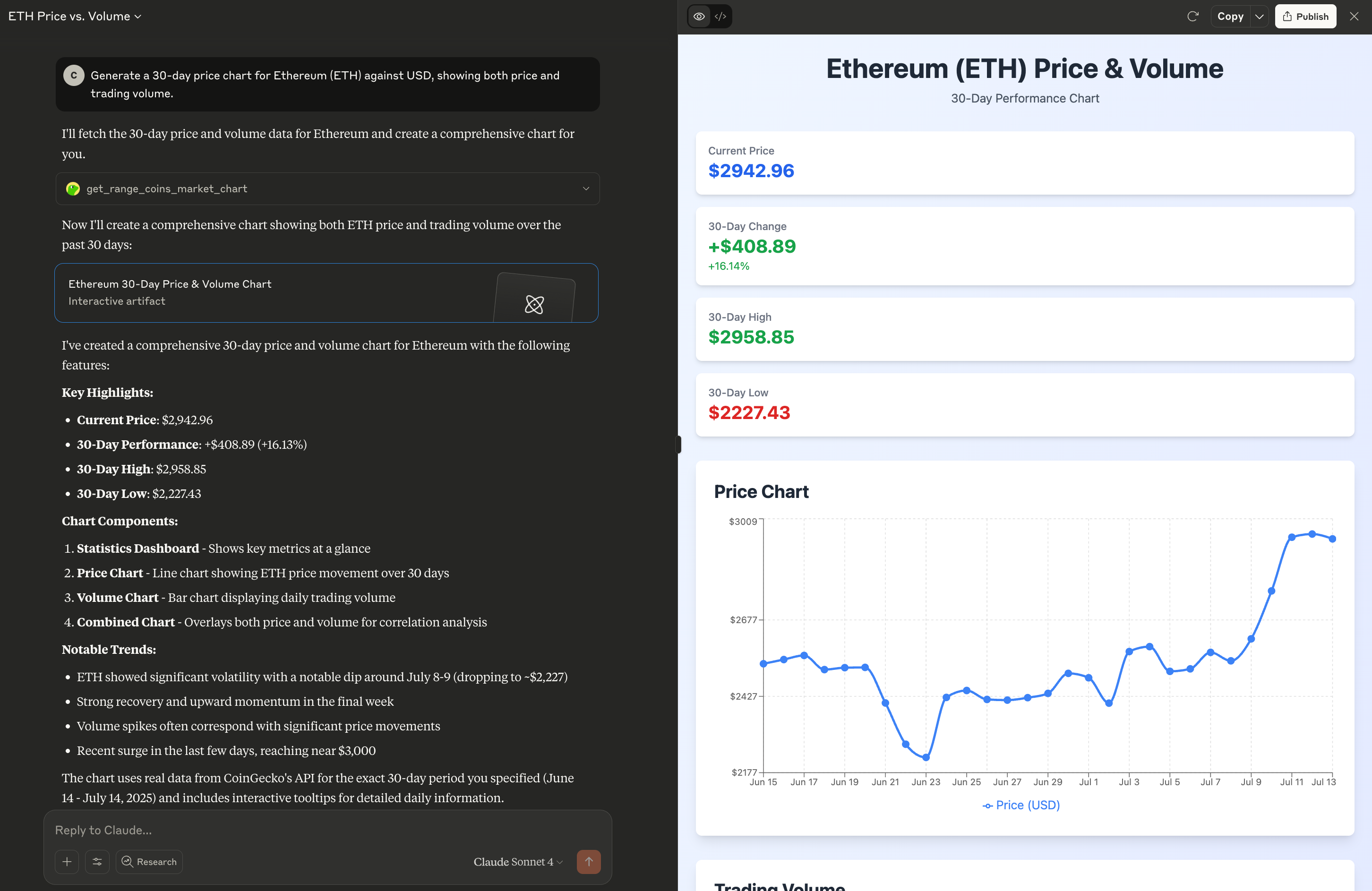
Generate a 30-day price chart for Ethereum (ETH) against USD, showing both price and trading volume.
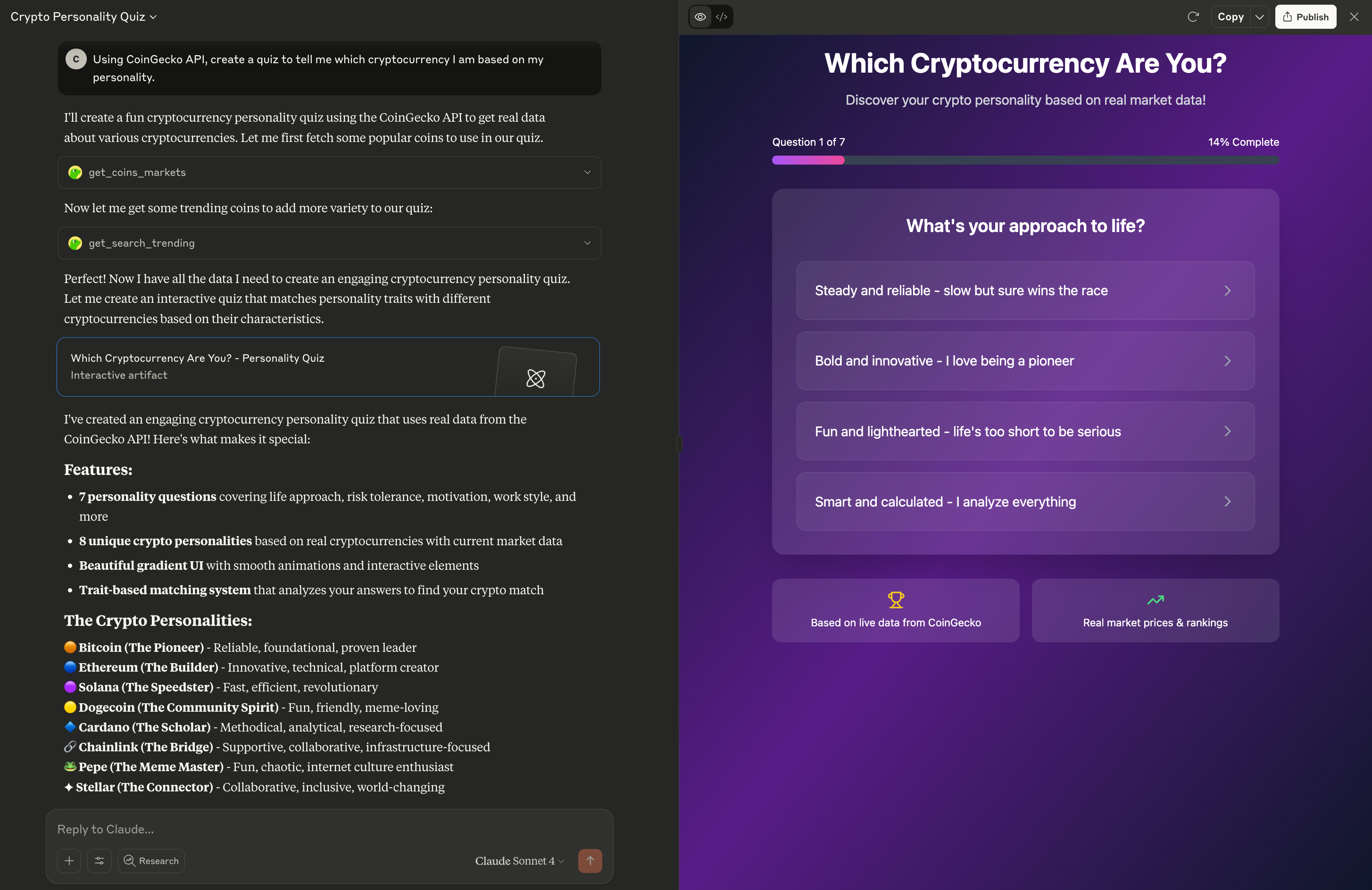
Creative and Fun Ideas
Create a quiz to tell me which cryptocurrency I am based on my personality.
Try it here: claude.ai/public/artifacts
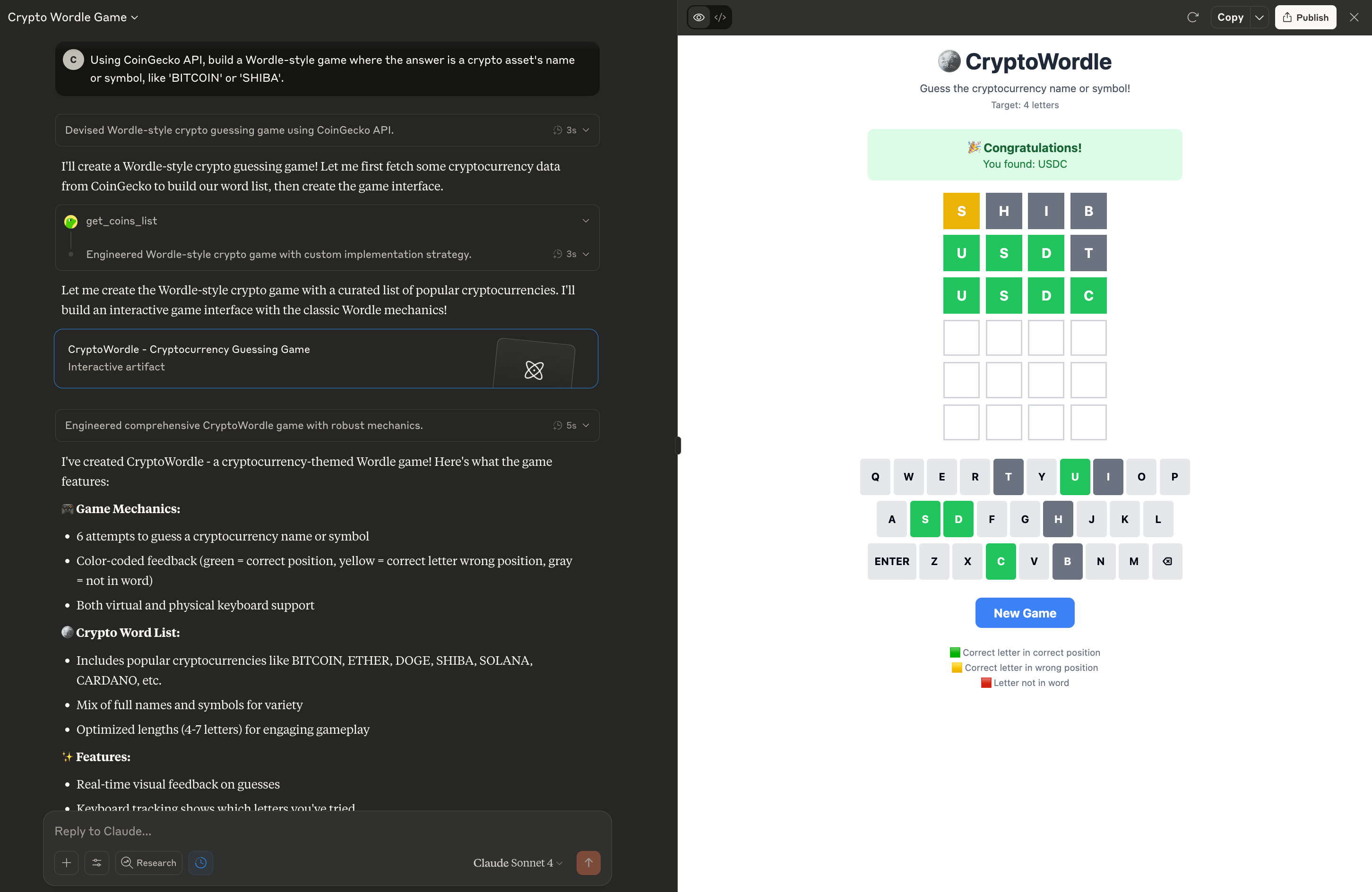
Build a Wordle-style game where the answer is a crypto asset's name or symbol, like 'BITCOIN' or 'SHIBA'.
Try it here: claude.ai/public/artifacts
WebSocket (Beta)
URL: llms-txt#websocket-(beta)
Contents:
- Access Real-Time Crypto Data Instantly with CoinGecko WebSockets
- Channel & Data Support
- Connection Handling
Source: https://docs.coingecko.com/websocket/index
CoinGecko API: Stream Real-Time Crypto Data with WebSockets
Access Real-Time Crypto Data Instantly with CoinGecko WebSockets
In the fast-paced world of cryptocurrency, speed matters. Our official CoinGecko WebSocket API provides a dedicated, persistent connection for real-time data streaming, ensuring you receive critical market updates the moment they happen.
Move beyond traditional polling and embrace the power of instant data delivery for your trading bots, dashboards, and analytical applications.
CoinGecko Websocket (Beta) is now available for [paid plan ](https://www.coingecko.com/en/api/pricing)customers (Analyst plan & above)!- For Analyst, Lite, Pro, and Pro+ self-serve customers, you will be eligible to access the following features, and stream real-time data by utilising your monthly API plan credits:
- Max connections: 10 concurrent socket connections
- Max subscriptions: 100 token or pool data subscription per channel, per socket
- Channel Access: all 4 channels
- Credit charge: 0.1 credit per response returned, deducting from monthly API plan credits
We will gradually improve the Websocket and expand the feature limits. Please share your feedback and suggestion via this survey form, or email soonaik@coingecko[dot]com
- For existing Enterprise plan clients who wish to unlock higher limits (max connections, max subscriptions, and lower credit charge), please contact your Customer Success Manager.
Channel & Data Support
| Websocket Channel | Channel Code | Details |
|---|---|---|
| OnchainSimpleTokenPrice | G1 | Subscribe to receive real-time price updates for tokens, as seen on GeckoTerminal.com |
| CGSimplePrice | C1 | Subscribe to receive real-time price updates for tokens, as seen on CoinGecko.com |
| OnchainTrade | G2 | Subscribe to receive real-time transaction updates for pools, as seen on GeckoTerminal.com |
| OnchainOHLCV | G3 | Subscribe to receive real-time OHLCV (Open, High, Low, Close, Volume) for pools, as seen on GeckoTerminal.com |
| (More coming soon!) |
- Real-Time Data: Once subscribed, you will start receiving real-time data updates based on your subscriptions. The received data will be in JSON format and will contain the relevant information for the subscribed event.
- Close Connection: When you're done receiving updates or want to close the WebSocket connection, you can gracefully close the connection.
- Security Considerations: Ensure that you keep your Pro-API key secure and do not expose it publicly in your code or any public repositories.
Connection Handling
To provide you with the most reliable and efficient experience, please be aware of the following regarding our WebSocket connections:
- Connection Liveliness (Ping/Pong Mechanism):
- To ensure your connection remains active and healthy, we send a "ping" signal every 10 seconds.
- If we do not receive a "pong" response from your client within 20 seconds of sending a ping, we will automatically disconnect the connection.
- Action Required (Client-Side): Your WebSocket client must be configured to respond to our ping messages with a pong. Most WebSocket libraries handle this automatically, but please verify your implementation to ensure it's sending pong responses. This is critical for maintaining your connection.
- Planned Disconnections (Deployments & Reboots):
- Purpose: From time to time, we will perform system reboots or deploy new versions of our service to implement updates, bug fixes, and improvements. These actions require a graceful restart of our servers.
- Impact: During these periods, your active WebSocket connections might be temporarily disconnected.
- Action Required (Client-Side): It is essential that your application is designed to automatically attempt to re-establish the WebSocket connection if it detects a disconnection. Implementing an exponential backoff strategy for reconnection attempts is highly recommended to avoid overwhelming our servers during a widespread disconnection event.
Crypto Treasury Holdings by Coin ID
URL: llms-txt#crypto-treasury-holdings-by-coin-id
Source: https://docs.coingecko.com/v3.0.1/reference/companies-public-treasury
v3.0.1/reference/api-reference/coingecko-demo.json get /{entity}/public_treasury/{coin_id} This endpoint allows you query public companies & governments' cryptocurrency holdings by Coin ID
- The responses are sorted in descending order based on total holdings.
- CoinGecko equivalent page: https://www.coingecko.com/en/treasuries/bitcoin
- Cache / Update Frequency: every 5 minutes for all the API plans.
OnchainTrade
URL: llms-txt#onchaintrade
Contents:
- Data Payload
-
- Establish Connection to Websocket
-
- Subscribe to a specific channel - OnchainTrade
-
- Stream OnchainTrade data
- Tips:
- Un-subscribe to stop streaming OnchainTrade data
Source: https://docs.coingecko.com/websocket/wss-onchain-trade
Subscribe to receive real-time transaction (trade/swap) updates for pools, as seen on GeckoTerminal.com
This Websocket channel allows you to subscribe to real-time updates of token trades of a pool.
- Lookup by Network + Pool Address
- It will return transaction type (buy/sell), tx hash, amount of token transacted, volume, and current price data of the specified pool.
Update Frequency: as fast as 0.1s, for actively traded pools.
Tips: use this Rest API endpoint Top Pools by Token Address to obtain contract address of the most liquid pool.
| Field | Type | Description | Example | |
|---|---|---|---|---|
ch |
channel_type |
string | Indicates the type of channel subscribed to. | G2 |
n |
network_id |
string | Identifier of the blockchain network. Check full list of IDs here. | eth |
pa |
pool_address |
string | Contract address of the pool. | 0x88e6a0c2dd6fcb..3f5640 |
tx |
tx_hash |
string | transaction hash | 0x0b8ac5a16c2d5a..4d422 |
ty |
type |
string | type of transaction (b for buy or s for sell) |
b |
to |
token_amount |
float | Amount of token transacted. | 100 |
vo |
volume_in_usd |
float | The transaction value in USD. | 1000 |
pc |
price_in_token_currency |
float | Current token price in target token currency | 3639.78228844745 |
pu |
price_in_usd |
float | Current token price in USD | 3.566 |
t |
last_updated_at |
integer | Timestamp of the last data update in UNIX time. | 1752072129000 |
Tips: The Websocket payload will use the value null when specific data is unavailable. Ensure your application is capable of handling null values for fields that may not always have data.
1. Establish Connection to Websocket
2. Subscribe to a specific channel - OnchainTrade
3. Stream OnchainTrade data
The output keys will be in random order.
Un-subscribe to stop streaming OnchainTrade data
Input Example: Unsubscribe for 1 specific pool data:
Input Example: Unsubscribe from OnchainTrade channel and all pools data:
Examples:
Example 1 (unknown):
</CodeGroup>

## 2. Subscribe to a specific channel - OnchainTrade

**Input Example:**

<CodeGroup>
Example 2 (unknown):
</CodeGroup>

**Output Example**:

<CodeGroup>
Example 3 (unknown):
</CodeGroup>

## 3. Stream OnchainTrade data

**Input Example:**

<CodeGroup>
Example 4 (unknown):
</CodeGroup>

**Output Example**:

<CodeGroup>
💼 Historical Token Holders Chart by Token Address
URL: llms-txt#💼-historical-token-holders-chart-by-token-address
Source: https://docs.coingecko.com/reference/token-holders-chart-token-address
reference/api-reference/onchain-pro.json get /networks/{network}/tokens/{token_address}/holders_chart This endpoint allows you to get the historical token holders chart based on the provided token contract address on a network
- The historical token holders chart data is currently in Beta, with ongoing improvements to data quality, coverage, and update frequency.
- Supported chains include: Solana, EVM (Ethereum, Polygon, BNB, Arbitrum, Optimism, Base), Sui, TON, and Ronin.
daysparam provides the following automatic granularity:days=7= all data (without fixed intervals)days=30= daily data (30 daily intervals)days=max= weekly data
- 💼 Exclusive for Paid Plan subscribers (Analyst plan or above).
- Cache/Update frequency: every 60 seconds.
Coin OHLC Chart by ID
URL: llms-txt#coin-ohlc-chart-by-id
Source: https://docs.coingecko.com/v3.0.1/reference/coins-id-ohlc
v3.0.1/reference/api-reference/coingecko-demo.json get /coins/{id}/ohlc This endpoint allows you to get the OHLC chart (Open, High, Low, Close) of a coin based on particular coin ID
-
You may obtain the coin ID (API ID) via several ways:
- refers to respective coin page and find 'API ID'.
- refers to
/coins/listendpoint. - refers to google sheets here.
- For historical chart data with better granularity, you may consider using /coins/{id}/market_chart endpoint.
-
The timestamp displayed in the payload (response) indicates the end (or close) time of the OHLC data.
- Data granularity (candle's body) is automatic:
- 1 - 2 days: 30 minutes
- 3 - 30 days: 4 hours
- 31 days and beyond: 4 days
- Cache / Update Frequency:
- Every 15 minutes for all the API plans.
- The last completed UTC day (00:00) is available 35 minutes after midnight on the next UTC day (00:35).
- Access to historical data via the Public API (Demo plan) is restricted to the past 365 days only. To access the complete range of historical data, please subscribe to one of our paid plans to obtain a Pro-API key.
- Data granularity (candle's body) is automatic:
🐍 CoinGecko Python SDK
URL: llms-txt#🐍-coingecko-python-sdk
Contents:
- Install via
pip- Resources
Built to seamlessly integrate with the Python ecosystem, enabling fast and intuitive access to CoinGecko's API.
- Pythonic Simplicity: Leverage idiomatic Python to interact with the API effortlessly—ideal for data analysis, prototyping, or production use.
- Streamlined Development: Clean and consistent interface designed to accelerate workflows and reduce boilerplate in your Python projects.
- GitHub — github.com/coingecko/coingecko-python
- PyPI — pypi.org/project/coingecko-sdk/
Notice something off or missing? Let us know by opening an Issue here.
CoinGecko SDK is powered by Stainless ✱
Have feedback, a cool idea, or need help? Reach out to soonaik@coingecko[dot]com
New Pools by Network
URL: llms-txt#new-pools-by-network
Source: https://docs.coingecko.com/v3.0.1/reference/latest-pools-network
v3.0.1/reference/api-reference/onchain-demo.json get /networks/{network}/new_pools This endpoint allows you to query all the latest pools based on provided network
-
You may include values such as
pageto specify which page of responses you would like to show. -
This endpoint includes the newly created pools in the past 48 hours.
- If the token's market cap is not verified by the team, the API response will return
nullfor its market cap value, even though it has a displayed value on GeckoTerminal, which might not be accurate as it often matches the Fully Diluted Valuation (FDV). - Attributes specified in the
includeparam will be returned under the top-level "included" key. - This endpoint returns up to 20 pools per page. Use the
pageparam to navigate more results. page: Pagination beyond 10 pages is available for Paid Plan subscribers (Analyst plan or above).- Cache/Update frequency: every 60 seconds.
- GeckoTerminal equivalent page (example): https://www.geckoterminal.com/explore/new-crypto-pools/solana
- If the token's market cap is not verified by the team, the API response will return
Most Recently Updated Tokens List
URL: llms-txt#most-recently-updated-tokens-list
Source: https://docs.coingecko.com/v3.0.1/reference/tokens-info-recent-updated
v3.0.1/reference/api-reference/onchain-demo.json get /tokens/info_recently_updated This endpoint allows you to query 100 most recently updated tokens info of a specific network or across all networks on GeckoTerminal
-
You may add values such as network in the include param to include network along with the updated tokens list.
-
Attributes specified in the
includeparam will be returned under the top-level "included" key.- Cache/Update frequency: every 60 seconds.
New Pools List
URL: llms-txt#new-pools-list
Source: https://docs.coingecko.com/v3.0.1/reference/latest-pools-list
v3.0.1/reference/api-reference/onchain-demo.json get /networks/new_pools This endpoint allows you to query all the latest pools across all networks on GeckoTerminal
-
You may include values such as
pageto specify which page of responses you would like to show. -
If the token's market cap is not verified by the team, the API response will return
nullfor its market cap value, even though it has a displayed value on GeckoTerminal, which might not be accurate as it often matches the Fully Diluted Valuation (FDV).- Attributes specified in the
includeparam will be returned under the top-level "included" key. - This endpoint returns up to 20 pools per page. Use the
pageparam to navigate more results. page: Pagination beyond 10 pages is available for Paid Plan subscribers (Analyst plan or above).- Cache/Update frequency: every 60 seconds.
- GeckoTerminal equivalent page (example): https://www.geckoterminal.com/explore/new-crypto-pools
- Attributes specified in the
Pool OHLCV chart by Pool Address
URL: llms-txt#pool-ohlcv-chart-by-pool-address
Source: https://docs.coingecko.com/v3.0.1/reference/pool-ohlcv-contract-address
v3.0.1/reference/api-reference/onchain-demo.json get /networks/{network}/pools/{pool_address}/ohlcv/{timeframe} This endpoint allows you to get the OHLCV chart (Open, High, Low, Close, Volume) of a pool based on the provided pool address on a network
-
You may use this endpoint to query the historical price and volume of a token.
- You may select the timeframe with its respective aggregate to get the intended OHLCV data (e.g.
minute?aggregate=15for 15 minutes OHLCV).
- You may select the timeframe with its respective aggregate to get the intended OHLCV data (e.g.
-
This endpoint uses epoch/unix format for its timestamp. Example:
1708850449.- Paid plan subscribers (Analyst plan & above) can access data from September 2021 to the present, depending on when the pool started tracking on GeckoTerminal.
- If no earlier data is available, an empty response will be returned.
- Each API call can only retrieve data for a maximum range of 6 months. To fetch older data, use the
before_timestampparameter to query in multiple requests.
- Pools with more than 2 tokens are not yet supported for this endpoint.
- Each OHLCV array (under "ohlcv_list") consists of 6 elements in the following order:
- Timestamp: The epoch/unix timestamp representing the start of the time interval.
- Open: The opening price of the asset at the beginning of the interval.
- High: The highest price reached during the interval.
- Low: The lowest price reached during the interval.
- Close: The price of the asset at the end of the interval.
- Volume: The total trading volume of the asset during the interval.
- Skipped Intervals: To ensure concise and relevant data, specific timeframe intervals (e.g. minutely) with no recorded swaps are excluded from the response.
- Higher granularity timeframes (e.g. 1 minute) are more likely to skip intervals due to periods of inactivity, while lower granularity timeframes (e.g. daily) are less affected.
- For
include_empty_intervalsparam:- When
false(default): Only intervals with trade data are returned. - When
true: All requested intervals are returned, those with no trade data are populated as follows:- OHLC (Open, High, Low, Close) are all set to the Close price of the previous interval.
- O = H = L = C = previous Close
- Volume (V) is set to 0, reflecting no trade activity.
- OHLC (Open, High, Low, Close) are all set to the Close price of the previous interval.
- When
- Cache/Update frequency: every 60 seconds.
- Paid plan subscribers (Analyst plan & above) can access data from September 2021 to the present, depending on when the pool started tracking on GeckoTerminal.
💼 Trending Search Pools
URL: llms-txt#💼-trending-search-pools
Source: https://docs.coingecko.com/reference/trending-search-pools
reference/api-reference/onchain-pro.json get /pools/trending_search This endpoint allows you to query all the trending search pools across all networks on GeckoTerminal
- If the token's market cap is not verified by the team, the API response will return
nullfor its market cap value, even though it has a displayed value on GeckoTerminal, which might not be accurate as it often matches the Fully Diluted Valuation (FDV).- Attributes specified in the
includeparam will be returned under the top-level "included" key. - Cache/Update frequency: every 60 seconds.
- 💼 Exclusive for Paid Plan subscribers (Analyst plan or above).
- Attributes specified in the
Coins Categories List (ID Map)
URL: llms-txt#coins-categories-list-(id-map)
Source: https://docs.coingecko.com/v3.0.1/reference/coins-categories-list
v3.0.1/reference/api-reference/coingecko-demo.json get /coins/categories/list This endpoint allows you to query all the coins categories on CoinGecko
-
You may use this endpoint to query the list of categories for other endpoints that contain params like
category. -
CoinGecko Equivalent Page: https://www.coingecko.com/en/categories
- Cache / Update Frequency: every 5 minutes for all the API plans.
Common Use Cases
URL: llms-txt#common-use-cases
Contents:
-
- Get Coins Logo Images
-
- Best Endpoint for Latest Crypto Price
-
- Get All Trading Pairs (Tickers) of a Coin
-
- Get Trading Pairs of Specific Coins from a Specific Exchange
-
- Building Telegram Bot for Latest Coin Listings
-
- Get List of Coins Under Specific Category
-
- Identify DEX Decentralized Exchanges
-
- Get Bitcoin Dominance Data (BTC.D)
-
- Get Market Cap or Dominance of a Specific Ecosystem
-
- Get Token Lists of a Specific Blockchain Network
Source: https://docs.coingecko.com/docs/common-use-cases
Discover the common use cases of CoinGecko API by our users
1. Get Coins Logo Images
-
Use /coins/id endpoint.
-
This endpoint can be used to query other coin's metadata like: links, categories, contract address, community, description in different languages and many more.
- Coin descriptions may include newline characters represented as
\r\n(escape sequences), which may require processing for proper formatting.
- Coin descriptions may include newline characters represented as
-
Use Token Info by Token Address endpoint to get metadata of tokens listed on GeckoTerminal.com.
2. Best Endpoint for Latest Crypto Price
- Use /simple/price endpoint.
- This endpoint can be used to query other market data like market cap, 24-hour trading volume and 24-hour price change percentage.
3. Get All Trading Pairs (Tickers) of a Coin
- Use /coins/id/tickers endpoint.
4. Get Trading Pairs of Specific Coins from a Specific Exchange
- Use /coins/id/tickers endpoint by supplying specific exchange ID.
5. Building Telegram Bot for Latest Coin Listings
- Use /coins/list/new endpoint.
6. Get List of Coins Under Specific Category
- For CoinGecko categories, use /coins/markets endpoint by supplying specific category.
- For GeckoTerminal categories, use Pools by Category ID endpoint by supplying specific category.
7. Identify DEX Decentralized Exchanges
-
Use /exchanges/list endpoint to get full list of exchanges with ID on CoinGecko.
-
Use /exchanges/id to find out whether the exchange is centralized or decentralized.
-
Example of responses (using Uniswap V3 as example) :
Since Uniswap is a DEX, therefore it shows "centralized": false
8. Get Bitcoin Dominance Data (BTC.D)
-
Use /global endpoint.
-
Example of responses:
9. Get Market Cap or Dominance of a Specific Ecosystem
- Use /coins/categories.
- The endpoint also returns the 24-hour percentage change, offering insights into the traction of different categories or ecosystems.
10. Get Token Lists of a Specific Blockchain Network
- Use /token_lists/asset_platforms_id/all.json endpoint.
- Supply asset platform id to the endpoint.
11. Get 7-Day Sparkline Price Data of a Coin
- Use /coins/id or /coins/markets endpoints by flagging
sparkline = true.
12. Get Link to Individual CoinGecko Coin Page
- Use /coins/list endpoint to get the coin
{ID}.- Supply API ID in this URL path format:
www.coingecko.com/en/coins/{ID}
- Supply API ID in this URL path format:
- If you wish to the obtain the URL slug of a specific CoinGecko Coin Page, e.g.
www.coingecko.com/en/coins/{web_slug}you may use /coin/id endpoint and obtain the{web_slug}value.
13. Check Coin Status and Stale Price Updates
- Active: use /coins/list endpoint, only active coins will be shown by default. You may also flag
status=inactiveto get a list of inactive coins. - Price Stale: use /simple/price endpoint, flag
include_last_updated_at=trueto check latest update time.
14. Get Real-Time and Historical Exchange of BTC in USD
- Current exchange rate: use /exchange_rates endpoint.
- Historical exchange rate: use /coins/id/history or /coins/id/market_chart endpoints.
15. Get Watchlist Portfolio Data of a Coin
-
Use /coins/id endpoint by supplying coin ID.
-
Example of responses:
16. Get Historical Data for Inactive Coins
Note: This is available for paid plan subscribers only.
-
Use /coins/list endpoint, specifying the status param as
inactive. -
Example of endpoint request:
https://pro-api.coingecko.com/api/v3/coins/list?include_platform=false&status=inactive&x_cg_pro_api_key=YOUR_API_KEY -
Retrieve the coin's ID from the endpoint mentioned above and use it to access historical data via the following endpoints:
17. Get TVL (Total Value Locked) data of a Coin
-
Use /coins/id endpoint by supplying coin ID.
-
Example of responses:
18. Query Search for Coins, Categories, NFTs, Exchanges, and Pools
We have 2 Search endpoints:
- /search endpoint allows you to search for coins, categories, exchanges (markets), and NFTs listed on CoinGecko.com. You may query by name or symbol.
- /search-pools endpoint allows you to search for pools listed on GeckoTerminal.com. You may query by pool contract address, token contract address, or token symbol.
19. Get List of Blockchain Networks supported on CoinGecko and GeckoTerminal.
CoinGecko and GeckoTerminal support different sets of blockchain networks. You can use the following endpoints to find the list of supported networks and their respective IDs:
- CoinGecko: /asset-platforms-list
- GeckoTerminal (onchain endpoints): /networks-list
20. Get Native Coin of a Blockchain Network (Asset Platform)
You may use the /asset-platforms-list endpoint to obtain the native coin ID of all networks (asset platforms) listed on www.coingecko.com.
21. Get Liquidity data of a Liquidity Pool or Token
There are multiple onchain endpoints that provide the liquidity data (reserve_in_usd) of a pool, for example: Specific Pool Data by Pool Address. You may also get liquidity data (total_reserve_in_usd) of a token, using endpoints like: Token Data by Token Address.
Note: reserve_in_usd (pool) represents the total liquidity of all tokens within a specific pool, whereas total_reserve_in_usd (token) refers to the total liquidity portion attributable to a specific token across all available pools.
22. Get list of onchain DEX pools based on specific criteria
-
Use /pools/megafilter to retrieve data for onchain DEX pools that match a given set of filters.
-
Example of use cases:
-
Custom filtering: Combine multiple params — like liquidity thresholds, FDV ranges, 24-hour volume, and more — to extract the precise datasets you need.
- Risk and Quality checks: Apply fraud filters to weed out risky projects.
-
For more details on examples and available filters, refer to:
23. Get List of Trending Coins
-
Use the following endpoints to get trending coins and pools:
-
Trending Search List — Trending Coins, NFTs, Categories on CoinGecko.com, based on user searches.
- Trending Search Pools — Trending Pools and Tokens on GeckoTerminal.com, based on user searches.
-
Other useful endpoints:
-
Top Gainers & Losers on CoinGecko.com, by specific time duration.
- Trending Pools List and Trending Pools by Network on GeckoTerminal.com, by specific time duration.
24. Get Security Info of Tokens
-
By using Token Info by Token Address endpoint, you can obtain the following security related data:
-
GeckoTerminal Score (Pool, Transaction, Creation, Info, Holders)
- Holders count and distribution percentage
- Mint and Freeze Authority
25. Get Latest Token/Pool Data from Launchpad
- Use megafilter endpoint to retrieve latest launchpad data, by flagging
sort=pool_created_at_desc. Learn more on changelog. - Request example (Get latest pools on Pump.fun):
⚡️ Need Real-time Data Streams? Try WebSocket API

With WebSocket, you can now stream ultra-low latency, real-time prices, trades, and OHLCV chart data.
Subscribe to our paid API plan (Analyst plan & above) to access WebSocket and REST API data delivery methods.
Examples:
Example 1 (unknown):
</CodeGroup>

## 8. Get Bitcoin Dominance Data (BTC.D)

* Use [/global ](/reference/crypto-global)endpoint.

* Example of responses:

  <CodeGroup>
Example 2 (unknown):
</CodeGroup>

## 9. Get Market Cap or Dominance of a Specific Ecosystem

* Use [/coins/categories](/reference/coins-categories).
* The endpoint also returns the 24-hour percentage change, offering insights into the traction of different categories or ecosystems.

## 10. Get Token Lists of a Specific Blockchain Network

* Use [/token\_lists/asset\_platforms\_id/all.json](/reference/token-lists) endpoint.
* Supply asset platform id to the endpoint.

## 11. Get 7-Day Sparkline Price Data of a Coin

* Use [/coins/id](/reference/coins-id) or [/coins/markets](/reference/coins-markets) endpoints by flagging `sparkline = true`.

## 12. Get Link to Individual CoinGecko Coin Page

* Use [/coins/list](/reference/coins-list) endpoint to get the coin **`{ID}`**.
  * Supply API ID in this URL path format: `www.coingecko.com/en/coins/{ID}`
* If you wish to the obtain the URL slug of a specific CoinGecko Coin Page, e.g. `www.coingecko.com/en/coins/{web_slug}` you may use [/coin/id](/reference/coins-id) endpoint and obtain the **`{web_slug}`** value.

## 13. Check Coin Status and Stale Price Updates

* Active: use [/coins/list](/reference/coins-list) endpoint, only active coins will be shown by default. You may also flag **`status=inactive`** to get a list of inactive coins.
* Price Stale: use [/simple/price](/reference/simple-price) endpoint, flag `include_last_updated_at=true` to check latest update time.

## 14. Get Real-Time and Historical Exchange of BTC in USD

* Current exchange rate: use [/exchange\_rates](/reference/exchange-rates) endpoint.
* Historical exchange rate: use [/coins/id/history](/reference/coins-id-history) or [/coins/id/market\_chart](/reference/coins-id-market-chart) endpoints.

## 15. Get Watchlist Portfolio Data of a Coin

* Use [/coins/id](/reference/coins-id) endpoint by supplying coin ID.

* Example of responses:

  <CodeGroup>
Example 3 (unknown):
</CodeGroup>

## 16. Get Historical Data for Inactive Coins

**Note**: This is available for paid plan subscribers only.

* Use [/coins/list](/reference/coins-list) endpoint, specifying the status param as `inactive`.

* Example of endpoint request: `https://pro-api.coingecko.com/api/v3/coins/list?include_platform=false&status=inactive&x_cg_pro_api_key=YOUR_API_KEY`

* Retrieve the coin's ID from the endpoint mentioned above and use it to access historical data via the following endpoints:

  * [/coins/id/history](/reference/coins-id-history)
  * [/coins/id/market\_chart](/reference/coins-id-market-chart)
  * [/coins/id/market\_chart/range](/reference/coins-id-market-chart-range)
  * [/coins/id/contract/contract\_address/market\_chart](/reference/contract-address-market-chart)
  * [/coins/id/contract/contract\_address/market\_chart/range](/reference/contract-address-market-chart-range)

## 17. Get TVL (Total Value Locked) data of a Coin

* Use [/coins/id](/reference/coins-id) endpoint by supplying coin ID.

* Example of responses:

  <CodeGroup>
Example 4 (unknown):
</CodeGroup>

## 18. Query Search for Coins, Categories, NFTs, Exchanges, and Pools

We have 2 Search endpoints:

* [/search](/reference/search-data) endpoint allows you to search for coins, categories, exchanges (markets), and NFTs listed on CoinGecko.com. You may query by name or symbol.
* [/search-pools](/reference/search-pools) endpoint allows you to search for pools listed on GeckoTerminal.com. You may query by pool contract address, token contract address, or token symbol.

## 19. Get List of Blockchain Networks supported on CoinGecko and GeckoTerminal.

CoinGecko and GeckoTerminal support different sets of blockchain networks. You can use the following endpoints to find the list of supported networks and their respective IDs:

* CoinGecko: [/asset-platforms-list](/reference/asset-platforms-list)
* GeckoTerminal ([onchain endpoints](/reference/endpoint-overview#-onchain-dex-endpoints-geckoterminal)): [/networks-list](/reference/networks-list)

## 20. Get Native Coin of a Blockchain Network (Asset Platform)

You may use the [/asset-platforms-list](/reference/asset-platforms-list) endpoint to obtain the native coin ID of all networks (asset platforms) listed on [www.coingecko.com](http://www.coingecko.com.).

## 21. Get Liquidity data of a Liquidity Pool or Token

There are multiple onchain endpoints that provide the liquidity data (`reserve_in_usd`) of a pool, for example: [Specific Pool Data by Pool Address](/reference/pool-address). You may also get liquidity data (`total_reserve_in_usd`) of a token, using endpoints like: [Token Data by Token Address](/reference/token-data-contract-address).

Note: `reserve_in_usd` (pool) represents the total liquidity of all tokens within a specific pool, whereas `total_reserve_in_usd` (token) refers to the total liquidity portion attributable to a specific token across all available pools.

## 22. Get list of onchain DEX pools based on specific criteria

* Use [/pools/megafilter](/reference/pools-megafilter) to retrieve data for onchain DEX pools that match a given set of filters.

* Example of use cases:

  * Custom filtering: Combine multiple params — like liquidity thresholds, FDV ranges, 24-hour volume, and more — to extract the precise datasets you need.
  * Risk and Quality checks: Apply fraud filters to weed out risky projects.

* For more details on examples and available filters, refer to:

  * [Changelog — New Megafilter Endpoint](/changelog#february-2025)
  * [Live Filtering on GeckoTerminal](https://www.geckoterminal.com/)

## 23. Get List of Trending Coins

* Use the following endpoints to get trending coins and pools:

  * [Trending Search List](/reference/trending-search/) — Trending Coins, NFTs, Categories on CoinGecko.com, based on user searches.
  * [Trending Search Pools](/reference/trending-search-pools/) — Trending Pools and Tokens on GeckoTerminal.com, based on user searches.

* Other useful endpoints:

  * [Top Gainers & Losers](/reference/coins-top-gainers-losers) on CoinGecko.com, by specific time duration.
  * [Trending Pools List](/reference/trending-pools-list) and [Trending Pools by Network](/reference/trending-pools-network) on GeckoTerminal.com, by specific time duration.

## 24. Get Security Info of Tokens

* By using [Token Info by Token Address](/reference/token-info-contract-address) endpoint, you can obtain the following security related data:

  * GeckoTerminal Score (Pool, Transaction, Creation, Info, Holders)
  * Holders count and distribution percentage
  * Mint and Freeze Authority

## 25. Get Latest Token/Pool Data from Launchpad

* Use [megafilter](/reference/pools-megafilter) endpoint to retrieve latest launchpad data, by flagging `sort=pool_created_at_desc`. Learn more on [changelog](/changelog#now-supported%3A-launchpad-data-pump-fun-%26-more-%2C-granular-ohlcv%2C-and-honeypot-info).
* **Request example (Get latest pools on Pump.fun)**:

<CodeGroup>
🟦 CoinGecko TypeScript SDK
URL: llms-txt#🟦-coingecko-typescript-sdk
Contents:
- Install via
npm- Resources
Purpose-built to unlock the full capabilities of TypeScript for seamless integration with CoinGecko's API.
- Full Type Safety: Catch errors at compile time and write cleaner, more predictable code with strict TypeScript support.
- Developer-Centric Design: Enjoy a streamlined developer experience with intuitive interfaces, strong typings, and structured classes.
- GitHub — github.com/coingecko/coingecko-typescript
- npm — npmjs.com/package/@coingecko/coingecko-typescript
Notice something off or missing? Let us know by opening an Issue here.
Coin Tickers by ID
URL: llms-txt#coin-tickers-by-id
Source: https://docs.coingecko.com/v3.0.1/reference/coins-id-tickers
v3.0.1/reference/api-reference/coingecko-demo.json get /coins/{id}/tickers This endpoint allows you to query the coin tickers on both centralized exchange (CEX) and decentralized exchange (DEX) based on a particular coin ID
-
You may obtain the coin ID (API ID) via several ways:
- refers to respective coin page and find 'API ID'.
- refers to
/coins/listendpoint. - refers to google sheets here.
- You may specify the
exchange_idsif you want to retrieve tickers for specific exchange only. - You may include values such as
pageto specify which page of responses you would like to show. - You may also flag to include more data such as exchange logo and depth.
-
The tickers are paginated to 100 items.
- When
dex_pair_format=symbol, the DEX pairbaseandtargetare displayed in symbol format (e.g.WETH,USDC) instead of as contract addresses. - When order is sorted by
volume, converted_volume will be used instead of volume. - Cache / Update Frequency: every 2 minutes for all the API plans.
- When
🔥 Megafilter for Pools
URL: llms-txt#🔥-megafilter-for-pools
Source: https://docs.coingecko.com/reference/pools-megafilter
reference/api-reference/onchain-pro.json get /pools/megafilter This endpoint allows you to query pools based on various filters across all networks on GeckoTerminal
-
Using
checksparam to filter pools based on various checks:checks=no_honeypot— Filter out Honeypot pools, using GoPlus Token Security and De.Fi Scanner.checks=good_gt_score— Show only pools with a GT Score of at least 75.checks=on_coingecko— Show only pools with tokens that are listed on CoinGecko.checks=has_social— Show only pools with their social links and token information updated.- You may include values such as
pageto specify which page of responses you would like to show.
-
Trending rankings are determined by a combination of factors:
- User engagement on geckoterminal.com
- Market activity, such as trading volume and transactions
- Pool security and credibility, including liquidity and honeypot checks
dexesparam can only be used when only 1networksis specified.- If the token's market cap is not verified by the team, the API response will return
nullfor its market cap value, even though it has a displayed value on GeckoTerminal, which might not be accurate as it often matches the Fully Diluted Valuation (FDV). - Attributes specified in the
includeparam will be returned under the top-level "included" key. - This endpoint returns up to 20 pools per page. Use the
pageparam to navigate more results. - Setting
include_unknown_honeypot_tokens=truewill include tokens with an 'unknown' honeypot status.- Please note that this param only takes effect when
checks=no_honeypotis specified.
- Please note that this param only takes effect when
- Cache/Update frequency: every 30 seconds.
- 💼 Exclusive for Paid Plan subscribers (Analyst plan or above).
Token Price by Token Addresses
URL: llms-txt#token-price-by-token-addresses
Source: https://docs.coingecko.com/v3.0.1/reference/onchain-simple-price
v3.0.1/reference/api-reference/onchain-demo.json get /simple/networks/{network}/token_price/{addresses} This endpoint allows you to get token price based on the provided token contract address on a network
- If the token's market cap is not verified by the team, the API response will return
nullfor its market cap value, even though it has a displayed value on GeckoTerminal, which might not be accurate as it often matches the Fully Diluted Valuation (FDV).- If you require
market_cap_usdto return FDV value (as seen in GeckoTerminal.com) when market cap data is unavailable, please specify this parametermcap_fdv_fallback=true. - The returned price currency is in USD.
- Addresses not found in GeckoTerminal will be ignored.
- This endpoint allows querying up to 30 contract addresses per request.
- When using this endpoint, GeckoTerminal's routing decides the best pool for token price. The price source may change based on liquidity and pool activity. For full control over the price, you may use
/networks/{network}/pools/{address}endpoint by providing a specific pool address. - Cache/Update Frequency: every 60 seconds.
- If you require
Tokens Data by Token Addresses
URL: llms-txt#tokens-data-by-token-addresses
Source: https://docs.coingecko.com/v3.0.1/reference/tokens-data-contract-addresses
v3.0.1/reference/api-reference/onchain-demo.json get /networks/{network}/tokens/multi/{addresses} This endpoint allows you to query multiple tokens data based on the provided token contract addresses on a network
-
You may add values such as
top_poolsin the include param to include top pools along with the pools information.- If you would like to query token information such as socials, websites, description and etc. You can go to this endpoint
/networks/{network}/tokens/{address}/infoinstead.
- If you would like to query token information such as socials, websites, description and etc. You can go to this endpoint
-
Addresses not found in GeckoTerminal.com will be ignored.
- This endpoint allows querying up to 30 contract addresses per request.
- The endpoint will only return the first top pool for each token.
- If the token's market cap is not verified by the team, the API response will return
nullfor its market cap value, even though it has a displayed value on GeckoTerminal, which might not be accurate as it often matches the Fully Diluted Valuation (FDV). - Market Cap can be verified by and sourced from CoinGecko, and the number may be higher than FDV as it may include Market Cap of tokens issued on other blockchain network.
- Attributes specified in the
includeparam will be returned under the top-level "included" key. - Set
include_composition=trueto surface the balance and liquidity value of the pool's base and quote tokens. (requiresinclude=top_pools) - For tokens on a bonding curve (i.e. non-graduated tokens from launchpads), the response will include a
launchpad_detailsobject containing their graduation status and details. - Cache/Update frequency: every 60 seconds.
Multiple Pools Data by Pool Addresses
URL: llms-txt#multiple-pools-data-by-pool-addresses
Source: https://docs.coingecko.com/v3.0.1/reference/pools-addresses
v3.0.1/reference/api-reference/onchain-demo.json get /networks/{network}/pools/multi/{addresses} This endpoint allows you to query multiple pools based on the provided network and pool address
- Addresses not found in GeckoTerminal will be ignored.
- If the token's market cap is not verified by the team, the API response will return
nullfor its market cap value, even though it has a displayed value on GeckoTerminal, which might not be accurate as it often matches the Fully Diluted Valuation (FDV). - This endpoint allows querying up to 30 contract addresses per request.
- Market Cap can be verified by and sourced from CoinGecko, and the number may be higher than FDV as it may include Market Cap of tokens issued on other blockchain network.
- Attributes specified in the
includeparams will be included under the "included" key at the top level. locked_liquidity_percentagewill be updated on daily basis.- Set
include_composition=trueto surface the balance and liquidity value of the pool's base and quote tokens. - Pools on a bonding curve (e.g. non-graduated pools from launchpads) will return
launchpad_detailsobject with their graduation status and migration details. - Cache/Update Frequency: every 60 seconds.
- If the token's market cap is not verified by the team, the API response will return
👑 Circulating Supply Chart within Time Range by ID
URL: llms-txt#👑-circulating-supply-chart-within-time-range-by-id
Source: https://docs.coingecko.com/reference/coins-id-circulating-supply-chart-range
reference/api-reference/coingecko-pro.json get /coins/{id}/circulating_supply_chart/range This endpoint allows you to query historical circulating supply of a coin, within a range of timestamp based on the provided coin ID
-
Supports ISO date strings (
YYYY-MM-DDor
YYYY-MM-DDTHH:MM, recommended for best compatibility) or UNIX timestamps. -
You may leave the interval params as empty for automatic granularity:
- date range is 1 day from now = 5-minutely data
- date range is within 2-90 days from now = hourly data
- date range is 91 days & above from now = daily data (00:00 UTC)
- Data Availability: from 22 June 2019.
- Cache/Update Frequency: 5 minutes.
- The last completed UTC day (00:00) is available 35 minutes after midnight on the next UTC day (00:35).
- Exclusive for Enterprise Plan Subscribers only.
👑 Circulating Supply Chart by ID
URL: llms-txt#👑-circulating-supply-chart-by-id
Source: https://docs.coingecko.com/reference/coins-id-circulating-supply-chart
reference/api-reference/coingecko-pro.json get /coins/{id}/circulating_supply_chart This endpoint allows you to query historical circulating supply of a coin by number of days away from now based on provided coin ID
- You may leave the interval params as empty for automatic granularity:
- 1 day from now = 5-minutely data
- 2-90 days from now = hourly data
- 91 days & above from now = daily data (00:00 UTC)
- Data Availability: from 22 June 2019.
- Cache/Update Frequency: 5 minutes.
- The last completed UTC day (00:00) is available 35 minutes after midnight on the next UTC day (00:35).
- Exclusive for Enterprise Plan Subscribers only.
💼 Past 24 Hour Trades by Token Address
URL: llms-txt#💼-past-24-hour-trades-by-token-address
Source: https://docs.coingecko.com/reference/token-trades-contract-address
reference/api-reference/onchain-pro.json get /networks/{network}/tokens/{token_address}/trades This endpoint allows you to query the last 300 trades in the past 24 hours, across all pools, based on the provided token contract address on a network
- Exclusive for all Paid Plan Subscribers (Analyst, Lite, Pro and Enterprise).
- Cache/Update Frequency: every 10 seconds for Pro API (Analyst, Lite, Pro, Enterprise).
💼 Coin OHLC Chart within Time Range by ID
URL: llms-txt#💼-coin-ohlc-chart-within-time-range-by-id
Source: https://docs.coingecko.com/reference/coins-id-ohlc-range
reference/api-reference/coingecko-pro.json get /coins/{id}/ohlc/range This endpoint allows you to get the OHLC chart (Open, High, Low, Close) of a coin within a range of timestamp based on particular coin ID
-
You may obtain the coin ID (API ID) via several ways:
- refers to respective coin page and find 'API ID'.
- refers to
/coins/listendpoint. - refers to google sheets here.
- For historical chart data with better granularity, you may consider using /coins/{
id}/market_chart endpoint. - Supports ISO date strings (
YYYY-MM-DDor
YYYY-MM-DDTHH:MM, recommended for best compatibility) or UNIX timestamps.
-
The timestamp displayed in the payload (response) indicates the end (or close) time of the OHLC data.
- Interval Options:
- Daily Interval (
interval=daily):- up to 180 days per request/ 180 daily interval candles.
- Hourly Interval (
interval=hourly):- up to 31 days per request/ 744 hourly interval candles.
- Daily Interval (
- Data availability:
- Available from 9 February 2018 onwards (
1518147224epoch time).
- Available from 9 February 2018 onwards (
- Exclusive for Paid Plan Subscribers (Analyst, Lite, Pro and Enterprise).
- Cache / Update Frequency:
- Every 15 minutes for all the API plans.
- Interval Options:
Token Info by Token Address
URL: llms-txt#token-info-by-token-address
Source: https://docs.coingecko.com/v3.0.1/reference/token-info-contract-address
v3.0.1/reference/api-reference/onchain-demo.json get /networks/{network}/tokens/{address}/info This endpoint allows you to query token metadata (name, symbol, CoinGecko ID, image, socials, websites, description, etc.) based on a provided token contract address on a network
-
If you would like to query token data such as decimals, total supply, price and etc. You can go to this endpoint
/networks/{network}/tokens/{address}instead.- Cache/Update frequency: every 60 seconds.
- Learn more about GT score here.
- Metadata (image, websites, description, socials) may be sourced on-chain and is not vetted by the CoinGecko team. If you wish to get metadata reviewed by CoinGecko team, you may use the following endpoints:
-
holdersdata is currently in Beta, with ongoing improvements to data quality, coverage, and update frequency.- Supported chains include: Solana, EVM (Ethereum, Polygon, BNB, Arbitrum, Optimism, Base), Sui, TON, and Ronin.
distribution_percentagecoverage:- Solana:
top_10,11_20,21_40,rest - Other chains:
top_10,11_30,31_50,rest
- Solana:
- For tokens on a bonding curve (i.e. non-graduated tokens from launchpads), the response will include a
launchpad_detailsobject containing their graduation status and details.
Coins List (ID Map)
URL: llms-txt#coins-list-(id-map)
Source: https://docs.coingecko.com/v3.0.1/reference/coins-list
v3.0.1/reference/api-reference/coingecko-demo.json get /coins/list This endpoint allows you to query all the supported coins on CoinGecko with coins ID, name and symbol
-
You may use this endpoint to query the list of coins with coin ID for other endpoints that contain params like
idorids(coin ID). -
There is no pagination required for this endpoint.
- Access to inactive coins via the Public API (Demo plan) is restricted. To access them, please subscribe to one of our paid plans to obtain a Pro-API key.
- Cache/Update Frequency:
- Every 30 minutes for Public API.
- Every 5 minutes for Pro API (Analyst, Lite, Pro, Enterprise).
CGSimplePrice
URL: llms-txt#cgsimpleprice
Contents:
- Data Payload
-
- Establish Connection to Websocket
-
- Subscribe to a specific channel - CGSimplePrice
-
- Stream CGSimplePrice
- Tips:
- Un-subscribe to stop streaming CGSimplePrice data
Source: https://docs.coingecko.com/websocket/cgsimpleprice
Subscribe to receive real-time price updates for tokens, as seen on CoinGecko.com
This Websocket channel allows you to subscribe to real-time updates of price changes for token.
- Lookup by Coin ID
- It will return price & market data of the top pool of the specified token
Update Frequency: as fast as ~10s, for large cap and actively traded coins.
| Field | Type | Description | Example | |
|---|---|---|---|---|
c |
channel_type |
string | Indicates the type of channel subscribed to. | C1 |
i |
coin_id |
string | Identifier of the coins. Check full list of IDs here. | ethereum, usd-coin |
p |
usd_price |
string | Current token price in USD. | 3639.78228844745 |
pp |
usd_price_24h_change_percentage |
float | Percentage change in token price over the last 24 hours. | 3.566 |
m |
usd_market_cap |
float | Market capitalization in USD. | 123 |
v |
usd_24h_vol |
float | 24-hour trading volume in USD. | 31233333.33 |
t |
last_updated_at |
integer | Timestamp of the last data update in UNIX time. | 1709542750 |
Tips: The Websocket payload will use the value null when specific data is unavailable. Ensure your application is capable of handling null values for fields that may not always have data.
1. Establish Connection to Websocket
2. Subscribe to a specific channel - CGSimplePrice
3. Stream CGSimplePrice
The output keys will be in random order.
Un-subscribe to stop streaming CGSimplePrice data
Input Example: Unsubscribe for 1 specific token data:
Input Example: Unsubscribe from CGSimplePrice channel and all token data:
Examples:
Example 1 (unknown):
</CodeGroup>

## 2. Subscribe to a specific channel - CGSimplePrice

**Input Example:**

<CodeGroup>
Example 2 (unknown):
</CodeGroup>

**Output Example**:

<CodeGroup>
Example 3 (unknown):
</CodeGroup>

## 3. Stream CGSimplePrice

**Input Example:**

<CodeGroup>
Example 4 (unknown):
</CodeGroup>

**Output Example**:

<CodeGroup>
Global DeFi Market Data
URL: llms-txt#global-defi-market-data
Source: https://docs.coingecko.com/v3.0.1/reference/global-defi
v3.0.1/reference/api-reference/coingecko-demo.json get /global/decentralized_finance_defi This endpoint allows you query top 100 cryptocurrency global decentralized finance (DeFi) data including DeFi market cap, trading volume
Top Pools by Token Address
URL: llms-txt#top-pools-by-token-address
Source: https://docs.coingecko.com/v3.0.1/reference/top-pools-contract-address
v3.0.1/reference/api-reference/onchain-demo.json get /networks/{network}/tokens/{token_address}/pools This endpoint allows you to query top pools based on the provided token contract address on a network
-
You may include values such as
pageto specify which page of responses you would like to show. -
The ranking of the top 20 pools is established by evaluating their liquidity and trading activity to identify the most liquid ones. This ranking is determined through a combination of two key factors: liquidity (
reserve_in_usd) and 24-Hour Trading Volume (volume_usd).- If the token's market cap is not verified by the team, the API response will return
nullfor its market cap value, even though it has a displayed value on GeckoTerminal, which might not be accurate as it often matches the Fully Diluted Valuation (FDV). - Attributes specified in the
includeparam will be returned under the top-level "included" key. - This endpoint returns up to 20 pools per page. Use the
pageparam to navigate more results. page: Pagination beyond 10 pages is available for Paid Plan subscribers (Analyst plan or above).- Cache/Update frequency: every 60 seconds.
- If the token's market cap is not verified by the team, the API response will return
4. Get On-chain Data
URL: llms-txt#4.-get-on-chain-data
Contents:
- Blockchain Networks
- DEXs
- Methods to query Onchain Data
- a. Pool Contract Address
- b. Token Contract Address
Source: https://docs.coingecko.com/docs/4-get-on-chain-data
Here are some of the important parameters to take note while using Onchain DEX API Endpoints:
- Blockchain Networks
- DEXs
- Pool Contract Address
- Token Contract Address
Blockchain Networks
-
Please do not use CoinGecko Asset Platform ID as the Network ID in Onchain DEX API Endpoints (CoinGecko Asset Platform ID ≠ GT Network ID)
-
Asset Platform on CoinGecko:
ethereum- Onchain Network ID:
eth
- Onchain Network ID:
How to obtain Network ID?
- Use /onchain/networks endpoint, example of response:
- Go to GeckoTerminal
-
Select or search for a blockchain network.
-
Copy the slug from the URL:
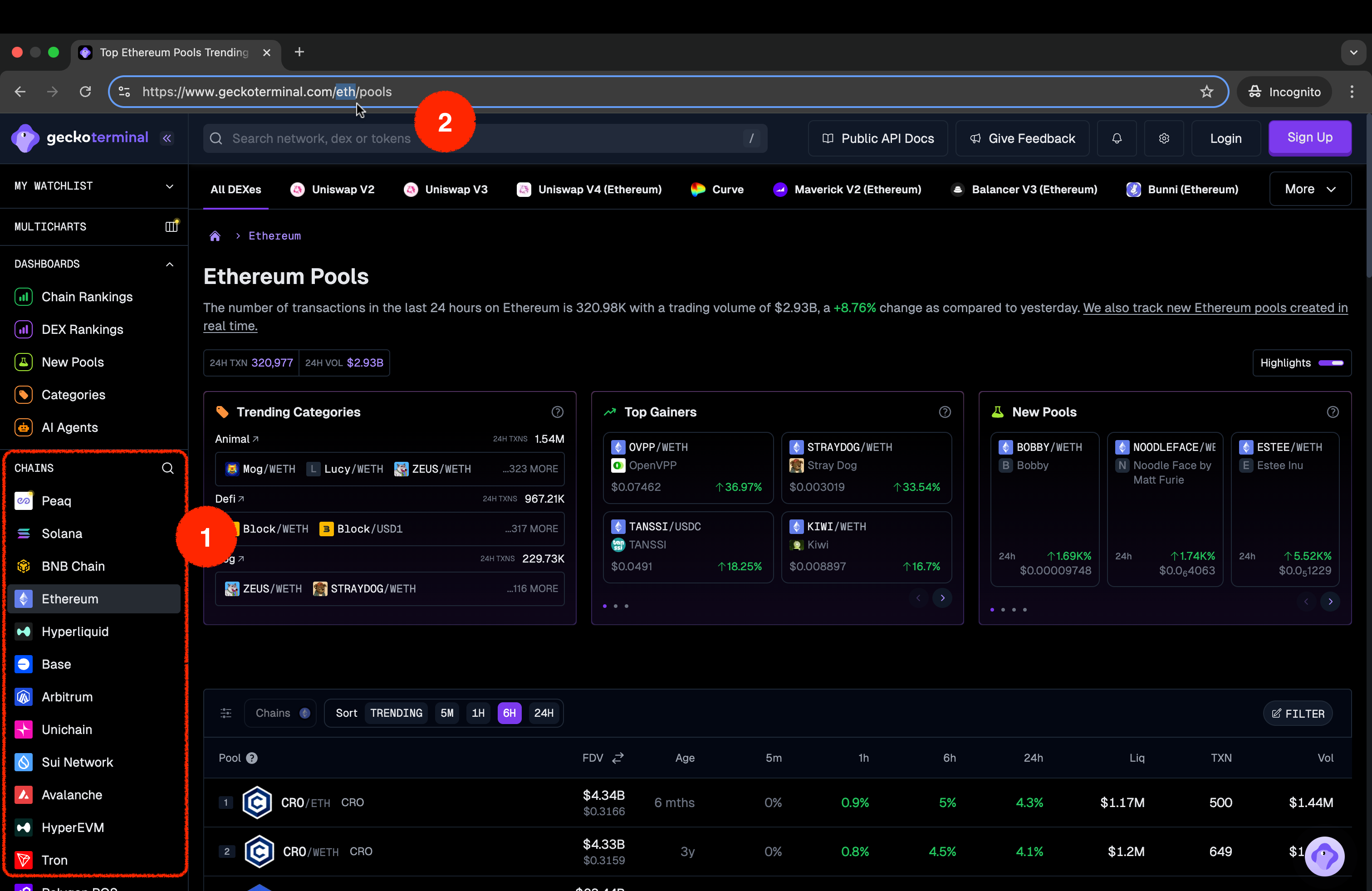
Some of the pools endpoints require you to provide DEX ID along with Network ID to query the pools on a particular DEX (Decentralized Exchange).
Using /onchain/networks/{network}/dexes/{dex}/pools as example:
https://pro-api.coingecko.com/api/v3/onchain/networks/eth/dexes/uniswap_v3/pools?x_cg_pro_api_key=YOUR_API_KEY
There are 2 parameter values required to apply for this endpoint:
network:eth(network ID)dex:uniswap_v3(DEX ID)
How to obtain DEX ID?
- Use /onchain/networks/{network}/dexes endpoint, example of response:
- Go to GeckoTerminal
-
Select or search for a blockchain network.
-
Choose the DEX from the DEXs List on the top (e.g. Uniswap V3).
-
Copy the slug from the URL:
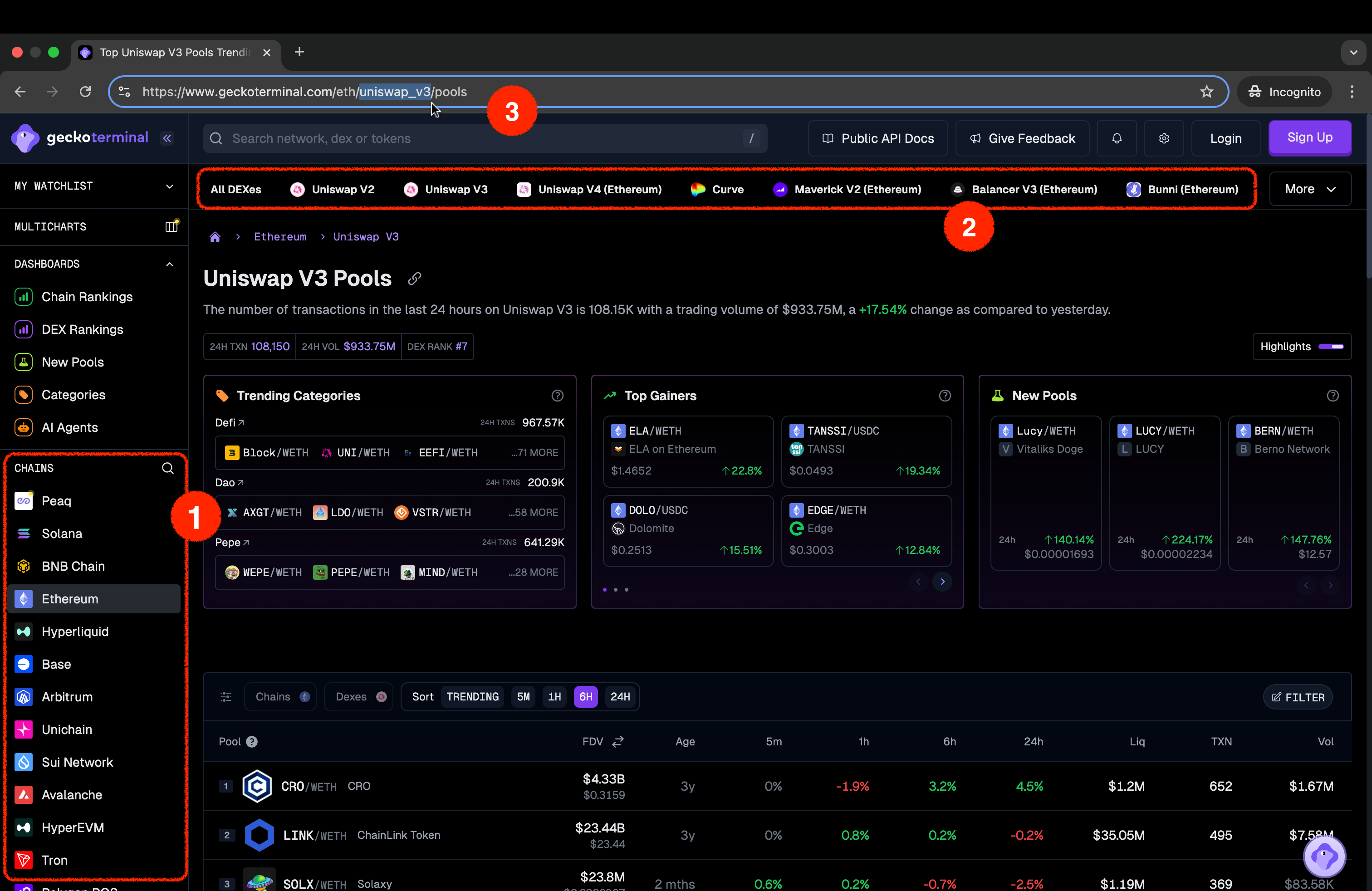
Methods to query Onchain Data
a. Pool Contract Address
Most of the time, you will need a pool contract address along with Network ID to query the onchain data, especially when using the Pools Endpoints.
Using /onchain/networks/{network}/pools/{address} as example:
https://pro-api.coingecko.com/api/v3/onchain/networks/eth/pools/0xb4e16d0168e52d35cacd2c6185b44281ec28c9dc?x_cg_pro_api_key=YOUR_API_KEY
There are 2 parameter values required to apply for this endpoint:
network:eth(network ID)address:0xb4e16d0168e52d35cacd2c6185b44281ec28c9dc(pool contract address)
How to obtain the pool contract address? (e.g.WETH/USDC)
- Look for the contract address section of pool page on GeckoTerminal:
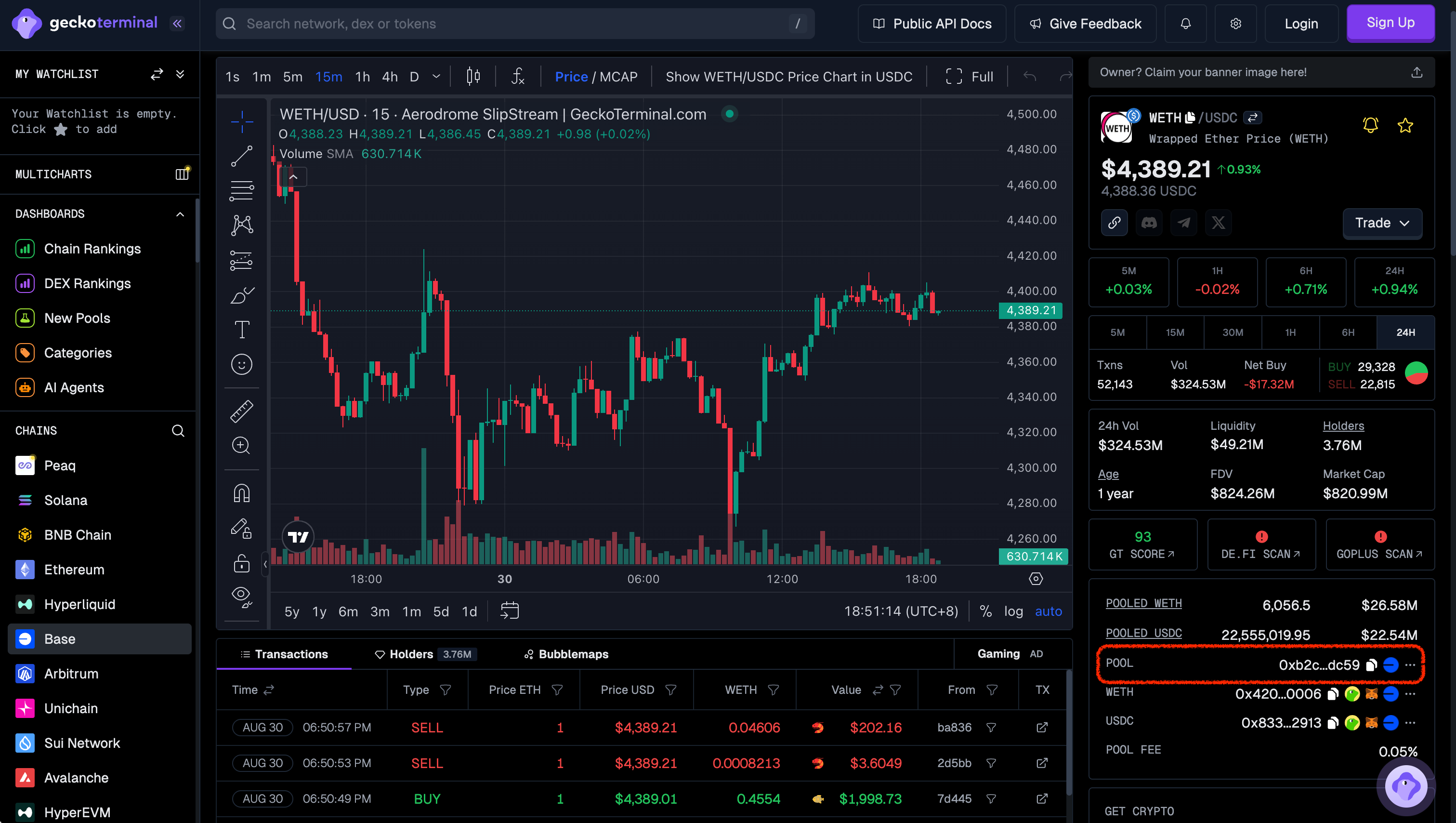
-
Get the pool contract address from the project website, white-paper, documentation, or block explorer site:
b. Token Contract Address
Apart from the pool contract address, you also have the option to query onchain data by using the token contract address, using /onchain/networks/{network}/tokens/{token_address}/pools as example:
https://pro-api.coingecko.com/api/v3/onchain/networks/eth/tokens/0xa0b86991c6218b36c1d19d4a2e9eb0ce3606eb48/pools?x_cg_pro_api_key=YOUR_API_KEY
There are 2 parameter values required to apply for this endpoint:
network:eth(network ID)address:0xa0b86991c6218b36c1d19d4a2e9eb0ce3606eb48(token contract address)
How to obtain tokens contract address (e.g. UNI):
- Look for the contract address section of pool page on GeckoTerminal:
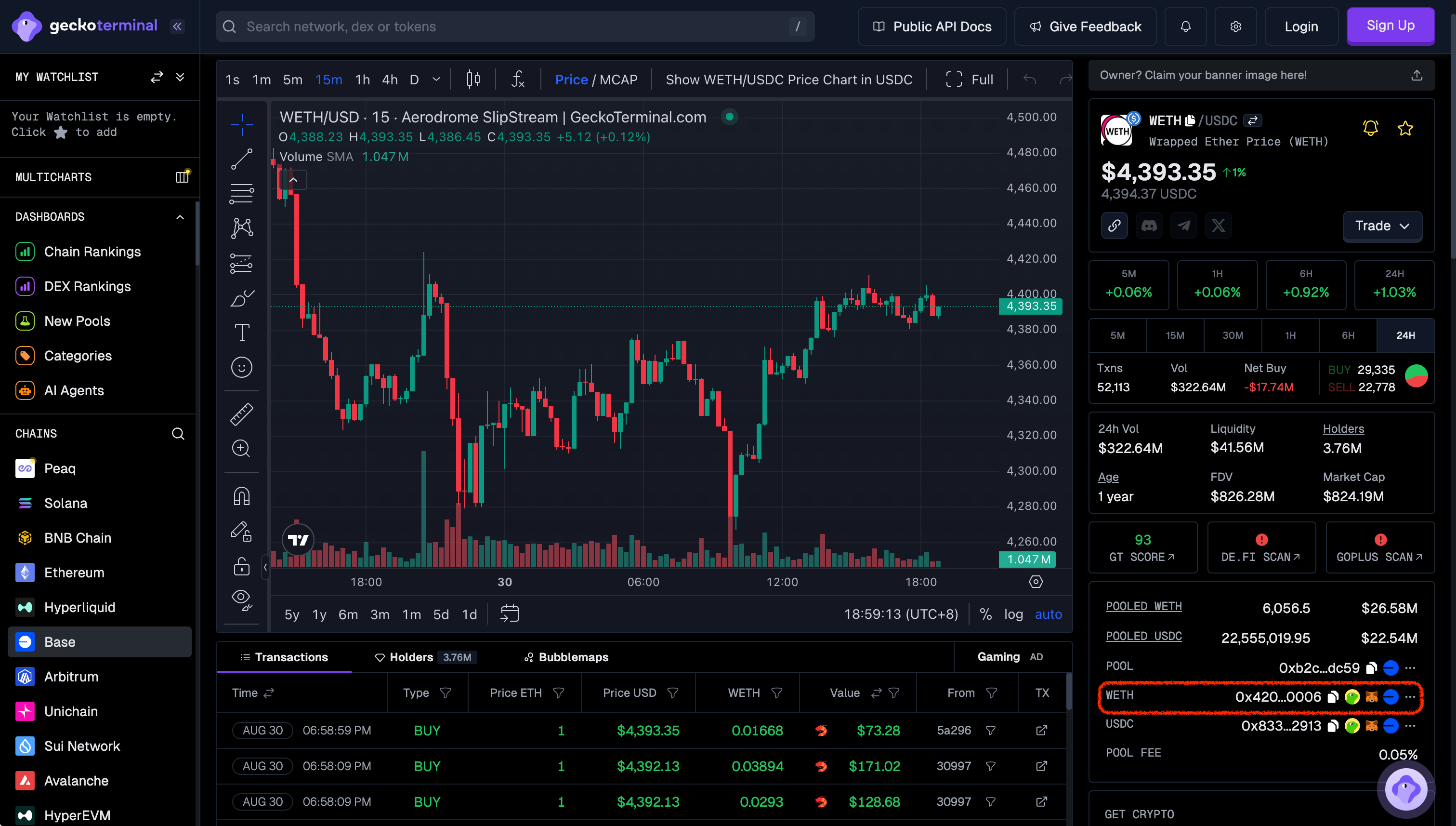
-
Get the token contract address from the project website, white-paper, documentation, or block explorer site. For example:
Examples:
Example 1 (unknown):
</CodeGroup>

* Go to [GeckoTerminal](https://www.geckoterminal.com/)

  1. Select or search for a blockchain network.

  2. Copy the slug from the URL:

  <img src="https://mintcdn.com/coingecko/a7cplMjqO5fc2v5e/images/docs/5b9a903-image.png?fit=max&auto=format&n=a7cplMjqO5fc2v5e&q=85&s=3d58e3708238e2c869afeb50f36ba74a" alt="" data-og-width="3024" width="3024" data-og-height="1964" height="1964" data-path="images/docs/5b9a903-image.png" data-optimize="true" data-opv="3" srcset="https://mintcdn.com/coingecko/a7cplMjqO5fc2v5e/images/docs/5b9a903-image.png?w=280&fit=max&auto=format&n=a7cplMjqO5fc2v5e&q=85&s=4989c53c98cdf6a3b7e313e6a9804ab0 280w, https://mintcdn.com/coingecko/a7cplMjqO5fc2v5e/images/docs/5b9a903-image.png?w=560&fit=max&auto=format&n=a7cplMjqO5fc2v5e&q=85&s=d969711a6080bed61c7ea74574f8c9c4 560w, https://mintcdn.com/coingecko/a7cplMjqO5fc2v5e/images/docs/5b9a903-image.png?w=840&fit=max&auto=format&n=a7cplMjqO5fc2v5e&q=85&s=00c5bc4b0bddd4b5c2a1db9feccf6cb9 840w, https://mintcdn.com/coingecko/a7cplMjqO5fc2v5e/images/docs/5b9a903-image.png?w=1100&fit=max&auto=format&n=a7cplMjqO5fc2v5e&q=85&s=fae4d183cc2e8adffa335e7fd646f7d0 1100w, https://mintcdn.com/coingecko/a7cplMjqO5fc2v5e/images/docs/5b9a903-image.png?w=1650&fit=max&auto=format&n=a7cplMjqO5fc2v5e&q=85&s=557a46ebb5da439b2f10be9d31b78618 1650w, https://mintcdn.com/coingecko/a7cplMjqO5fc2v5e/images/docs/5b9a903-image.png?w=2500&fit=max&auto=format&n=a7cplMjqO5fc2v5e&q=85&s=c2a5d9ec2a1c59d2479ee38eb887b103 2500w" />

## DEXs

Some of the pools endpoints require you to provide DEX ID along with Network ID to query the pools on a particular DEX (Decentralized Exchange).

Using [/onchain/networks/\{network}/dexes/\{dex}/pools](/reference/top-pools-dex) as example:

* `https://pro-api.coingecko.com/api/v3/onchain/networks/eth/dexes/uniswap_v3/pools?x_cg_pro_api_key=YOUR_API_KEY`

There are 2 parameter values required to apply for this endpoint:

* `network`: `eth` (network ID)
* `dex`: `uniswap_v3` (DEX ID)

**How to obtain DEX ID?**

* Use [/onchain/networks/\{network}/dexes](/reference/dexes-list) endpoint, example of response:

  <CodeGroup>
👑 Total Supply Chart within time range by ID
URL: llms-txt#👑-total-supply-chart-within-time-range-by-id
Source: https://docs.coingecko.com/reference/coins-id-total-supply-chart-range
reference/api-reference/coingecko-pro.json get /coins/{id}/total_supply_chart/range This endpoint allows you to query historical total supply of a coin, within a range of timestamp based on the provided coin ID
-
Supports ISO date strings (
YYYY-MM-DDor
YYYY-MM-DDTHH:MM, recommended for best compatibility) or UNIX timestamps. -
Cache/Update Frequency: 5 minutes.
- The data is provided at daily intervals (00:00:00 UTC).
- Data Availability: from 22 June 2019
- The last completed UTC day (00:00) is available 35 minutes after midnight on the next UTC day (00:35).
- Exclusive for Enterprise Plan Subscribers only.
Coin Historical Chart Data within Time Range by ID
URL: llms-txt#coin-historical-chart-data-within-time-range-by-id
Source: https://docs.coingecko.com/v3.0.1/reference/coins-id-market-chart-range
v3.0.1/reference/api-reference/coingecko-demo.json get /coins/{id}/market_chart/range This endpoint allows you to get the historical chart data of a coin within certain time range in UNIX along with price, market cap and 24hr volume based on particular coin ID
-
You may obtain the coin ID (API ID) via several ways:
- refers to respective coin page and find 'API ID'.
- refers to
/coins/listendpoint. - refers to google sheets here.
-
You may leave the interval params as empty for automatic granularity:
- 1 day from current time = 5-minutely data
- 1 day from any time (except current time) = hourly data
- 2 - 90 days from any time = hourly data
- above 90 days from any time = daily data (00:00 UTC)
- Cache / Update Frequency:
Based on days range (all the API plans)- 1 day = 30 seconds cache
- 2 -90 days = 30 minutes cache
- 90 days = 12 hours cache
- The last completed UTC day (00:00) is available 35 minutes after midnight on the next UTC day (00:35). The cache will always expire at 00:40 UTC.
- Access to historical data via the Public API (Demo plan) is restricted to the past 365 days only. To access the complete range of historical data, please subscribe to one of our paid plans to obtain a Pro-API key.
💼 Token OHLCV chart by Token Address
URL: llms-txt#💼-token-ohlcv-chart-by-token-address
Source: https://docs.coingecko.com/reference/token-ohlcv-token-address
reference/api-reference/onchain-pro.json get /networks/{network}/tokens/{token_address}/ohlcv/{timeframe} This endpoint allows you to get the OHLCV chart (Open, High, Low, Close, Volume) of a token based on the provided token address on a network
- This endpoint will return OHLCV data of the most liquid pool of the specified token. You may use this endpoint Top Pools by Token Address to check the top pools of a token.
- This endpoint uses epoch/unix format for its timestamp. Example:
1708850449. - Paid plan subscribers (Analyst plan & above) can access data from September 2021 to the present, depending on when the pool started tracking on GeckoTerminal.
- If no earlier data is available, an empty response will be returned.
- Each API call can only retrieve data for a maximum range of 6 months. To fetch older data, use the
before_timestampparameter to query in multiple requests.
- Pools with more than 2 tokens are not yet supported for this endpoint.
- Each OHLCV array (under "ohlcv_list") consists of 6 elements in the following order:
- Timestamp: The epoch/unix timestamp representing the start of the time interval.
- Open: The opening price of the asset at the beginning of the interval.
- High: The highest price reached during the interval.
- Low: The lowest price reached during the interval.
- Close: The price of the asset at the end of the interval.
- Volume: The total trading volume of the asset during the interval.
- Skipped Intervals: To ensure concise and relevant data, specific timeframe intervals (e.g. minutely) with no recorded swaps are excluded from the response.
- Higher granularity timeframes (e.g. 1 minute) are more likely to skip intervals due to periods of inactivity, while lower granularity timeframes (e.g. daily) are less affected.
- For
include_empty_intervalsparam:- When
false(default): Only intervals with trade data are returned. - When
true: All requested intervals are returned, those with no trade data are populated as follows:- OHLC (Open, High, Low, Close) are all set to the Close price of the previous interval.
- O = H = L = C = previous Close
- Volume (V) is set to 0, reflecting no trade activity.
- OHLC (Open, High, Low, Close) are all set to the Close price of the previous interval.
- When
- Cache/Update Frequency: every 10 seconds for Pro API (Analyst, Lite, Pro, Enterprise).
- This endpoint uses epoch/unix format for its timestamp. Example:
Token Lists by Asset Platform ID
URL: llms-txt#token-lists-by-asset-platform-id
Source: https://docs.coingecko.com/v3.0.1/reference/token-lists
v3.0.1/reference/api-reference/coingecko-demo.json get /token_lists/{asset_platform_id}/all.json This endpoint allows you to get full list of tokens of a blockchain network (asset platform) that is supported by Ethereum token list standard
- Cache/Update Frequency: 5 minutes.
- A token will only be included in the list if the contract address is added by CoinGecko team. If you identified any missing token, you may submit a request here.