2196 lines
65 KiB
Markdown
2196 lines
65 KiB
Markdown
# Timescaledb - Api
|
|
|
|
**Pages:** 100
|
|
|
|
---
|
|
|
|
## UUIDv7 functions
|
|
|
|
**URL:** llms-txt#uuidv7-functions
|
|
|
|
**Contents:**
|
|
- Examples
|
|
- Functions
|
|
|
|
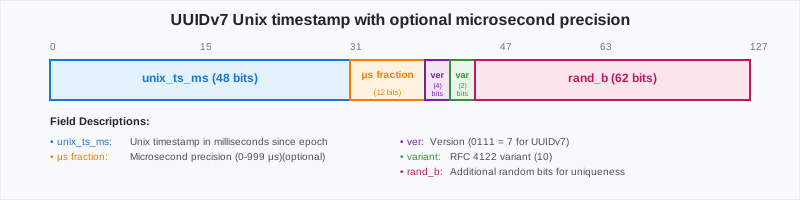
UUIDv7 is a time-ordered UUID that includes a Unix timestamp (with millisecond precision) in its first 48 bits. Like
|
|
other UUIDs, it uses 6 bits for version and variant info, and the remaining 74 bits are random.
|
|
|
|
|
|
|
|
UUIDv7 is ideal anywhere you create lots of records over time, not only observability. Advantages are:
|
|
|
|
- **No extra column required to partition by time with sortability**: you can sort UUIDv7 instances by their value. This
|
|
is useful for ordering records by creation time without the need for a separate timestamp column.
|
|
- **Indexing performance**: UUIDv7s increase with time, so new rows append near the end of a B-tree instead of
|
|
This results in fewer page splits, less fragmentation, faster inserts, and efficient time-range scans.
|
|
- **Easy keyset pagination**: `WHERE id > :cursor` and natural sharding.
|
|
- **UUID**: safe across services, replicas, and unique across distributed systems.
|
|
|
|
UUIDv7 also increases query speed by reducing the number of chunks scanned during queries. For example, in a database
|
|
with 25 million rows, the following query runs in 25 seconds:
|
|
|
|
Using UUIDv7 excludes chunks at startup and reduces the query time to 550ms:
|
|
|
|
You use UUIDvs for events, orders, messages, uploads, runs, jobs, spans, and more.
|
|
|
|
- **High-rate event logs for observability and metrics**:
|
|
|
|
UUIDv7 gives you globally unique IDs (for traceability) and time windows (“last hour”), without the need for a
|
|
separate `created_at` column. UUIDv7 create less churn because inserts land at the end of the index, and you can
|
|
filter by time using UUIDv7 objects.
|
|
|
|
- Last hour:
|
|
|
|
- Keyset pagination
|
|
|
|
- **Workflow / durable execution runs**:
|
|
|
|
Each run needs a stable ID for joins and retries, and you often ask “what started since X?”. UUIDs help by serving
|
|
both as the primary key and a time cursor across services. For example:
|
|
|
|
- **Orders / activity feeds / messages (SaaS apps)**:
|
|
|
|
Human-readable timestamps are not mandatory in a table. However, you still need time-ordered pages and day/week ranges.
|
|
UUIDv7 enables clean date windows and cursor pagination with just the ID. For example:
|
|
|
|
- [generate_uuidv7()][generate_uuidv7]: generate a version 7 UUID based on current time
|
|
- [to_uuidv7()][to_uuidv7]: create a version 7 UUID from a PostgreSQL timestamp
|
|
- [to_uuidv7_boundary()][to_uuidv7_boundary]: create a version 7 "boundary" UUID from a PostgreSQL timestamp
|
|
- [uuid_timestamp()][uuid_timestamp]: extract a PostgreSQL timestamp from a version 7 UUID
|
|
- [uuid_timestamp_micros()][uuid_timestamp_micros]: extract a PostgreSQL timestamp with microsecond precision from a version 7 UUID
|
|
- [uuid_version()][uuid_version]: extract the version of a UUID
|
|
|
|
===== PAGE: https://docs.tigerdata.com/api/approximate_row_count/ =====
|
|
|
|
**Examples:**
|
|
|
|
Example 1 (sql):
|
|
```sql
|
|
WITH ref AS (SELECT now() AS t0)
|
|
SELECT count(*) AS cnt_ts_filter
|
|
FROM events e, ref
|
|
WHERE uuid_timestamp(e.event_id) >= ref.t0 - INTERVAL '2 days';
|
|
```
|
|
|
|
Example 2 (sql):
|
|
```sql
|
|
WITH ref AS (SELECT now() AS t0)
|
|
SELECT count(*) AS cnt_boundary_filter
|
|
FROM events e, ref
|
|
WHERE e.event_id >= to_uuidv7_boundary(ref.t0 - INTERVAL '2 days')
|
|
```
|
|
|
|
Example 3 (sql):
|
|
```sql
|
|
SELECT count(*) FROM logs WHERE id >= to_uuidv7_boundary(now() - interval '1 hour');
|
|
```
|
|
|
|
Example 4 (sql):
|
|
```sql
|
|
SELECT * FROM logs WHERE id > to_uuidv7($last_seen'::timestamptz, true) ORDER BY id LIMIT 1000;
|
|
```
|
|
|
|
---
|
|
|
|
## lttb()
|
|
|
|
**URL:** llms-txt#lttb()
|
|
|
|
===== PAGE: https://docs.tigerdata.com/api/_hyperfunctions/saturating_add/ =====
|
|
|
|
---
|
|
|
|
## state_agg()
|
|
|
|
**URL:** llms-txt#state_agg()
|
|
|
|
===== PAGE: https://docs.tigerdata.com/api/_hyperfunctions/state_agg/state_timeline/ =====
|
|
|
|
---
|
|
|
|
## compact_state_agg()
|
|
|
|
**URL:** llms-txt#compact_state_agg()
|
|
|
|
===== PAGE: https://docs.tigerdata.com/api/_hyperfunctions/compact_state_agg/into_values/ =====
|
|
|
|
---
|
|
|
|
## vwap()
|
|
|
|
**URL:** llms-txt#vwap()
|
|
|
|
===== PAGE: https://docs.tigerdata.com/api/_hyperfunctions/candlestick_agg/rollup/ =====
|
|
|
|
---
|
|
|
|
## interpolated_state_timeline()
|
|
|
|
**URL:** llms-txt#interpolated_state_timeline()
|
|
|
|
===== PAGE: https://docs.tigerdata.com/api/_hyperfunctions/state_agg/interpolated_duration_in/ =====
|
|
|
|
---
|
|
|
|
## close()
|
|
|
|
**URL:** llms-txt#close()
|
|
|
|
===== PAGE: https://docs.tigerdata.com/api/_hyperfunctions/candlestick_agg/open_time/ =====
|
|
|
|
---
|
|
|
|
## interpolated_downtime()
|
|
|
|
**URL:** llms-txt#interpolated_downtime()
|
|
|
|
===== PAGE: https://docs.tigerdata.com/api/_hyperfunctions/min_n/min_n/ =====
|
|
|
|
---
|
|
|
|
## Frequency analysis
|
|
|
|
**URL:** llms-txt#frequency-analysis
|
|
|
|
This section includes frequency aggregate APIs, which find the most common elements out of a set of
|
|
vastly more varied values.
|
|
|
|
For these hyperfunctions, you need to install the [TimescaleDB Toolkit][install-toolkit] Postgres extension.
|
|
|
|
<HyperfunctionTable
|
|
hyperfunctionFamily='frequency analysis'
|
|
includeExperimental
|
|
sortByType
|
|
/>
|
|
|
|
===== PAGE: https://docs.tigerdata.com/api/informational-views/ =====
|
|
|
|
---
|
|
|
|
## stderror()
|
|
|
|
**URL:** llms-txt#stderror()
|
|
|
|
===== PAGE: https://docs.tigerdata.com/api/_hyperfunctions/hyperloglog/approx_count_distinct/ =====
|
|
|
|
---
|
|
|
|
## tdigest()
|
|
|
|
**URL:** llms-txt#tdigest()
|
|
|
|
===== PAGE: https://docs.tigerdata.com/api/_hyperfunctions/tdigest/mean/ =====
|
|
|
|
---
|
|
|
|
## volume()
|
|
|
|
**URL:** llms-txt#volume()
|
|
|
|
===== PAGE: https://docs.tigerdata.com/api/_hyperfunctions/candlestick_agg/candlestick_agg/ =====
|
|
|
|
---
|
|
|
|
## high_time()
|
|
|
|
**URL:** llms-txt#high_time()
|
|
|
|
===== PAGE: https://docs.tigerdata.com/api/_hyperfunctions/count_min_sketch/approx_count/ =====
|
|
|
|
---
|
|
|
|
## open()
|
|
|
|
**URL:** llms-txt#open()
|
|
|
|
===== PAGE: https://docs.tigerdata.com/api/_hyperfunctions/candlestick_agg/low/ =====
|
|
|
|
---
|
|
|
|
## interpolated_average()
|
|
|
|
**URL:** llms-txt#interpolated_average()
|
|
|
|
===== PAGE: https://docs.tigerdata.com/api/_hyperfunctions/time_weight/average/ =====
|
|
|
|
---
|
|
|
|
## slope()
|
|
|
|
**URL:** llms-txt#slope()
|
|
|
|
===== PAGE: https://docs.tigerdata.com/api/_hyperfunctions/counter_agg/num_elements/ =====
|
|
|
|
---
|
|
|
|
## irate_right()
|
|
|
|
**URL:** llms-txt#irate_right()
|
|
|
|
===== PAGE: https://docs.tigerdata.com/api/_hyperfunctions/counter_agg/last_val/ =====
|
|
|
|
---
|
|
|
|
## trim_to()
|
|
|
|
**URL:** llms-txt#trim_to()
|
|
|
|
===== PAGE: https://docs.tigerdata.com/api/_hyperfunctions/heartbeat_agg/intro/ =====
|
|
|
|
Given a series of timestamped heartbeats and a liveness interval, determine the
|
|
overall liveness of a system. This aggregate can be used to report total uptime
|
|
or downtime as well as report the time ranges where the system was live or dead.
|
|
|
|
It's also possible to combine multiple heartbeat aggregates to determine the
|
|
overall health of a service. For example, the heartbeat aggregates from a
|
|
primary and standby server could be combined to see if there was ever a window
|
|
where both machines were down at the same time.
|
|
|
|
===== PAGE: https://docs.tigerdata.com/api/_hyperfunctions/heartbeat_agg/dead_ranges/ =====
|
|
|
|
---
|
|
|
|
## irate_left()
|
|
|
|
**URL:** llms-txt#irate_left()
|
|
|
|
===== PAGE: https://docs.tigerdata.com/api/_hyperfunctions/counter_agg/num_changes/ =====
|
|
|
|
---
|
|
|
|
## interpolated_delta()
|
|
|
|
**URL:** llms-txt#interpolated_delta()
|
|
|
|
===== PAGE: https://docs.tigerdata.com/api/_hyperfunctions/counter_agg/counter_zero_time/ =====
|
|
|
|
---
|
|
|
|
## counter_zero_time()
|
|
|
|
**URL:** llms-txt#counter_zero_time()
|
|
|
|
===== PAGE: https://docs.tigerdata.com/api/_hyperfunctions/counter_agg/irate_left/ =====
|
|
|
|
---
|
|
|
|
## Tiger Cloud REST API reference
|
|
|
|
**URL:** llms-txt#tiger-cloud-rest-api-reference
|
|
|
|
**Contents:**
|
|
- Overview
|
|
- Authentication
|
|
- Basic Authentication
|
|
- Example
|
|
- Service Management
|
|
- List All Services
|
|
- Create a Service
|
|
- Get a Service
|
|
- Delete a Service
|
|
- Resize a Service
|
|
|
|
A comprehensive RESTful API for managing Tiger Cloud resources including VPCs, services, and read replicas.
|
|
|
|
**API Version:** 1.0.0
|
|
**Base URL:** `https://console.cloud.timescale.com/public/api/v1`
|
|
|
|
The Tiger REST API uses HTTP Basic Authentication. Include your access key and secret key in the Authorization header.
|
|
|
|
### Basic Authentication
|
|
|
|
## Service Management
|
|
|
|
You use this endpoint to create a Tiger Cloud service with one of more of the following addons:
|
|
|
|
- `time-series`: a Tiger Cloud service optimized for real-time analytics. For time-stamped data like events,
|
|
prices, metrics, sensor readings, or any information that changes over time.
|
|
- `ai`: a Tiger Cloud service instance with vector extensions.
|
|
|
|
To have multiple addons when you create a new service, set `"addons": ["time-series", "ai"]`. To create a
|
|
vanilla Postgres instance, set `addons` to an empty list `[]`.
|
|
|
|
### List All Services
|
|
|
|
Retrieve all services within a project.
|
|
|
|
**Response:** `200 OK`
|
|
|
|
Create a new Tiger Cloud service. This is an asynchronous operation.
|
|
|
|
**Response:** `202 Accepted`
|
|
|
|
**Service Types:**
|
|
- `TIMESCALEDB`: a Tiger Cloud service instance optimized for real-time analytics service For time-stamped data like events,
|
|
prices, metrics, sensor readings, or any information that changes over time
|
|
- `POSTGRES`: a vanilla Postgres instance
|
|
- `VECTOR`: a Tiger Cloud service instance with vector extensions
|
|
|
|
Retrieve details of a specific service.
|
|
|
|
**Response:** `200 OK`
|
|
|
|
**Service Status:**
|
|
- `QUEUED`: Service creation is queued
|
|
- `DELETING`: Service is being deleted
|
|
- `CONFIGURING`: Service is being configured
|
|
- `READY`: Service is ready for use
|
|
- `DELETED`: Service has been deleted
|
|
- `UNSTABLE`: Service is in an unstable state
|
|
- `PAUSING`: Service is being paused
|
|
- `PAUSED`: Service is paused
|
|
- `RESUMING`: Service is being resumed
|
|
- `UPGRADING`: Service is being upgraded
|
|
- `OPTIMIZING`: Service is being optimized
|
|
|
|
Delete a specific service. This is an asynchronous operation.
|
|
|
|
**Response:** `202 Accepted`
|
|
|
|
Change CPU and memory allocation for a service.
|
|
|
|
**Response:** `202 Accepted`
|
|
|
|
### Update Service Password
|
|
|
|
Set a new master password for the service.
|
|
|
|
**Response:** `204 No Content`
|
|
|
|
### Set Service Environment
|
|
|
|
Set the environment type for the service.
|
|
|
|
**Environment Values:**
|
|
- `PROD`: Production environment
|
|
- `DEV`: Development environment
|
|
|
|
**Response:** `200 OK`
|
|
|
|
### Configure High Availability
|
|
|
|
Change the HA configuration for a service. This is an asynchronous operation.
|
|
|
|
**Response:** `202 Accepted`
|
|
|
|
### Connection Pooler Management
|
|
|
|
#### Enable Connection Pooler
|
|
|
|
Activate the connection pooler for a service.
|
|
|
|
**Response:** `200 OK`
|
|
|
|
#### Disable Connection Pooler
|
|
|
|
Deactivate the connection pooler for a service.
|
|
|
|
**Response:** `200 OK`
|
|
|
|
Create a new, independent service by taking a snapshot of an existing one.
|
|
|
|
**Response:** `202 Accepted`
|
|
|
|
Manage read replicas for improved read performance.
|
|
|
|
### List Read Replica Sets
|
|
|
|
Retrieve all read replica sets associated with a primary service.
|
|
|
|
**Response:** `200 OK`
|
|
|
|
**Replica Set Status:**
|
|
- `creating`: Replica set is being created
|
|
- `active`: Replica set is active and ready
|
|
- `resizing`: Replica set is being resized
|
|
- `deleting`: Replica set is being deleted
|
|
- `error`: Replica set encountered an error
|
|
|
|
### Create a Read Replica Set
|
|
|
|
Create a new read replica set. This is an asynchronous operation.
|
|
|
|
**Response:** `202 Accepted`
|
|
|
|
### Delete a Read Replica Set
|
|
|
|
Delete a specific read replica set. This is an asynchronous operation.
|
|
|
|
**Response:** `202 Accepted`
|
|
|
|
### Resize a Read Replica Set
|
|
|
|
Change resource allocation for a read replica set. This operation is async.
|
|
|
|
**Response:** `202 Accepted`
|
|
|
|
### Read Replica Set Connection Pooler
|
|
|
|
#### Enable Replica Set Pooler
|
|
|
|
Activate the connection pooler for a read replica set.
|
|
|
|
**Response:** `200 OK`
|
|
|
|
#### Disable Replica Set Pooler
|
|
|
|
Deactivate the connection pooler for a read replica set.
|
|
|
|
**Response:** `200 OK`
|
|
|
|
### Set Replica Set Environment
|
|
|
|
Set the environment type for a read replica set.
|
|
|
|
**Response:** `200 OK`
|
|
|
|
Virtual Private Clouds (VPCs) provide network isolation for your TigerData services.
|
|
|
|
List all Virtual Private Clouds in a project.
|
|
|
|
**Response:** `200 OK`
|
|
|
|
**Response:** `201 Created`
|
|
|
|
Retrieve details of a specific VPC.
|
|
|
|
**Response:** `200 OK`
|
|
|
|
Update the name of a specific VPC.
|
|
|
|
**Response:** `200 OK`
|
|
|
|
Delete a specific VPC.
|
|
|
|
**Response:** `204 No Content`
|
|
|
|
Manage peering connections between VPCs across different accounts and regions.
|
|
|
|
### List VPC Peerings
|
|
|
|
Retrieve all VPC peering connections for a given VPC.
|
|
|
|
**Response:** `200 OK`
|
|
|
|
### Create VPC Peering
|
|
|
|
Create a new VPC peering connection.
|
|
|
|
**Response:** `201 Created`
|
|
|
|
Retrieve details of a specific VPC peering connection.
|
|
|
|
### Delete VPC Peering
|
|
|
|
Delete a specific VPC peering connection.
|
|
|
|
**Response:** `204 No Content`
|
|
|
|
## Service VPC Operations
|
|
|
|
### Attach Service to VPC
|
|
|
|
Associate a service with a VPC.
|
|
|
|
**Response:** `202 Accepted`
|
|
|
|
### Detach Service from VPC
|
|
|
|
Disassociate a service from its VPC.
|
|
|
|
**Response:** `202 Accepted`
|
|
|
|
### Read Replica Set Object
|
|
|
|
Tiger Cloud REST API uses standard HTTP status codes and returns error details in JSON format.
|
|
|
|
### Error Response Format
|
|
|
|
### Common Error Codes
|
|
- `400 Bad Request`: Invalid request parameters or malformed JSON
|
|
- `401 Unauthorized`: Missing or invalid authentication credentials
|
|
- `403 Forbidden`: Insufficient permissions for the requested operation
|
|
- `404 Not Found`: Requested resource does not exist
|
|
- `409 Conflict`: Request conflicts with current resource state
|
|
- `500 Internal Server Error`: Unexpected server error
|
|
|
|
### Example Error Response
|
|
|
|
===== PAGE: https://docs.tigerdata.com/api/glossary/ =====
|
|
|
|
**Examples:**
|
|
|
|
Example 1 (http):
|
|
```http
|
|
Authorization: Basic <base64(access_key:secret_key)>
|
|
```
|
|
|
|
Example 2 (bash):
|
|
```bash
|
|
curl -X GET "https://console.cloud.timescale.com/public/api/v1/projects/{project_id}/services" \
|
|
-H "Authorization: Basic $(echo -n 'your_access_key:your_secret_key' | base64)"
|
|
```
|
|
|
|
Example 3 (http):
|
|
```http
|
|
GET /projects/{project_id}/services
|
|
```
|
|
|
|
Example 4 (json):
|
|
```json
|
|
[
|
|
{
|
|
"service_id": "p7zm9wqqii",
|
|
"project_id": "jz22xtzemv",
|
|
"name": "my-production-db",
|
|
"region_code": "eu-central-1",
|
|
"service_type": "TIMESCALEDB",
|
|
"status": "READY",
|
|
"created": "2024-01-15T10:30:00Z",
|
|
"paused": false,
|
|
"resources": [
|
|
{
|
|
"id": "resource-1",
|
|
"spec": {
|
|
"cpu_millis": 1000,
|
|
"memory_gbs": 4,
|
|
"volume_type": "gp2"
|
|
}
|
|
}
|
|
],
|
|
"endpoint": {
|
|
"host": "my-service.com",
|
|
"port": 5432
|
|
}
|
|
}
|
|
]
|
|
```
|
|
|
|
---
|
|
|
|
## approx_count_distinct()
|
|
|
|
**URL:** llms-txt#approx_count_distinct()
|
|
|
|
===== PAGE: https://docs.tigerdata.com/api/_hyperfunctions/max_n/max_n/ =====
|
|
|
|
---
|
|
|
|
## variance()
|
|
|
|
**URL:** llms-txt#variance()
|
|
|
|
===== PAGE: https://docs.tigerdata.com/api/_hyperfunctions/gauge_agg/delta/ =====
|
|
|
|
---
|
|
|
|
## low()
|
|
|
|
**URL:** llms-txt#low()
|
|
|
|
===== PAGE: https://docs.tigerdata.com/api/_hyperfunctions/candlestick_agg/candlestick/ =====
|
|
|
|
---
|
|
|
|
## Administrative functions
|
|
|
|
**URL:** llms-txt#administrative-functions
|
|
|
|
**Contents:**
|
|
- Dump TimescaleDB meta data
|
|
- get_telemetry_report()
|
|
- Sample usage
|
|
- timescaledb_post_restore()
|
|
- Sample usage
|
|
- timescaledb_pre_restore()
|
|
- Sample usage
|
|
|
|
These administrative APIs help you prepare a database before and after a restore event. They also help you keep track of your TimescaleDB setup data.
|
|
|
|
## Dump TimescaleDB meta data
|
|
|
|
To help when asking for support and reporting bugs, TimescaleDB includes an SQL dump script. It outputs metadata from the internal TimescaleDB tables, along with version information.
|
|
|
|
This script is available in the source distribution in `scripts/`. To use it, run:
|
|
|
|
Inspect `dumpfile.txt` before sending it together with a bug report or support question.
|
|
|
|
## get_telemetry_report()
|
|
|
|
Returns the background [telemetry][telemetry] string sent to Tiger Data.
|
|
|
|
If telemetry is turned off, it sends the string that would be sent if telemetry were enabled.
|
|
|
|
View the telemetry report:
|
|
|
|
## timescaledb_post_restore()
|
|
|
|
Perform the required operations after you have finished restoring the database using `pg_restore`. Specifically, this resets the `timescaledb.restoring` GUC and restarts any background workers.
|
|
|
|
For more information, see [Migrate using pg_dump and pg_restore].
|
|
|
|
Prepare the database for normal use after a restore:
|
|
|
|
## timescaledb_pre_restore()
|
|
|
|
Perform the required operations so that you can restore the database using `pg_restore`. Specifically, this sets the `timescaledb.restoring` GUC to `on` and stops any background workers which could have been performing tasks.
|
|
|
|
The background workers are stopped until the [timescaledb_post_restore()](#timescaledb_post_restore) function is run, after the restore operation is complete.
|
|
|
|
For more information, see [Migrate using pg_dump and pg_restore].
|
|
|
|
After using `timescaledb_pre_restore()`, you need to run [`timescaledb_post_restore()`](#timescaledb_post_restore) before you can use the database normally.
|
|
|
|
Prepare to restore the database:
|
|
|
|
===== PAGE: https://docs.tigerdata.com/api/api-tag-overview/ =====
|
|
|
|
**Examples:**
|
|
|
|
Example 1 (bash):
|
|
```bash
|
|
psql [your connect flags] -d your_timescale_db < dump_meta_data.sql > dumpfile.txt
|
|
```
|
|
|
|
Example 2 (sql):
|
|
```sql
|
|
SELECT get_telemetry_report();
|
|
```
|
|
|
|
Example 3 (sql):
|
|
```sql
|
|
SELECT timescaledb_post_restore();
|
|
```
|
|
|
|
Example 4 (sql):
|
|
```sql
|
|
SELECT timescaledb_pre_restore();
|
|
```
|
|
|
|
---
|
|
|
|
## into_array()
|
|
|
|
**URL:** llms-txt#into_array()
|
|
|
|
===== PAGE: https://docs.tigerdata.com/api/_hyperfunctions/max_n/into_values/ =====
|
|
|
|
---
|
|
|
|
## live_ranges()
|
|
|
|
**URL:** llms-txt#live_ranges()
|
|
|
|
===== PAGE: https://docs.tigerdata.com/api/_hyperfunctions/heartbeat_agg/interpolate/ =====
|
|
|
|
---
|
|
|
|
## num_resets()
|
|
|
|
**URL:** llms-txt#num_resets()
|
|
|
|
===== PAGE: https://docs.tigerdata.com/api/_hyperfunctions/counter_agg/last_time/ =====
|
|
|
|
---
|
|
|
|
## uptime()
|
|
|
|
**URL:** llms-txt#uptime()
|
|
|
|
===== PAGE: https://docs.tigerdata.com/api/_hyperfunctions/heartbeat_agg/num_gaps/ =====
|
|
|
|
---
|
|
|
|
## API Reference
|
|
|
|
**URL:** llms-txt#api-reference
|
|
|
|
===== PAGE: https://docs.tigerdata.com/api/_hyperfunctions/counter_agg/time_delta/ =====
|
|
|
|
---
|
|
|
|
## saturating_mul()
|
|
|
|
**URL:** llms-txt#saturating_mul()
|
|
|
|
===== PAGE: https://docs.tigerdata.com/api/_hyperfunctions/downsampling-intro/ =====
|
|
|
|
Downsample your data to visualize trends while preserving fewer data points.
|
|
Downsampling replaces a set of values with a much smaller set that is highly
|
|
representative of the original data. This is particularly useful for graphing
|
|
applications.
|
|
|
|
===== PAGE: https://docs.tigerdata.com/api/_hyperfunctions/saturating_sub/ =====
|
|
|
|
---
|
|
|
|
## average()
|
|
|
|
**URL:** llms-txt#average()
|
|
|
|
===== PAGE: https://docs.tigerdata.com/api/_hyperfunctions/time_weight/rollup/ =====
|
|
|
|
---
|
|
|
|
## downtime()
|
|
|
|
**URL:** llms-txt#downtime()
|
|
|
|
===== PAGE: https://docs.tigerdata.com/api/_hyperfunctions/heartbeat_agg/interpolated_uptime/ =====
|
|
|
|
---
|
|
|
|
## Create and manage jobs
|
|
|
|
**URL:** llms-txt#create-and-manage-jobs
|
|
|
|
**Contents:**
|
|
- Prerequisites
|
|
- Create a job
|
|
- Test and debug a job
|
|
- Alter and delete a job
|
|
|
|
Jobs in TimescaleDB are custom functions or procedures that run on a schedule that you define. This page explains how to create, test, alter, and delete a job.
|
|
|
|
To follow the procedure on this page you need to:
|
|
|
|
* Create a [target Tiger Cloud service][create-service].
|
|
|
|
This procedure also works for [self-hosted TimescaleDB][enable-timescaledb].
|
|
|
|
To create a job, create a [function][postgres-createfunction] or [procedure][postgres-createprocedure] that you want your database to execute, then set it up to run on a schedule.
|
|
|
|
1. **Define a function or procedure in the language of your choice**
|
|
|
|
Wrap it in a `CREATE` statement:
|
|
|
|
For example, to create a function that reindexes a table within your database:
|
|
|
|
`job_id` and `config` are required arguments in the function signature. This returns `CREATE FUNCTION` to indicate that the function has successfully been created.
|
|
|
|
1. **Call the function to validate**
|
|
|
|
The result looks like this:
|
|
|
|
1. **Register your job with [`add_job`][api-add_job]**
|
|
|
|
Pass the name of your job, the schedule you want it to run on, and the content of your config. For the `config` value, if you don't need any special configuration parameters, set to `NULL`. For example, to run the `reindex_mytable` function every hour:
|
|
|
|
The call returns a `job_id` and stores it along with `config` in the TimescaleDB catalog.
|
|
|
|
The job runs on the schedule you set. You can also run it manually with [`run_job`][api-run_job] passing `job_id`. When the job runs, `job_id` and `config` are passed as arguments.
|
|
|
|
1. **Validate the job**
|
|
|
|
List all currently registered jobs with [`timescaledb_information.jobs`][api-timescaledb_information-jobs]:
|
|
|
|
The result looks like this:
|
|
|
|
## Test and debug a job
|
|
|
|
To debug a job, increase the log level and run the job manually with [`run_job`][api-run_job] in the foreground. Because `run_job` is a stored procedure and not a function, run it with [`CALL`][postgres-call] instead of `SELECT`.
|
|
|
|
1. **Set the minimum log level to `DEBUG1`**
|
|
|
|
Replace `1000` with your `job_id`:
|
|
|
|
## Alter and delete a job
|
|
|
|
Alter an existing job with [`alter_job`][api-alter_job]. You can change both the config and the schedule on which the job runs.
|
|
|
|
1. **Change a job's config**
|
|
|
|
To replace the entire JSON config for a job, call `alter_job` with a new `config` object. For example, replace the JSON config for a job with ID `1000`:
|
|
|
|
1. **Turn off job scheduling**
|
|
|
|
To turn off automatic scheduling of a job, call `alter_job` and set `scheduled`to `false`. You can still run the job manually with `run_job`. For example, turn off the scheduling for a job with ID `1000`:
|
|
|
|
1. **Re-enable automatic scheduling of a job**
|
|
|
|
To re-enable automatic scheduling of a job, call `alter_job` and set `scheduled` to `true`. For example, re-enable scheduling for a job with ID `1000`:
|
|
|
|
1. **Delete a job with [`delete_job`][api-delete_job]**
|
|
|
|
For example, to delete a job with ID `1000`:
|
|
|
|
===== PAGE: https://docs.tigerdata.com/use-timescale/hyperfunctions/function-pipelines/ =====
|
|
|
|
**Examples:**
|
|
|
|
Example 1 (sql):
|
|
```sql
|
|
CREATE FUNCTION <function_name> (job_id INT DEFAULT NULL, config JSONB DEFAULT NULL)
|
|
RETURNS VOID
|
|
DECLARE
|
|
<declaration>;
|
|
BEGIN
|
|
<function_body>;
|
|
END;
|
|
$<variable_name>$ LANGUAGE <language>;
|
|
```
|
|
|
|
Example 2 (sql):
|
|
```sql
|
|
CREATE FUNCTION reindex_mytable(job_id INT DEFAULT NULL, config JSONB DEFAULT NULL)
|
|
RETURNS VOID
|
|
AS $$
|
|
BEGIN
|
|
REINDEX TABLE mytable;
|
|
END;
|
|
$$ LANGUAGE plpgsql;
|
|
```
|
|
|
|
Example 3 (sql):
|
|
```sql
|
|
select reindex_mytable();
|
|
```
|
|
|
|
Example 4 (sql):
|
|
```sql
|
|
reindex_mytable
|
|
-----------------
|
|
|
|
(1 row)
|
|
```
|
|
|
|
---
|
|
|
|
## topn()
|
|
|
|
**URL:** llms-txt#topn()
|
|
|
|
===== PAGE: https://docs.tigerdata.com/api/_hyperfunctions/freq_agg/intro/ =====
|
|
|
|
Get the most common elements of a set and their relative frequency. The
|
|
estimation uses the [SpaceSaving][spacingsaving-algorithm] algorithm.
|
|
|
|
This group of functions contains two aggregate functions, which let you set the
|
|
cutoff for keeping track of a value in different ways. [`freq_agg`](#freq_agg)
|
|
allows you to specify a minimum frequency, and [`mcv_agg`](#mcv_agg) allows
|
|
you to specify the target number of values to keep.
|
|
|
|
To estimate the absolute number of times a value appears, use [`count_min_sketch`][count_min_sketch].
|
|
|
|
===== PAGE: https://docs.tigerdata.com/api/_hyperfunctions/freq_agg/min_frequency/ =====
|
|
|
|
---
|
|
|
|
## duration_in()
|
|
|
|
**URL:** llms-txt#duration_in()
|
|
|
|
===== PAGE: https://docs.tigerdata.com/api/_hyperfunctions/compact_state_agg/intro/ =====
|
|
|
|
Given a system or value that switches between discrete states, aggregate the
|
|
amount of time spent in each state. For example, you can use the `compact_state_agg`
|
|
functions to track how much time a system spends in `error`, `running`, or
|
|
`starting` states.
|
|
|
|
`compact_state_agg` is designed to work with a relatively small number of states. It
|
|
might not perform well on datasets where states are mostly distinct between
|
|
rows.
|
|
|
|
If you need to track when each state is entered and exited, use the
|
|
[`state_agg`][state_agg] functions. If you need to track the liveness of a
|
|
system based on a heartbeat signal, consider using the
|
|
[`heartbeat_agg`][heartbeat_agg] functions.
|
|
|
|
===== PAGE: https://docs.tigerdata.com/api/_hyperfunctions/compact_state_agg/compact_state_agg/ =====
|
|
|
|
---
|
|
|
|
## high()
|
|
|
|
**URL:** llms-txt#high()
|
|
|
|
===== PAGE: https://docs.tigerdata.com/api/_hyperfunctions/candlestick_agg/high_time/ =====
|
|
|
|
---
|
|
|
|
## corr()
|
|
|
|
**URL:** llms-txt#corr()
|
|
|
|
===== PAGE: https://docs.tigerdata.com/api/_hyperfunctions/counter_agg/idelta_right/ =====
|
|
|
|
---
|
|
|
|
## last_time()
|
|
|
|
**URL:** llms-txt#last_time()
|
|
|
|
===== PAGE: https://docs.tigerdata.com/api/_hyperfunctions/counter_agg/counter_agg/ =====
|
|
|
|
---
|
|
|
|
## gp_lttb()
|
|
|
|
**URL:** llms-txt#gp_lttb()
|
|
|
|
===== PAGE: https://docs.tigerdata.com/api/_hyperfunctions/saturating-math-intro/ =====
|
|
|
|
The saturating math hyperfunctions help you perform saturating math on integers.
|
|
In saturating math, the final result is bounded. If the result of a normal
|
|
mathematical operation exceeds either the minimum or maximum bound, the result
|
|
of the corresponding saturating math operation is capped at the bound. For
|
|
example, `2 + (-3) = -1`. But in a saturating math function with a lower bound
|
|
of `0`, such as [`saturating_add_pos`](#saturating_add_pos), the result is `0`.
|
|
|
|
You can use saturating math to make sure your results don't overflow the allowed
|
|
range of integers, or to force a result to be greater than or equal to zero.
|
|
|
|
===== PAGE: https://docs.tigerdata.com/api/_hyperfunctions/lttb/ =====
|
|
|
|
---
|
|
|
|
## intercept()
|
|
|
|
**URL:** llms-txt#intercept()
|
|
|
|
===== PAGE: https://docs.tigerdata.com/api/_hyperfunctions/counter_agg/extrapolated_rate/ =====
|
|
|
|
---
|
|
|
|
## min_n()
|
|
|
|
**URL:** llms-txt#min_n()
|
|
|
|
===== PAGE: https://docs.tigerdata.com/api/_hyperfunctions/min_n/intro/ =====
|
|
|
|
Get the N smallest values from a column.
|
|
|
|
The `min_n()` functions give the same results as the regular SQL query `SELECT
|
|
... ORDER BY ... LIMIT n`. But unlike the SQL query, they can be composed and
|
|
combined like other aggregate hyperfunctions.
|
|
|
|
To get the N largest values, use [`max_n()`][max_n]. To get the N smallest
|
|
values with accompanying data, use [`min_n_by()`][min_n_by].
|
|
|
|
===== PAGE: https://docs.tigerdata.com/api/_hyperfunctions/min_n/into_array/ =====
|
|
|
|
---
|
|
|
|
## state_timeline()
|
|
|
|
**URL:** llms-txt#state_timeline()
|
|
|
|
===== PAGE: https://docs.tigerdata.com/api/_hyperfunctions/state_agg/interpolated_state_timeline/ =====
|
|
|
|
---
|
|
|
|
## mcv_agg()
|
|
|
|
**URL:** llms-txt#mcv_agg()
|
|
|
|
===== PAGE: https://docs.tigerdata.com/api/_hyperfunctions/compact_state_agg/interpolated_duration_in/ =====
|
|
|
|
---
|
|
|
|
## into_values()
|
|
|
|
**URL:** llms-txt#into_values()
|
|
|
|
===== PAGE: https://docs.tigerdata.com/api/_hyperfunctions/max_n/rollup/ =====
|
|
|
|
---
|
|
|
|
## heartbeat_agg()
|
|
|
|
**URL:** llms-txt#heartbeat_agg()
|
|
|
|
===== PAGE: https://docs.tigerdata.com/api/_hyperfunctions/heartbeat_agg/rollup/ =====
|
|
|
|
---
|
|
|
|
## saturating_add_pos()
|
|
|
|
**URL:** llms-txt#saturating_add_pos()
|
|
|
|
===== PAGE: https://docs.tigerdata.com/api/_hyperfunctions/saturating_multiply/ =====
|
|
|
|
---
|
|
|
|
## rate()
|
|
|
|
**URL:** llms-txt#rate()
|
|
|
|
===== PAGE: https://docs.tigerdata.com/api/_hyperfunctions/counter_agg/with_bounds/ =====
|
|
|
|
---
|
|
|
|
## state_at()
|
|
|
|
**URL:** llms-txt#state_at()
|
|
|
|
===== PAGE: https://docs.tigerdata.com/api/_hyperfunctions/state_agg/interpolated_state_periods/ =====
|
|
|
|
---
|
|
|
|
## close_time()
|
|
|
|
**URL:** llms-txt#close_time()
|
|
|
|
===== PAGE: https://docs.tigerdata.com/api/_hyperfunctions/candlestick_agg/close/ =====
|
|
|
|
---
|
|
|
|
## saturating_add()
|
|
|
|
**URL:** llms-txt#saturating_add()
|
|
|
|
===== PAGE: https://docs.tigerdata.com/api/_hyperfunctions/asap_smooth/ =====
|
|
|
|
---
|
|
|
|
## freq_agg()
|
|
|
|
**URL:** llms-txt#freq_agg()
|
|
|
|
===== PAGE: https://docs.tigerdata.com/api/_hyperfunctions/freq_agg/max_frequency/ =====
|
|
|
|
---
|
|
|
|
## num_live_ranges()
|
|
|
|
**URL:** llms-txt#num_live_ranges()
|
|
|
|
===== PAGE: https://docs.tigerdata.com/api/_hyperfunctions/heartbeat_agg/interpolated_downtime/ =====
|
|
|
|
---
|
|
|
|
## candlestick()
|
|
|
|
**URL:** llms-txt#candlestick()
|
|
|
|
===== PAGE: https://docs.tigerdata.com/api/_hyperfunctions/candlestick_agg/volume/ =====
|
|
|
|
---
|
|
|
|
## first_time()
|
|
|
|
**URL:** llms-txt#first_time()
|
|
|
|
===== PAGE: https://docs.tigerdata.com/api/_hyperfunctions/counter_agg/intro/ =====
|
|
|
|
Analyze data whose values are designed to monotonically increase, and where any
|
|
decreases are treated as resets. The `counter_agg` functions simplify this task,
|
|
which can be difficult to do in pure SQL.
|
|
|
|
If it's possible for your readings to decrease as well as increase, use [`gauge_agg`][gauge_agg]
|
|
instead.
|
|
|
|
===== PAGE: https://docs.tigerdata.com/api/_hyperfunctions/counter_agg/irate_right/ =====
|
|
|
|
---
|
|
|
|
## extrapolated_delta()
|
|
|
|
**URL:** llms-txt#extrapolated_delta()
|
|
|
|
===== PAGE: https://docs.tigerdata.com/api/_hyperfunctions/counter_agg/interpolated_delta/ =====
|
|
|
|
---
|
|
|
|
## asap_smooth()
|
|
|
|
**URL:** llms-txt#asap_smooth()
|
|
|
|
===== PAGE: https://docs.tigerdata.com/api/_hyperfunctions/saturating_sub_pos/ =====
|
|
|
|
---
|
|
|
|
## open_time()
|
|
|
|
**URL:** llms-txt#open_time()
|
|
|
|
===== PAGE: https://docs.tigerdata.com/api/_hyperfunctions/candlestick_agg/vwap/ =====
|
|
|
|
---
|
|
|
|
## extrapolated_rate()
|
|
|
|
**URL:** llms-txt#extrapolated_rate()
|
|
|
|
===== PAGE: https://docs.tigerdata.com/api/_hyperfunctions/counter_agg/rollup/ =====
|
|
|
|
---
|
|
|
|
## error()
|
|
|
|
**URL:** llms-txt#error()
|
|
|
|
===== PAGE: https://docs.tigerdata.com/api/_hyperfunctions/uddsketch/rollup/ =====
|
|
|
|
---
|
|
|
|
## first_val()
|
|
|
|
**URL:** llms-txt#first_val()
|
|
|
|
===== PAGE: https://docs.tigerdata.com/api/_hyperfunctions/counter_agg/num_resets/ =====
|
|
|
|
---
|
|
|
|
## interpolated_uptime()
|
|
|
|
**URL:** llms-txt#interpolated_uptime()
|
|
|
|
===== PAGE: https://docs.tigerdata.com/api/_hyperfunctions/heartbeat_agg/uptime/ =====
|
|
|
|
---
|
|
|
|
## interpolate()
|
|
|
|
**URL:** llms-txt#interpolate()
|
|
|
|
===== PAGE: https://docs.tigerdata.com/api/_hyperfunctions/heartbeat_agg/downtime/ =====
|
|
|
|
---
|
|
|
|
## delta()
|
|
|
|
**URL:** llms-txt#delta()
|
|
|
|
===== PAGE: https://docs.tigerdata.com/api/_hyperfunctions/counter_agg/idelta_left/ =====
|
|
|
|
---
|
|
|
|
## saturating_sub_pos()
|
|
|
|
**URL:** llms-txt#saturating_sub_pos()
|
|
|
|
===== PAGE: https://docs.tigerdata.com/api/_hyperfunctions/state_agg/timeline_agg/ =====
|
|
|
|
---
|
|
|
|
## approx_count()
|
|
|
|
**URL:** llms-txt#approx_count()
|
|
|
|
===== PAGE: https://docs.tigerdata.com/api/_hyperfunctions/count_min_sketch/intro/ =====
|
|
|
|
Count the number of times a value appears in a column, using the probabilistic
|
|
[`count-min sketch`][count-min-sketch] data structure and its associated
|
|
algorithms. For applications where a small error rate is tolerable, this can
|
|
result in huge savings in both CPU time and memory, especially for large
|
|
datasets.
|
|
|
|
===== PAGE: https://docs.tigerdata.com/api/_hyperfunctions/count_min_sketch/count_min_sketch/ =====
|
|
|
|
---
|
|
|
|
## idelta_right()
|
|
|
|
**URL:** llms-txt#idelta_right()
|
|
|
|
===== PAGE: https://docs.tigerdata.com/api/_hyperfunctions/counter_agg/first_val/ =====
|
|
|
|
---
|
|
|
|
## idelta_left()
|
|
|
|
**URL:** llms-txt#idelta_left()
|
|
|
|
===== PAGE: https://docs.tigerdata.com/api/_hyperfunctions/counter_agg/first_time/ =====
|
|
|
|
---
|
|
|
|
## gauge_zero_time()
|
|
|
|
**URL:** llms-txt#gauge_zero_time()
|
|
|
|
===== PAGE: https://docs.tigerdata.com/api/_hyperfunctions/gauge_agg/corr/ =====
|
|
|
|
---
|
|
|
|
## min_frequency()
|
|
|
|
**URL:** llms-txt#min_frequency()
|
|
|
|
===== PAGE: https://docs.tigerdata.com/api/_hyperfunctions/freq_agg/freq_agg/ =====
|
|
|
|
---
|
|
|
|
## num_gaps()
|
|
|
|
**URL:** llms-txt#num_gaps()
|
|
|
|
===== PAGE: https://docs.tigerdata.com/api/_hyperfunctions/heartbeat_agg/trim_to/ =====
|
|
|
|
---
|
|
|
|
## Function pipelines
|
|
|
|
**URL:** llms-txt#function-pipelines
|
|
|
|
**Contents:**
|
|
- Anatomy of a function pipeline
|
|
- Timevectors
|
|
- Custom operator
|
|
- Pipeline elements
|
|
- Transform elements
|
|
- Vectorized math functions
|
|
- Unary mathematical functions
|
|
- Binary mathematical functions
|
|
- Compound transforms
|
|
- Lambda elements
|
|
|
|
Function pipelines are an experimental feature, designed to radically improve
|
|
how you write queries to analyze data in Postgres and SQL. They work by
|
|
applying principles from functional programming and popular tools like Python
|
|
Pandas, and PromQL.
|
|
|
|
Experimental features could have bugs. They might not be backwards compatible,
|
|
and could be removed in future releases. Use these features at your own risk, and
|
|
do not use any experimental features in production.
|
|
|
|
The `timevector()` function materializes all its data points in
|
|
memory. This means that if you use it on a very large dataset,
|
|
it runs out of memory. Do not use the `timevector` function
|
|
on a large dataset, or in production.
|
|
|
|
SQL is the best language for data analysis, but it is not perfect, and at times
|
|
it can be difficult to construct the query you want. For example, this query
|
|
gets data from the last day from the measurements table, sorts the data by the
|
|
time column, calculates the delta between the values, takes the absolute value
|
|
of the delta, and then takes the sum of the result of the previous steps:
|
|
|
|
You can express the same query with a function pipeline like this:
|
|
|
|
Function pipelines are completely SQL compliant, meaning that any tool that
|
|
speaks SQL is able to support data analysis using function pipelines.
|
|
|
|
## Anatomy of a function pipeline
|
|
|
|
Function pipelines are built as a series of elements that work together to
|
|
create your query. The most important part of a pipeline is a custom data type
|
|
called a `timevector`. The other elements then work on the `timevector` to build
|
|
your query, using a custom operator to define the order in which the elements
|
|
are run.
|
|
|
|
A `timevector` is a collection of time,value pairs with a defined start and end
|
|
time, that could something like this:
|
|
|
|
<img class="main-content__illustration"
|
|
width={1375} height={944}
|
|
src="https://assets.timescale.com/docs/images/timevector.webp"
|
|
alt="An example timevector"/>
|
|
|
|
Your entire database might have time,value pairs that go well into the past and
|
|
continue into the future, but the `timevector` has a defined start and end time
|
|
within that dataset, which could look something like this:
|
|
|
|
<img class="main-content__illustration"
|
|
width={1375} height={944}
|
|
src="https://assets.timescale.com/docs/images/timeseries_vector.webp"
|
|
alt="An example of a timevector within a larger dataset"/>
|
|
|
|
To construct a `timevector` from your data, use a custom aggregate and pass
|
|
in the columns to become the time,value pairs. It uses a `WHERE` clause to
|
|
define the limits of the subset, and a `GROUP BY` clause to provide identifying
|
|
information about the time-series. For example, to construct a `timevector` from
|
|
a dataset that contains temperatures, the SQL looks like this:
|
|
|
|
Function pipelines use a single custom operator of `->`. This operator is used
|
|
to apply and compose multiple functions. The `->` operator takes the inputs on
|
|
the left of the operator, and applies the operation on the right of the
|
|
operator. To put it more plainly, you can think of it as "do the next thing."
|
|
|
|
A typical function pipeline could look something like this:
|
|
|
|
While it might look at first glance as though `timevector(ts, val)` operation is
|
|
an argument to `sort()`, in a pipeline these are all regular function calls.
|
|
Each of the calls can only operate on the things in their own parentheses, and
|
|
don't know about anything to the left of them in the statement.
|
|
|
|
Each of the functions in a pipeline returns a custom type that describes the
|
|
function and its arguments, these are all pipeline elements. The `->` operator
|
|
performs one of two different types of actions depending on the types on its
|
|
right and left sides:
|
|
|
|
* Applies a pipeline element to the left hand argument: performing the
|
|
function described by the pipeline element on the incoming data type directly.
|
|
* Compose pipeline elements into a combined element that can be applied at
|
|
some point in the future. This is an optimization that allows you to nest
|
|
elements to reduce the number of passes that are required.
|
|
|
|
The operator determines the action to perform based on its left and right
|
|
arguments.
|
|
|
|
### Pipeline elements
|
|
|
|
There are two main types of pipeline elements:
|
|
|
|
* Transforms change the contents of the `timevector`, returning
|
|
the updated vector.
|
|
* Finalizers finish the pipeline and output the resulting data.
|
|
|
|
Transform elements take in a `timevector` and produce a `timevector`. They are
|
|
the simplest element to compose, because they produce the same type.
|
|
For example:
|
|
|
|
Finalizer elements end the `timevector` portion of a pipeline. They can produce
|
|
an output in a specified format. or they can produce an aggregate of the
|
|
`timevector`.
|
|
|
|
For example, a finalizer element that produces an output:
|
|
|
|
Or a finalizer element that produces an aggregate:
|
|
|
|
The third type of pipeline elements are aggregate accessors and mutators. These
|
|
work on a `timevector` in a pipeline, but they also work in regular aggregate
|
|
queries. An example of using these in a pipeline:
|
|
|
|
## Transform elements
|
|
|
|
Transform elements take a `timevector`, and produce a `timevector`.
|
|
|
|
### Vectorized math functions
|
|
|
|
Vectorized math function elements modify each `value` inside the `timevector`
|
|
with the specified mathematical function. They are applied point-by-point and
|
|
they produce a one-to-one mapping from the input to output `timevector`. Each
|
|
point in the input has a corresponding point in the output, with its `value`
|
|
transformed by the mathematical function specified.
|
|
|
|
Elements are always applied left to right, so the order of operations is not
|
|
taken into account even in the presence of explicit parentheses. This means for
|
|
a `timevector` row `('2020-01-01 00:00:00+00', 20.0)`, this pipeline works:
|
|
|
|
And this pipeline works in the same way:
|
|
|
|
Both of these examples produce `('2020-01-01 00:00:00+00', 31.0)`.
|
|
|
|
If multiple arithmetic operations are needed and precedence is important,
|
|
consider using a [Lambda](#lambda-elements) instead.
|
|
|
|
### Unary mathematical functions
|
|
|
|
Unary mathematical function elements apply the corresponding mathematical
|
|
function to each datapoint in the `timevector`, leaving the timestamp and
|
|
ordering the same. The available elements are:
|
|
|
|
|Element|Description|
|
|
|-|-|
|
|
|`abs()`|Computes the absolute value of each value|
|
|
|`cbrt()`|Computes the cube root of each value|
|
|
|`ceil()`|Computes the first integer greater than or equal to each value|
|
|
|`floor()`|Computes the first integer less than or equal to each value|
|
|
|`ln()`|Computes the natural logarithm of each value|
|
|
|`log10()`|Computes the base 10 logarithm of each value|
|
|
|`round()`|Computes the closest integer to each value|
|
|
|`sign()`|Computes +/-1 for each positive/negative value|
|
|
|`sqrt()`|Computes the square root for each value|
|
|
|`trunc()`|Computes only the integer portion of each value|
|
|
|
|
Even if an element logically computes an integer, `timevectors` only deal with
|
|
double precision floating point values, so the computed value is the
|
|
floating point representation of the integer. For example:
|
|
|
|
The output for this example:
|
|
|
|
### Binary mathematical functions
|
|
|
|
Binary mathematical function elements run the corresponding mathematical function
|
|
on the `value` in each point in the `timevector`, using the supplied number as
|
|
the second argument of the function. The available elements are:
|
|
|
|
|Element|Description|
|
|
|-|-|
|
|
|`add(N)`|Computes each value plus `N`|
|
|
|`div(N)`|Computes each value divided by `N`|
|
|
|`logn(N)`|Computes the logarithm base `N` of each value|
|
|
|`mod(N)`|Computes the remainder when each number is divided by `N`|
|
|
|`mul(N)`|Computes each value multiplied by `N`|
|
|
|`power(N)`|Computes each value taken to the `N` power|
|
|
|`sub(N)`|Computes each value less `N`|
|
|
|
|
These elements calculate `vector -> power(2)` by squaring all of the `values`,
|
|
and `vector -> logn(3)` gives the log-base-3 of each `value`. For example:
|
|
|
|
The output for this example:
|
|
|
|
### Compound transforms
|
|
|
|
Mathematical transforms are applied only to the `value` in each
|
|
point in a `timevector` and always produce one-to-one output `timevectors`.
|
|
Compound transforms can involve both the `time` and `value` parts of the points
|
|
in the `timevector`, and they are not necessarily one-to-one. One or more points
|
|
in the input can be used to produce zero or more points in the output. So, where
|
|
mathematical transforms always produce `timevectors` of the same length,
|
|
compound transforms can produce larger or smaller `timevectors` as an output.
|
|
|
|
#### Delta transforms
|
|
|
|
A `delta()` transform calculates the difference between consecutive `values` in
|
|
the `timevector`. The first point in the `timevector` is omitted as there is no
|
|
previous value and it cannot have a `delta()`. Data should be sorted using the
|
|
`sort()` element before passing into `delta()`. For example:
|
|
|
|
The output for this example:
|
|
|
|
The first row of the output is missing, as there is no way to compute a delta
|
|
without a previous value.
|
|
|
|
#### Fill method transform
|
|
|
|
The `fill_to()` transform ensures that there is a point at least every
|
|
`interval`, if there is not a point, it fills in the point using the method
|
|
provided. The `timevector` must be sorted before calling `fill_to()`. The
|
|
available fill methods are:
|
|
|
|
|fill_method|description|
|
|
|-|-|
|
|
|LOCF|Last object carried forward, fill with last known value prior to the hole|
|
|
|Interpolate|Fill the hole using a collinear point with the first known value on either side|
|
|
|Linear|This is an alias for interpolate|
|
|
|Nearest|Fill with the matching value from the closer of the points preceding or following the hole|
|
|
|
|
The output for this example:
|
|
|
|
#### Largest triangle three buckets (LTTB) transform
|
|
|
|
The largest triangle three buckets (LTTB) transform uses the LTTB graphical
|
|
downsampling algorithm to downsample a `timevector` to the specified resolution
|
|
while maintaining visual acuity.
|
|
|
|
<!---- Insert example here. --LKB 2021-10-19-->
|
|
|
|
The `sort()` transform sorts the `timevector` by time, in ascending order. This
|
|
transform is ignored if the `timevector` is already sorted. For example:
|
|
|
|
The output for this example:
|
|
|
|
The Lambda element functions use the Toolkit's experimental Lambda syntax to transform
|
|
a `timevector`. A Lambda is an expression that is applied to the elements of a `timevector`.
|
|
It is written as a string, usually `$$`-quoted, containing the expression to run.
|
|
For example:
|
|
|
|
A Lambda expression can be constructed using these components:
|
|
|
|
* **Variable declarations** such as `let $foo = 3; $foo * $foo`. Variable
|
|
declarations end with a semicolon. All Lambdas must end with an
|
|
expression, this does not have a semicolon. Multiple variable declarations
|
|
can follow one another, for example:
|
|
`let $foo = 3; let $bar = $foo * $foo; $bar * 10`
|
|
* **Variable names** such as `$foo`. They must start with a `$` symbol. The
|
|
variables `$time` and `$value` are reserved; they refer to the time and
|
|
value of the point in the vector the Lambda expression is being called on.
|
|
* **Function calls** such as `abs($foo)`. Most mathematical functions are
|
|
supported.
|
|
* **Binary operations** containing the arithmetic binary operators `and`,
|
|
`or`, `=`, `!=`, `<`, `<=`, `>`, `>=`, `^`, `*`, `/`, `+`, and `-` are
|
|
supported.
|
|
* **Interval literals** are expressed with a trailing `i`. For example,
|
|
`'1 day'i`. Except for the trailing `i`, these follow the Postgres
|
|
`INTERVAL` input format.
|
|
* **Time literals** such as `'2021-01-02 03:00:00't` expressed with a
|
|
trailing `t`. Except for the trailing `t` these follow the Postgres
|
|
`TIMESTAMPTZ` input format.
|
|
* **Number literals** such as `42`, `0.0`, `-7`, or `1e2`.
|
|
|
|
Lambdas follow a grammar that is roughly equivalent to EBNF. For example:
|
|
|
|
The `map()` Lambda maps each element of the `timevector`. This Lambda must
|
|
return either a `DOUBLE PRECISION`, where only the values of each point in the
|
|
`timevector` is altered, or a `(TIMESTAMPTZ, DOUBLE PRECISION)`, where both the
|
|
times and values are changed. An example of the `map()` Lambda with a
|
|
`DOUBLE PRECISION` return:
|
|
|
|
The output for this example:
|
|
|
|
An example of the `map()` Lambda with a `(TIMESTAMPTZ, DOUBLE PRECISION)`
|
|
return:
|
|
|
|
The output for this example:
|
|
|
|
The `filter()` Lambda filters a `timevector` based on a Lambda expression that
|
|
returns `true` for every point that should stay in the `timevector` timeseries,
|
|
and `false` for every point that should be removed. For example:
|
|
|
|
The output for this example:
|
|
|
|
## Finalizer elements
|
|
|
|
Finalizer elements complete the function pipeline, and output a value or an
|
|
aggregate.
|
|
|
|
You can finalize a pipeline with a `timevector` output element. These are used
|
|
at the end of a pipeline to return a `timevector`. This can be useful if you
|
|
need to use them in another pipeline later on. The two types of output are:
|
|
|
|
* `unnest()`, which returns a set of `(TimestampTZ, DOUBLE PRECISION)` pairs.
|
|
* `materialize()`, which forces the pipeline to materialize a `timevector`.
|
|
This blocks any optimizations that lazily materialize a `timevector`.
|
|
|
|
### Aggregate output elements
|
|
|
|
These elements take a `timevector` and run the corresponding aggregate over it
|
|
to produce a result.. The possible elements are:
|
|
|
|
* `average()`
|
|
* `integral()`
|
|
* `counter_agg()`
|
|
* `hyperloglog()`
|
|
* `stats_agg()`
|
|
* `sum()`
|
|
* `num_vals()`
|
|
|
|
An example of an aggregate output using `num_vals()`:
|
|
|
|
The output for this example:
|
|
|
|
An example of an aggregate output using `stats_agg()`:
|
|
|
|
The output for this example:
|
|
|
|
## Aggregate accessors and mutators
|
|
|
|
Aggregate accessors and mutators work in function pipelines in the same way as
|
|
they do in other aggregates. You can use them to get a value from the aggregate
|
|
part of a function pipeline. For example:
|
|
|
|
When you use them in a pipeline instead of standard function accessors and
|
|
mutators, they can make the syntax clearer by getting rid of nested functions.
|
|
For example, the nested syntax looks like this:
|
|
|
|
Using a function pipeline with the `->` operator instead looks like this:
|
|
|
|
### Counter aggregates
|
|
|
|
Counter aggregates handle resetting counters. Counters are a common type of
|
|
metric in application performance monitoring and metrics. All values have resets
|
|
accounted for. These elements must have a `CounterSummary` to their left when
|
|
used in a pipeline, from a `counter_agg()` aggregate or pipeline element. The
|
|
available counter aggregate functions are:
|
|
|
|
|Element|Description|
|
|
|-|-|
|
|
|`counter_zero_time()`|The time at which the counter value is predicted to have been zero based on the least squares fit of the points input to the `CounterSummary`(x intercept)|
|
|
|`corr()`|The correlation coefficient of the least squares fit line of the adjusted counter value|
|
|
|`delta()`|Computes the last - first value of the counter|
|
|
|`extrapolated_delta(method)`|Computes the delta extrapolated using the provided method to bounds of range. Bounds must have been provided in the aggregate or a `with_bounds` call.|
|
|
|`idelta_left()`/`idelta_right()`|Computes the instantaneous difference between the second and first points (left) or last and next-to-last points (right)|
|
|
|`intercept()`|The y-intercept of the least squares fit line of the adjusted counter value|
|
|
|`irate_left()`/`irate_right()`|Computes the instantaneous rate of change between the second and first points (left) or last and next-to-last points (right)|
|
|
|`num_changes()`|Number of times the counter changed values|
|
|
|`num_elements()`|Number of items - any with the exact same time have been counted only once|
|
|
|`num_changes()`|Number of times the counter reset|
|
|
|`slope()`|The slope of the least squares fit line of the adjusted counter value|
|
|
|`with_bounds(range)`|Applies bounds using the `range` (a `TSTZRANGE`) to the `CounterSummary` if they weren't provided in the aggregation step|
|
|
|
|
### Percentile approximation
|
|
|
|
Percentile approximation aggregate accessors are used to approximate
|
|
percentiles. Currently, only accessors are implemented for `percentile_agg` and
|
|
`uddsketch` based aggregates. We have not yet implemented the pipeline aggregate
|
|
for percentile approximation with `tdigest`.
|
|
|
|
|Element|Description|
|
|
|---|---|
|
|
|`approx_percentile(p)`| The approximate value at percentile `p` |
|
|
|`approx_percentile_rank(v)`|The approximate percentile a value `v` would fall in|
|
|
|`error()`|The maximum relative error guaranteed by the approximation|
|
|
|`mean()`| The exact average of the input values.|
|
|
|`num_vals()`| The number of input values|
|
|
|
|
### Statistical aggregates
|
|
|
|
Statistical aggregate accessors add support for common statistical aggregates.
|
|
These allow you to compute and `rollup()` common statistical aggregates like
|
|
`average` and `stddev`, more advanced aggregates like `skewness`, and
|
|
two-dimensional aggregates like `slope` and `covariance`. Because there are
|
|
both single-dimensional and two-dimensional versions of these, the accessors can
|
|
have multiple forms. For example, `average()` calculates the average on a
|
|
single-dimension aggregate, while `average_y()` and `average_x()` calculate the
|
|
average on each of two dimensions. The available statistical aggregates are:
|
|
|
|
|Element|Description|
|
|
|-|-|
|
|
|`average()/average_y()/average_x()`|The average of the values|
|
|
|`corr()`|The correlation coefficient of the least squares fit line|
|
|
|`covariance(method)`|The covariance of the values using either `population` or `sample` method|
|
|
| `determination_coeff()`|The determination coefficient (or R squared) of the values|
|
|
|`kurtosis(method)/kurtosis_y(method)/kurtosis_x(method)`|The kurtosis (fourth moment) of the values using either the `population` or `sample` method|
|
|
|`intercept()`|The intercept of the least squares fit line|
|
|
|`num_vals()`|The number of values seen|
|
|
|`skewness(method)/skewness_y(method)/skewness_x(method)`|The skewness (third moment) of the values using either the `population` or `sample` method|
|
|
|`slope()`|The slope of the least squares fit line|
|
|
|`stddev(method)/stddev_y(method)/stddev_x(method)`|The standard deviation of the values using either the `population` or `sample` method|
|
|
|`sum()`|The sum of the values|
|
|
|`variance(method)/variance_y(method)/variance_x(method)`|The variance of the values using either the `population` or `sample` method|
|
|
|`x_intercept()`|The x intercept of the least squares fit line|
|
|
|
|
### Time-weighted averages aggregates
|
|
|
|
The `average()` accessor can be called on the output of a `time_weight()`. For
|
|
example:
|
|
|
|
### Approximate count distinct aggregates
|
|
|
|
This is an approximation for distinct counts. The `distinct_count()` accessor
|
|
can be called on the output of a `hyperloglog()`. For example:
|
|
|
|
## Formatting timevectors
|
|
|
|
You can turn a timevector into a formatted text representation. There are two
|
|
functions for turning a timevector to text:
|
|
|
|
* [`to_text`](#to-text), which allows you to specify the template
|
|
* [`to_plotly`](#to-plotly), which outputs a format suitable for use with the
|
|
[Plotly JSON chart schema][plotly]
|
|
|
|
This function produces a text representation, formatted according to the
|
|
`format_string`. The format string can use any valid Tera template
|
|
syntax, and it can include any of the built-in variables:
|
|
|
|
* `TIMES`: All the times in the timevector, as an array
|
|
* `VALUES`: All the values in the timevector, as an array
|
|
* `TIMEVALS`: All the time-value pairs in the timevector, formatted as
|
|
`{"time": $TIME, "val": $VAL}`, as an array
|
|
|
|
For example, given this table of data:
|
|
|
|
You can use a format string with `TIMEVALS` to produce the following text:
|
|
|
|
Or you can use a format string with `TIMES` and `VALUES` to produce the
|
|
following text:
|
|
|
|
This function produces a text representation, formatted for use with Plotly.
|
|
|
|
For example, given this table of data:
|
|
|
|
You can produce the following Plotly-compatible text:
|
|
|
|
## All function pipeline elements
|
|
|
|
This table lists all function pipeline elements in alphabetical order:
|
|
|
|
|Element|Category|Output|
|
|
|-|-|-|
|
|
|`abs()`|Unary Mathematical|`timevector` pipeline|
|
|
|`add(val DOUBLE PRECISION)`|Binary Mathematical|`timevector` pipeline|
|
|
|`average()`|Aggregate Finalizer|DOUBLE PRECISION|
|
|
|`cbrt()`|Unary Mathematical| `timevector` pipeline|
|
|
|`ceil()`|Unary Mathematical| `timevector` pipeline|
|
|
|`counter_agg()`|Aggregate Finalizer| `CounterAgg`|
|
|
|`delta()`|Compound|`timevector` pipeline|
|
|
|`div`|Binary Mathematical|`timevector` pipeline|
|
|
|`fill_to`|Compound|`timevector` pipeline|
|
|
|`filter`|Lambda|`timevector` pipeline|
|
|
|`floor`|Unary Mathematical|`timevector` pipeline|
|
|
|`hyperloglog`|Aggregate Finalizer|HyperLogLog|
|
|
|`ln`|Unary Mathematical|`timevector` pipeline|
|
|
|`log10`|Unary Mathematical|`timevector` pipeline|
|
|
|`logn`|Binary Mathematical|`timevector` pipeline|
|
|
|`lttb`|Compound|`timevector` pipeline|
|
|
|`map`|Lambda|`timevector` pipeline|
|
|
|`materialize`|Output|`timevector` pipeline|
|
|
|`mod`|Binary Mathematical|`timevector` pipeline|
|
|
|`mul`|Binary Mathematical|`timevector` pipeline|
|
|
|`num_vals`|Aggregate Finalizer|BIGINT|
|
|
|`power`|Binary Mathematical|`timevector` pipeline|
|
|
|`round`|Unary Mathematical|`timevector` pipeline|
|
|
|`sign`|Unary Mathematical|`timevector` pipeline|
|
|
|`sort`|Compound|`timevector` pipeline|
|
|
|`sqrt`|Unary Mathematical|`timevector` pipeline|
|
|
|`stats_agg`|Aggregate Finalizer|StatsSummary1D|
|
|
|`sub`|Binary Mathematical|`timevector` pipeline|
|
|
|`sum`|Aggregate Finalizer|`timevector` pipeline|
|
|
|`trunc`|Unary Mathematical|`timevector` pipeline|
|
|
|`unnest`|Output|`TABLE (time TIMESTAMPTZ, value DOUBLE PRECISION)`|
|
|
|
|
===== PAGE: https://docs.tigerdata.com/use-timescale/hyperfunctions/time-weighted-averages/ =====
|
|
|
|
**Examples:**
|
|
|
|
Example 1 (sql):
|
|
```sql
|
|
SELECT device id,
|
|
sum(abs_delta) as volatility
|
|
FROM (
|
|
SELECT device_id,
|
|
abs(val - lag(val) OVER last_day) as abs_delta
|
|
FROM measurements
|
|
WHERE ts >= now()-'1 day'::interval) calc_delta
|
|
GROUP BY device_id;
|
|
```
|
|
|
|
Example 2 (sql):
|
|
```sql
|
|
SELECT device_id,
|
|
toolkit_experimental.timevector(ts, val)
|
|
-> toolkit_experimental.sort()
|
|
-> toolkit_experimental.delta()
|
|
-> toolkit_experimental.abs()
|
|
-> toolkit_experimental.sum() as volatility
|
|
FROM measurements
|
|
WHERE ts >= now()-'1 day'::interval
|
|
GROUP BY device_id;
|
|
```
|
|
|
|
Example 3 (sql):
|
|
```sql
|
|
SELECT device_id,
|
|
toolkit_experimental.timevector(ts, val)
|
|
FROM measurements
|
|
WHERE ts >= now() - '1 day'::interval
|
|
GROUP BY device_id;
|
|
```
|
|
|
|
Example 4 (sql):
|
|
```sql
|
|
SELECT device_id,
|
|
toolkit_experimental.timevector(ts, val)
|
|
-> toolkit_experimental.sort()
|
|
-> toolkit_experimental.delta()
|
|
-> toolkit_experimental.abs()
|
|
-> toolkit_experimental.sum() as volatility
|
|
FROM measurements
|
|
WHERE ts >= now() - '1 day'::interval
|
|
GROUP BY device_id;
|
|
```
|
|
|
|
---
|
|
|
|
## low_time()
|
|
|
|
**URL:** llms-txt#low_time()
|
|
|
|
===== PAGE: https://docs.tigerdata.com/api/_hyperfunctions/candlestick_agg/intro/ =====
|
|
|
|
Perform analysis of financial asset data. These specialized hyperfunctions make
|
|
it easier to write financial analysis queries that involve candlestick data.
|
|
|
|
They help you answer questions such as:
|
|
|
|
* What are the opening and closing prices of these stocks?
|
|
* When did the highest price occur for this stock?
|
|
|
|
This function group uses the [two-step aggregation][two-step-aggregation]
|
|
pattern. In addition to the usual aggregate function,
|
|
[`candlestick_agg`][candlestick_agg], it also includes the pseudo-aggregate
|
|
function `candlestick`. `candlestick_agg` produces a candlestick aggregate from
|
|
raw tick data, which can then be used with the accessor and rollup functions in
|
|
this group. `candlestick` takes pre-aggregated data and transforms it into the
|
|
same format that `candlestick_agg` produces. This allows you to use the
|
|
accessors and rollups with existing candlestick data.
|
|
|
|
===== PAGE: https://docs.tigerdata.com/api/_hyperfunctions/candlestick_agg/close_time/ =====
|
|
|
|
---
|
|
|
|
## interpolated_state_periods()
|
|
|
|
**URL:** llms-txt#interpolated_state_periods()
|
|
|
|
===== PAGE: https://docs.tigerdata.com/api/_hyperfunctions/state_agg/state_periods/ =====
|
|
|
|
---
|
|
|
|
## Time-weighted average functions
|
|
|
|
**URL:** llms-txt#time-weighted-average-functions
|
|
|
|
This section contains functions related to time-weighted averages and integrals.
|
|
Time weighted averages and integrals are commonly used in cases where a time
|
|
series is not evenly sampled, so a traditional average gives misleading results.
|
|
For more information about these functions, see the
|
|
[hyperfunctions documentation][hyperfunctions-time-weight-average].
|
|
|
|
Some hyperfunctions are included in the default TimescaleDB product. For
|
|
additional hyperfunctions, you need to install the
|
|
[TimescaleDB Toolkit][install-toolkit] Postgres extension.
|
|
|
|
<HyperfunctionTable
|
|
hyperfunctionFamily='time-weighted averages'
|
|
includeExperimental
|
|
sortByType
|
|
/>
|
|
|
|
===== PAGE: https://docs.tigerdata.com/api/counter_aggs/ =====
|
|
|
|
---
|
|
|
|
## dead_ranges()
|
|
|
|
**URL:** llms-txt#dead_ranges()
|
|
|
|
===== PAGE: https://docs.tigerdata.com/api/_hyperfunctions/heartbeat_agg/live_at/ =====
|
|
|
|
---
|
|
|
|
## time_weight()
|
|
|
|
**URL:** llms-txt#time_weight()
|
|
|
|
===== PAGE: https://docs.tigerdata.com/api/_hyperfunctions/time_weight/integral/ =====
|
|
|
|
---
|
|
|
|
## interpolated_integral()
|
|
|
|
**URL:** llms-txt#interpolated_integral()
|
|
|
|
===== PAGE: https://docs.tigerdata.com/api/_hyperfunctions/time_weight/first_time/ =====
|
|
|
|
---
|
|
|
|
## interpolated_rate()
|
|
|
|
**URL:** llms-txt#interpolated_rate()
|
|
|
|
===== PAGE: https://docs.tigerdata.com/api/_hyperfunctions/counter_agg/intercept/ =====
|
|
|
|
---
|
|
|
|
## uuid_version()
|
|
|
|
**URL:** llms-txt#uuid_version()
|
|
|
|
**Contents:**
|
|
- Samples
|
|
- Arguments
|
|
|
|
Extract the version number from a UUID object:
|
|
|
|
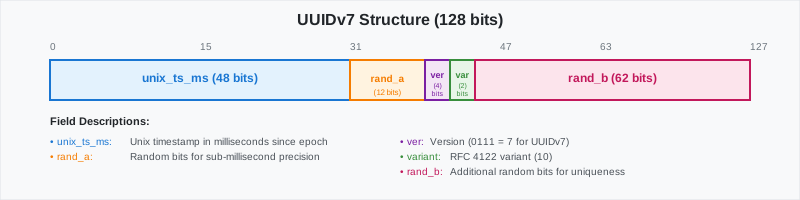
|
|
|
|
Returns something like:
|
|
|
|
| Name | Type | Default | Required | Description |
|
|
|-|------------------|-|----------|----------------------------------------------------|
|
|
|`uuid`|UUID| - | ✔ | The UUID object to extract the version number from |
|
|
|
|
===== PAGE: https://docs.tigerdata.com/api/uuid-functions/generate_uuidv7/ =====
|
|
|
|
**Examples:**
|
|
|
|
Example 1 (sql):
|
|
```sql
|
|
postgres=# SELECT uuid_version('019913ce-f124-7835-96c7-a2df691caa98');
|
|
```
|
|
|
|
Example 2 (terminaloutput):
|
|
```terminaloutput
|
|
uuid_version
|
|
--------------
|
|
7
|
|
```
|
|
|
|
---
|
|
|
|
## last_val()
|
|
|
|
**URL:** llms-txt#last_val()
|
|
|
|
===== PAGE: https://docs.tigerdata.com/api/_hyperfunctions/counter_agg/extrapolated_delta/ =====
|
|
|
|
---
|
|
|
|
## count_min_sketch()
|
|
|
|
**URL:** llms-txt#count_min_sketch()
|
|
|
|
===== PAGE: https://docs.tigerdata.com/api/_hyperfunctions/freq_agg/topn/ =====
|
|
|
|
---
|
|
|
|
## candlestick_agg()
|
|
|
|
**URL:** llms-txt#candlestick_agg()
|
|
|
|
===== PAGE: https://docs.tigerdata.com/api/_hyperfunctions/candlestick_agg/low_time/ =====
|
|
|
|
---
|
|
|
|
## locf()
|
|
|
|
**URL:** llms-txt#locf()
|
|
|
|
===== PAGE: https://docs.tigerdata.com/api/_hyperfunctions/tdigest/tdigest/ =====
|
|
|
|
---
|
|
|
|
## interpolated_duration_in()
|
|
|
|
**URL:** llms-txt#interpolated_duration_in()
|
|
|
|
===== PAGE: https://docs.tigerdata.com/api/_hyperfunctions/compact_state_agg/duration_in/ =====
|
|
|
|
---
|
|
|
|
## integral()
|
|
|
|
**URL:** llms-txt#integral()
|
|
|
|
===== PAGE: https://docs.tigerdata.com/api/_hyperfunctions/time_weight/last_time/ =====
|
|
|
|
---
|
|
|
|
## README
|
|
|
|
**URL:** llms-txt#readme
|
|
|
|
**Contents:**
|
|
- Bulk editing for API frontmatter
|
|
- `extract_excerpts.sh`
|
|
- `insert_excerpts.sh`
|
|
|
|
This directory includes helper scripts for writing and editing docs content. It
|
|
doesn't include scripts for building content; those are in the web-documentation
|
|
repo.
|
|
|
|
## Bulk editing for API frontmatter
|
|
API frontmatter metadata is stored with the API content it describes. This makes
|
|
sense in most cases, but sometimes you want to bulk edit metadata or compare
|
|
phrasing across all API references. There are 2 scripts to help with this. They
|
|
are currently written to edit the `excerpts` field, but can be adapted for other
|
|
fields.
|
|
|
|
### `extract_excerpts.sh`
|
|
This extracts the excerpt from every API reference into a single file named
|
|
`extracted_excerpts.md`.
|
|
|
|
To use:
|
|
1. `cd` into the `_scripts/` directory.
|
|
1. If you already have an `extracted_excerpts.md` file from a previous run,
|
|
delete it.
|
|
1. Run `./extract_excerpts.sh`.
|
|
1. Open `extracted_excerpts.md` and edit the excerpts directly within the file.
|
|
Only change the actual excerpts, not the filename or `excerpt: ` label.
|
|
Otherwise, the next script fails.
|
|
|
|
### `insert_excerpts.sh`
|
|
This takes the edited excerpts from `extracted_excerpts.md` and updates the
|
|
original files with the new edits. A backup is created so the data is saved if
|
|
something goes horribly wrong. (If something goes wrong with the backup, you can
|
|
always also restore from git.)
|
|
|
|
To use:
|
|
1. Save your edited `extracted_excerpts.md`.
|
|
1. Make sure you are in the `_scripts/` directory.
|
|
1. Run `./insert_excerpts.sh`.
|
|
1. Run `git diff` to double-check that the update worked correctly.
|
|
1. Delete the unnecessary backups.
|
|
|
|
===== PAGE: https://docs.tigerdata.com/navigation/index/ =====
|
|
|
|
---
|
|
|
|
## distinct_count()
|
|
|
|
**URL:** llms-txt#distinct_count()
|
|
|
|
===== PAGE: https://docs.tigerdata.com/api/_hyperfunctions/hyperloglog/hyperloglog/ =====
|
|
|
|
---
|
|
|
|
## time_delta()
|
|
|
|
**URL:** llms-txt#time_delta()
|
|
|
|
===== PAGE: https://docs.tigerdata.com/api/_hyperfunctions/counter_agg/slope/ =====
|
|
|
|
---
|
|
|
|
## Jobs
|
|
|
|
**URL:** llms-txt#jobs
|
|
|
|
Jobs allow you to run functions and procedures implemented in a
|
|
language of your choice on a schedule within Timescale. This allows
|
|
automatic periodic tasks that are not covered by existing policies and
|
|
even enhancing existing policies with additional functionality.
|
|
|
|
The following APIs and views allow you to manage the jobs that you create and
|
|
get details around automatic jobs used by other TimescaleDB functions like
|
|
continuous aggregation refresh policies and data retention policies. To view the
|
|
policies that you set or the policies that already exist, see
|
|
[informational views][informational-views].
|
|
|
|
===== PAGE: https://docs.tigerdata.com/api/uuid-functions/ =====
|
|
|
|
---
|
|
|
|
## API reference tag overview
|
|
|
|
**URL:** llms-txt#api-reference-tag-overview
|
|
|
|
**Contents:**
|
|
- Community Community
|
|
- Experimental (TimescaleDB Experimental Schema) Experimental
|
|
- Toolkit Toolkit
|
|
- Experimental (TimescaleDB Toolkit) Experimental
|
|
|
|
The TimescaleDB API Reference uses tags to categorize functions. The tags are
|
|
`Community`, `Experimental`, `Toolkit`, and `Experimental (Toolkit)`. This
|
|
section explains each tag.
|
|
|
|
## Community Community
|
|
|
|
This tag indicates that the function is available under TimescaleDB Community
|
|
Edition, and are not available under the Apache 2 Edition. For more information,
|
|
visit our [TimescaleDB License comparison sheet][tsl-comparison].
|
|
|
|
## Experimental (TimescaleDB Experimental Schema) Experimental
|
|
|
|
This tag indicates that the function is included in the TimescaleDB experimental
|
|
schema. Do not use experimental functions in production. Experimental features
|
|
could include bugs, and are likely to change in future versions. The
|
|
experimental schema is used by TimescaleDB to develop new features more quickly.
|
|
If experimental functions are successful, they can move out of the experimental
|
|
schema and go into production use.
|
|
|
|
When you upgrade the `timescaledb` extension, the experimental schema is removed
|
|
by default. To use experimental features after an upgrade, you need to add the
|
|
experimental schema again.
|
|
|
|
For more information about the experimental
|
|
schema, [read the Tiger Data blog post][experimental-blog].
|
|
|
|
This tag indicates that the function is included in the TimescaleDB Toolkit extension.
|
|
Toolkit functions are available under TimescaleDB Community Edition.
|
|
For installation instructions, [see the installation guide][toolkit-install].
|
|
|
|
## Experimental (TimescaleDB Toolkit) Experimental
|
|
|
|
This tag is used with the Toolkit tag. It indicates a Toolkit function that is
|
|
under active development. Do not use experimental toolkit functions in
|
|
production. Experimental toolkit functions could include bugs, and are likely to
|
|
change in future versions.
|
|
|
|
These functions might not correctly handle unusual use cases or errors, and they
|
|
could have poor performance. Updates to the TimescaleDB extension drop database
|
|
objects that depend on experimental features like this function. If you use
|
|
experimental toolkit functions on Timescale, this function is
|
|
automatically dropped when the Toolkit extension is updated. For more
|
|
information, [see the TimescaleDB Toolkit docs][toolkit-docs].
|
|
|
|
===== PAGE: https://docs.tigerdata.com/api/api-reference/ =====
|
|
|
|
---
|
|
|
|
## saturating_sub()
|
|
|
|
**URL:** llms-txt#saturating_sub()
|
|
|
|
===== PAGE: https://docs.tigerdata.com/api/_hyperfunctions/gp_lttb/ =====
|
|
|
|
---
|
|
|
|
## Using REST API in Managed Service for TimescaleDB
|
|
|
|
**URL:** llms-txt#using-rest-api-in-managed-service-for-timescaledb
|
|
|
|
**Contents:**
|
|
- Using cURL to get your details
|
|
|
|
Managed Service for TimescaleDB has an API for integration and automation tasks.
|
|
For information about using the endpoints, see the [API Documentation][aiven-api].
|
|
MST offers an HTTP API with token authentication and JSON-formatted data. You
|
|
can use the API for all the tasks that can be performed using the MST Console.
|
|
To get started you need to first create an authentication token, and then use
|
|
the token in the header to use the API endpoints.
|
|
|
|
1. In [Managed Service for TimescaleDB][mst-login], click `User Information` in the top right corner.
|
|
1. In the `User Profile` page, navigate to the `Authentication`tab.
|
|
1. Click `Generate Token`.
|
|
1. In the `Generate access token` dialog, type a descriptive name for the
|
|
token and leave the rest of the fields blank.
|
|
1. Copy the generated authentication token and save it.
|
|
|
|
### Using cURL to get your details
|
|
|
|
1. Set the environment variable `MST_API_TOKEN` with the access token that you generate:
|
|
|
|
1. To get the details about the current user session using the `/me` endpoint:
|
|
|
|
The output looks similar to this:
|
|
|
|
===== PAGE: https://docs.tigerdata.com/mst/identify-index-issues/ =====
|
|
|
|
**Examples:**
|
|
|
|
Example 1 (bash):
|
|
```bash
|
|
export MST_API_TOKEN="access token"
|
|
```
|
|
|
|
Example 2 (bash):
|
|
```bash
|
|
curl -s -H "Authorization: aivenv1 $MST_API_TOKEN" https://api.aiven.io/v1/me|json_pp
|
|
```
|
|
|
|
Example 3 (bash):
|
|
```bash
|
|
{
|
|
"user": {
|
|
"auth": [],
|
|
"create_time": "string",
|
|
"features": { },
|
|
"intercom": {},
|
|
"invitations": [],
|
|
"project_membership": {},
|
|
"project_memberships": {},
|
|
"projects": [],
|
|
"real_name": "string",
|
|
"state": "string",
|
|
"token_validity_begin": "string",
|
|
"user": "string",
|
|
"user_id": "string"
|
|
}
|
|
}
|
|
```
|
|
|
|
---
|
|
|
|
## num_changes()
|
|
|
|
**URL:** llms-txt#num_changes()
|
|
|
|
===== PAGE: https://docs.tigerdata.com/api/_hyperfunctions/counter_agg/interpolated_rate/ =====
|
|
|
|
---
|
|
|
|
## counter_agg()
|
|
|
|
**URL:** llms-txt#counter_agg()
|
|
|
|
===== PAGE: https://docs.tigerdata.com/api/_hyperfunctions/counter_agg/rate/ =====
|
|
|
|
---
|
|
|
|
## live_at()
|
|
|
|
**URL:** llms-txt#live_at()
|
|
|
|
===== PAGE: https://docs.tigerdata.com/api/_hyperfunctions/heartbeat_agg/heartbeat_agg/ =====
|
|
|
|
---
|
|
|
|
## max_frequency()
|
|
|
|
**URL:** llms-txt#max_frequency()
|
|
|
|
===== PAGE: https://docs.tigerdata.com/api/_hyperfunctions/freq_agg/into_values/ =====
|
|
|
|
---
|
|
|
|
## hyperloglog()
|
|
|
|
**URL:** llms-txt#hyperloglog()
|
|
|
|
===== PAGE: https://docs.tigerdata.com/api/_hyperfunctions/hyperloglog/rollup/ =====
|
|
|
|
---
|
|
|
|
## gauge_agg()
|
|
|
|
**URL:** llms-txt#gauge_agg()
|
|
|
|
===== PAGE: https://docs.tigerdata.com/api/_hyperfunctions/gauge_agg/rate/ =====
|
|
|
|
---
|