398 lines
14 KiB
Markdown
398 lines
14 KiB
Markdown
# Open Multi-Agent
|
|
|
|
Build AI agent teams that work together. One agent plans, another implements, a third reviews — the framework handles task scheduling, dependencies, and communication automatically.
|
|
|
|
[](https://github.com/JackChen-me/open-multi-agent/stargazers)
|
|
[](./LICENSE)
|
|
[](https://www.typescriptlang.org/)
|
|
|
|
**English** | [中文](./README_zh.md)
|
|
|
|
## Why Open Multi-Agent?
|
|
|
|
- **Multi-Agent Teams** — Define agents with different roles, tools, and even different models. They collaborate through a message bus and shared memory.
|
|
- **Task DAG Scheduling** — Tasks have dependencies. The framework resolves them topologically — dependent tasks wait, independent tasks run in parallel.
|
|
- **Model Agnostic** — Claude and GPT in the same team. Swap models per agent. Bring your own adapter for any LLM.
|
|
- **In-Process Execution** — No subprocess overhead. Everything runs in one Node.js process. Deploy to serverless, Docker, CI/CD.
|
|
|
|
## Quick Start
|
|
|
|
```bash
|
|
npm install @jackchen_me/open-multi-agent
|
|
```
|
|
|
|
Set `ANTHROPIC_API_KEY` (and optionally `OPENAI_API_KEY`) in your environment.
|
|
|
|
> **Running locally without a cloud API?** See [Ollama](#ollama-local-models) and [GitHub Copilot](#github-copilot) below.
|
|
|
|
```typescript
|
|
import { OpenMultiAgent } from '@jackchen_me/open-multi-agent'
|
|
|
|
const orchestrator = new OpenMultiAgent({ defaultModel: 'claude-sonnet-4-6' })
|
|
|
|
// One agent, one task
|
|
const result = await orchestrator.runAgent(
|
|
{
|
|
name: 'coder',
|
|
model: 'claude-sonnet-4-6',
|
|
tools: ['bash', 'file_write'],
|
|
},
|
|
'Write a TypeScript function that reverses a string, save it to /tmp/reverse.ts, and run it.',
|
|
)
|
|
|
|
console.log(result.output)
|
|
```
|
|
|
|
## Multi-Agent Team
|
|
|
|
This is where it gets interesting. Three agents, one goal:
|
|
|
|
```typescript
|
|
import { OpenMultiAgent } from '@jackchen_me/open-multi-agent'
|
|
import type { AgentConfig } from '@jackchen_me/open-multi-agent'
|
|
|
|
const architect: AgentConfig = {
|
|
name: 'architect',
|
|
model: 'claude-sonnet-4-6',
|
|
systemPrompt: 'You design clean API contracts and file structures.',
|
|
tools: ['file_write'],
|
|
}
|
|
|
|
const developer: AgentConfig = {
|
|
name: 'developer',
|
|
model: 'claude-sonnet-4-6',
|
|
systemPrompt: 'You implement what the architect designs.',
|
|
tools: ['bash', 'file_read', 'file_write', 'file_edit'],
|
|
}
|
|
|
|
const reviewer: AgentConfig = {
|
|
name: 'reviewer',
|
|
model: 'claude-sonnet-4-6',
|
|
systemPrompt: 'You review code for correctness and clarity.',
|
|
tools: ['file_read', 'grep'],
|
|
}
|
|
|
|
const orchestrator = new OpenMultiAgent({
|
|
defaultModel: 'claude-sonnet-4-6',
|
|
onProgress: (event) => console.log(event.type, event.agent ?? event.task ?? ''),
|
|
})
|
|
|
|
const team = orchestrator.createTeam('api-team', {
|
|
name: 'api-team',
|
|
agents: [architect, developer, reviewer],
|
|
sharedMemory: true,
|
|
})
|
|
|
|
// Describe a goal — the framework breaks it into tasks and orchestrates execution
|
|
const result = await orchestrator.runTeam(team, 'Create a REST API for a todo list in /tmp/todo-api/')
|
|
|
|
console.log(`Success: ${result.success}`)
|
|
console.log(`Tokens: ${result.totalTokenUsage.output_tokens} output tokens`)
|
|
```
|
|
|
|
## More Examples
|
|
|
|
<details>
|
|
<summary><b>Task Pipeline</b> — explicit control over task graph and assignments</summary>
|
|
|
|
```typescript
|
|
const result = await orchestrator.runTasks(team, [
|
|
{
|
|
title: 'Design the data model',
|
|
description: 'Write a TypeScript interface spec to /tmp/spec.md',
|
|
assignee: 'architect',
|
|
},
|
|
{
|
|
title: 'Implement the module',
|
|
description: 'Read /tmp/spec.md and implement the module in /tmp/src/',
|
|
assignee: 'developer',
|
|
dependsOn: ['Design the data model'], // blocked until design completes
|
|
},
|
|
{
|
|
title: 'Write tests',
|
|
description: 'Read the implementation and write Vitest tests.',
|
|
assignee: 'developer',
|
|
dependsOn: ['Implement the module'],
|
|
},
|
|
{
|
|
title: 'Review code',
|
|
description: 'Review /tmp/src/ and produce a structured code review.',
|
|
assignee: 'reviewer',
|
|
dependsOn: ['Implement the module'], // can run in parallel with tests
|
|
},
|
|
])
|
|
```
|
|
|
|
</details>
|
|
|
|
<details>
|
|
<summary><b>Custom Tools</b> — define tools with Zod schemas</summary>
|
|
|
|
```typescript
|
|
import { z } from 'zod'
|
|
import { defineTool, Agent, ToolRegistry, ToolExecutor, registerBuiltInTools } from '@jackchen_me/open-multi-agent'
|
|
|
|
const searchTool = defineTool({
|
|
name: 'web_search',
|
|
description: 'Search the web and return the top results.',
|
|
inputSchema: z.object({
|
|
query: z.string().describe('The search query.'),
|
|
maxResults: z.number().optional().describe('Number of results (default 5).'),
|
|
}),
|
|
execute: async ({ query, maxResults = 5 }) => {
|
|
const results = await mySearchProvider(query, maxResults)
|
|
return { data: JSON.stringify(results), isError: false }
|
|
},
|
|
})
|
|
|
|
const registry = new ToolRegistry()
|
|
registerBuiltInTools(registry)
|
|
registry.register(searchTool)
|
|
|
|
const executor = new ToolExecutor(registry)
|
|
const agent = new Agent(
|
|
{ name: 'researcher', model: 'claude-sonnet-4-6', tools: ['web_search'] },
|
|
registry,
|
|
executor,
|
|
)
|
|
|
|
const result = await agent.run('Find the three most recent TypeScript releases.')
|
|
```
|
|
|
|
</details>
|
|
|
|
<details>
|
|
<summary><b>Multi-Model Teams</b> — mix Claude and GPT in one workflow</summary>
|
|
|
|
```typescript
|
|
const claudeAgent: AgentConfig = {
|
|
provider: 'anthropic',
|
|
systemPrompt: 'You plan high-level approaches.',
|
|
tools: ['file_write'],
|
|
}
|
|
|
|
const gptAgent: AgentConfig = {
|
|
name: 'implementer',
|
|
model: 'gpt-5.4',
|
|
provider: 'openai',
|
|
systemPrompt: 'You implement plans as working code.',
|
|
tools: ['bash', 'file_read', 'file_write'],
|
|
}
|
|
|
|
const team = orchestrator.createTeam('mixed-team', {
|
|
name: 'mixed-team',
|
|
agents: [claudeAgent, gptAgent],
|
|
sharedMemory: true,
|
|
})
|
|
|
|
const result = await orchestrator.runTeam(team, 'Build a CLI tool that converts JSON to CSV.')
|
|
```
|
|
|
|
</details>
|
|
|
|
<details>
|
|
<summary><b>Streaming Output</b></summary>
|
|
|
|
```typescript
|
|
import { Agent, ToolRegistry, ToolExecutor, registerBuiltInTools } from '@jackchen_me/open-multi-agent'
|
|
|
|
const registry = new ToolRegistry()
|
|
registerBuiltInTools(registry)
|
|
const executor = new ToolExecutor(registry)
|
|
|
|
const agent = new Agent(
|
|
{ name: 'writer', model: 'claude-sonnet-4-6', maxTurns: 3 },
|
|
registry,
|
|
executor,
|
|
)
|
|
|
|
for await (const event of agent.stream('Explain monads in two sentences.')) {
|
|
if (event.type === 'text' && typeof event.data === 'string') {
|
|
process.stdout.write(event.data)
|
|
}
|
|
}
|
|
```
|
|
|
|
</details>
|
|
|
|
## Ollama — Local Models
|
|
|
|
Run multi-agent workflows entirely on your own hardware using [Ollama](https://ollama.com).
|
|
No cloud API key required.
|
|
|
|
```bash
|
|
# Install and start Ollama, then pull a model
|
|
ollama pull qwen2.5
|
|
```
|
|
|
|
```typescript
|
|
import { OllamaAdapter, Agent, ToolRegistry, ToolExecutor, registerBuiltInTools } from '@jackchen_me/open-multi-agent'
|
|
|
|
// Point at your local Ollama server (defaults to http://localhost:11434)
|
|
// Override via the OLLAMA_BASE_URL environment variable or constructor arg:
|
|
const adapter = new OllamaAdapter() // uses localhost
|
|
// const adapter = new OllamaAdapter('http://my-server:11434')
|
|
|
|
const registry = new ToolRegistry()
|
|
registerBuiltInTools(registry)
|
|
const executor = new ToolExecutor(registry)
|
|
|
|
const agent = new Agent(
|
|
{ name: 'local-coder', model: 'qwen2.5', provider: 'ollama', tools: ['bash'] },
|
|
registry,
|
|
executor,
|
|
adapter, // pass the adapter directly to bypass the cloud factory
|
|
)
|
|
|
|
const result = await agent.run('Write a Python one-liner that prints the Fibonacci sequence.')
|
|
console.log(result.output)
|
|
```
|
|
|
|
You can also use Ollama via the standard factory:
|
|
|
|
```typescript
|
|
import { createAdapter } from '@jackchen_me/open-multi-agent'
|
|
|
|
const adapter = await createAdapter('ollama')
|
|
// or with a custom URL:
|
|
const adapter = await createAdapter('ollama', 'http://my-server:11434')
|
|
```
|
|
|
|
Supported models include any model available through Ollama — Qwen 2.5, Llama 3.3,
|
|
Mistral, Phi-4, Gemma 3, and more. Tool calling requires a model that supports it
|
|
(e.g. `qwen2.5`, `llama3.1`, `mistral-nemo`).
|
|
|
|
---
|
|
|
|
## GitHub Copilot
|
|
|
|
Use your existing GitHub Copilot subscription. The `CopilotAdapter` authenticates
|
|
exactly like `:Copilot setup` in [copilot.vim](https://github.com/github/copilot.vim) —
|
|
GitHub's Device Authorization Flow — and stores the token in the same location
|
|
(`~/.config/github-copilot/hosts.json`).
|
|
|
|
### Step 1 — Authenticate (once)
|
|
|
|
```typescript
|
|
import { CopilotAdapter } from '@jackchen_me/open-multi-agent'
|
|
|
|
// Interactive Device Flow: prints a one-time code, waits for browser confirmation.
|
|
// Token is saved to ~/.config/github-copilot/hosts.json for future runs.
|
|
await CopilotAdapter.authenticate()
|
|
```
|
|
|
|
This is a one-time step. If you have already authenticated via `:Copilot setup` in Vim
|
|
or Neovim the token file already exists and you can skip this step.
|
|
|
|
You can also pass a token via environment variable — no interactive prompt needed:
|
|
|
|
```bash
|
|
export GITHUB_COPILOT_TOKEN=ghu_your_github_oauth_token
|
|
```
|
|
|
|
### Step 2 — Use normally
|
|
|
|
```typescript
|
|
import { CopilotAdapter, Agent, ToolRegistry, ToolExecutor, registerBuiltInTools } from '@jackchen_me/open-multi-agent'
|
|
|
|
// Token is loaded automatically from hosts.json or GITHUB_COPILOT_TOKEN
|
|
const adapter = new CopilotAdapter()
|
|
|
|
const registry = new ToolRegistry()
|
|
registerBuiltInTools(registry)
|
|
const executor = new ToolExecutor(registry)
|
|
|
|
const agent = new Agent(
|
|
{ name: 'copilot-coder', model: 'gpt-4o', provider: 'copilot', tools: ['bash', 'file_write'] },
|
|
registry,
|
|
executor,
|
|
adapter,
|
|
)
|
|
|
|
const result = await agent.run('Scaffold a TypeScript Express app in /tmp/my-app/')
|
|
console.log(result.output)
|
|
```
|
|
|
|
Via the factory:
|
|
|
|
```typescript
|
|
import { createAdapter } from '@jackchen_me/open-multi-agent'
|
|
|
|
const adapter = await createAdapter('copilot')
|
|
// or with an explicit token:
|
|
const adapter = await createAdapter('copilot', process.env.GITHUB_COPILOT_TOKEN)
|
|
```
|
|
|
|
Available models include `gpt-4o`, `claude-3.5-sonnet`, `o3-mini`, and others
|
|
enabled by your Copilot plan.
|
|
|
|
---
|
|
|
|
## Architecture
|
|
|
|
```
|
|
┌─────────────────────────────────────────────────────────────────┐
|
|
│ OpenMultiAgent (Orchestrator) │
|
|
│ │
|
|
│ createTeam() runTeam() runTasks() runAgent() getStatus() │
|
|
└──────────────────────┬──────────────────────────────────────────┘
|
|
│
|
|
┌──────────▼──────────┐
|
|
│ Team │
|
|
│ - AgentConfig[] │
|
|
│ - MessageBus │
|
|
│ - TaskQueue │
|
|
│ - SharedMemory │
|
|
└──────────┬──────────┘
|
|
│
|
|
┌─────────────┴─────────────┐
|
|
│ │
|
|
┌────────▼──────────┐ ┌───────────▼───────────┐
|
|
│ AgentPool │ │ TaskQueue │
|
|
│ - Semaphore │ │ - dependency graph │
|
|
│ - runParallel() │ │ - auto unblock │
|
|
└────────┬──────────┘ │ - cascade failure │
|
|
│ └───────────────────────┘
|
|
┌────────▼──────────┐
|
|
│ Agent │
|
|
│ - run() │ ┌──────────────────────┐
|
|
│ - prompt() │───►│ LLMAdapter │
|
|
│ - stream() │ │ - AnthropicAdapter │
|
|
└────────┬──────────┘ │ - OpenAIAdapter │
|
|
│ │ - OllamaAdapter │
|
|
│ │ - CopilotAdapter │
|
|
│ └──────────────────────┘
|
|
┌────────▼──────────┐
|
|
│ AgentRunner │ ┌──────────────────────┐
|
|
│ - conversation │───►│ ToolRegistry │
|
|
│ loop │ │ - defineTool() │
|
|
│ - tool dispatch │ │ - 5 built-in tools │
|
|
└───────────────────┘ └──────────────────────┘
|
|
```
|
|
|
|
## Built-in Tools
|
|
|
|
| Tool | Description |
|
|
|------|-------------|
|
|
| `bash` | Execute shell commands. Returns stdout + stderr. Supports timeout and cwd. |
|
|
| `file_read` | Read file contents at an absolute path. Supports offset/limit for large files. |
|
|
| `file_write` | Write or create a file. Auto-creates parent directories. |
|
|
| `file_edit` | Edit a file by replacing an exact string match. |
|
|
| `grep` | Search file contents with regex. Uses ripgrep when available, falls back to Node.js. |
|
|
|
|
## Contributing
|
|
|
|
Issues, feature requests, and PRs are welcome. Some areas where contributions would be especially valuable:
|
|
|
|
- **LLM Adapters** — llama.cpp, vLLM, Gemini, and others. The `LLMAdapter` interface requires just two methods: `chat()` and `stream()`.
|
|
- **Examples** — Real-world workflows and use cases.
|
|
- **Documentation** — Guides, tutorials, and API docs.
|
|
|
|
## Star History
|
|
|
|
[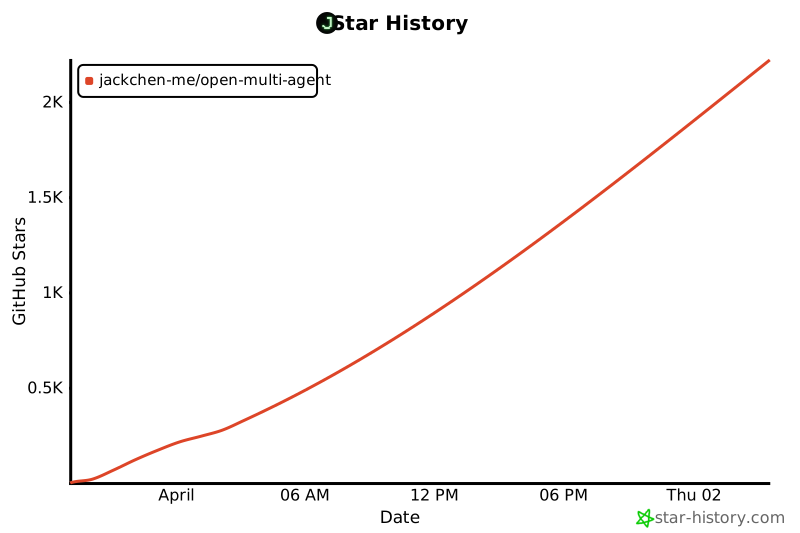](https://star-history.com/#JackChen-me/open-multi-agent&Date)
|
|
|
|
## License
|
|
|
|
MIT
|