314 lines
12 KiB
Markdown
314 lines
12 KiB
Markdown
# Open Multi-Agent
|
||
|
||
构建能自动拆解目标的 AI 智能体团队。定义智能体的角色和工具,描述一个目标——框架自动规划任务图、调度依赖、并行执行。
|
||
|
||
[](https://github.com/JackChen-me/open-multi-agent/stargazers)
|
||
[](./LICENSE)
|
||
[](https://www.typescriptlang.org/)
|
||
|
||
[English](./README.md) | **中文**
|
||
|
||
## 为什么选择 Open Multi-Agent?
|
||
|
||
- **自动任务拆解** — 用自然语言描述目标,内置的协调者智能体自动将其拆解为带依赖关系和分配的任务图——无需手动编排。
|
||
- **多智能体团队** — 定义不同角色、工具甚至不同模型的智能体。它们通过消息总线和共享内存协作。
|
||
- **任务 DAG 调度** — 任务之间存在依赖关系。框架进行拓扑排序——有依赖的任务等待,无依赖的任务并行执行。
|
||
- **模型无关** — Claude、GPT 和本地模型(Ollama、vLLM、LM Studio)可以在同一个团队中使用。通过 `baseURL` 即可接入任何 OpenAI 兼容服务。
|
||
- **进程内执行** — 没有子进程开销。所有内容在一个 Node.js 进程中运行。可部署到 Serverless、Docker、CI/CD。
|
||
|
||
## 快速开始
|
||
|
||
```bash
|
||
npm install @jackchen_me/open-multi-agent
|
||
```
|
||
|
||
在环境变量中设置 `ANTHROPIC_API_KEY`(以及可选的 `OPENAI_API_KEY` 或用于 Copilot 的 `GITHUB_TOKEN`)。
|
||
|
||
```typescript
|
||
import { OpenMultiAgent } from '@jackchen_me/open-multi-agent'
|
||
|
||
const orchestrator = new OpenMultiAgent({ defaultModel: 'claude-sonnet-4-6' })
|
||
|
||
// 一个智能体,一个任务
|
||
const result = await orchestrator.runAgent(
|
||
{
|
||
name: 'coder',
|
||
model: 'claude-sonnet-4-6',
|
||
tools: ['bash', 'file_write'],
|
||
},
|
||
'Write a TypeScript function that reverses a string, save it to /tmp/reverse.ts, and run it.',
|
||
)
|
||
|
||
console.log(result.output)
|
||
```
|
||
|
||
## 作者
|
||
|
||
> JackChen — 前 WPS 产品经理,现独立创业者。关注小红书[「杰克西|硅基杠杆」](https://www.xiaohongshu.com/user/profile/5a1bdc1e4eacab4aa39ea6d6),持续获取我的 AI Agent 观点和思考。
|
||
|
||
## 多智能体团队
|
||
|
||
这才是有意思的地方。三个智能体,一个目标:
|
||
|
||
```typescript
|
||
import { OpenMultiAgent } from '@jackchen_me/open-multi-agent'
|
||
import type { AgentConfig } from '@jackchen_me/open-multi-agent'
|
||
|
||
const architect: AgentConfig = {
|
||
name: 'architect',
|
||
model: 'claude-sonnet-4-6',
|
||
systemPrompt: 'You design clean API contracts and file structures.',
|
||
tools: ['file_write'],
|
||
}
|
||
|
||
const developer: AgentConfig = {
|
||
name: 'developer',
|
||
model: 'claude-sonnet-4-6',
|
||
systemPrompt: 'You implement what the architect designs.',
|
||
tools: ['bash', 'file_read', 'file_write', 'file_edit'],
|
||
}
|
||
|
||
const reviewer: AgentConfig = {
|
||
name: 'reviewer',
|
||
model: 'claude-sonnet-4-6',
|
||
systemPrompt: 'You review code for correctness and clarity.',
|
||
tools: ['file_read', 'grep'],
|
||
}
|
||
|
||
const orchestrator = new OpenMultiAgent({
|
||
defaultModel: 'claude-sonnet-4-6',
|
||
onProgress: (event) => console.log(event.type, event.agent ?? event.task ?? ''),
|
||
})
|
||
|
||
const team = orchestrator.createTeam('api-team', {
|
||
name: 'api-team',
|
||
agents: [architect, developer, reviewer],
|
||
sharedMemory: true,
|
||
})
|
||
|
||
// 描述一个目标——框架将其拆解为任务并编排执行
|
||
const result = await orchestrator.runTeam(team, 'Create a REST API for a todo list in /tmp/todo-api/')
|
||
|
||
console.log(`成功: ${result.success}`)
|
||
console.log(`Token 用量: ${result.totalTokenUsage.output_tokens} output tokens`)
|
||
```
|
||
|
||
## 三种运行模式
|
||
|
||
| 模式 | 方法 | 适用场景 |
|
||
|------|------|----------|
|
||
| 单智能体 | `runAgent()` | 一个智能体,一个提示词——最简入口 |
|
||
| 自动编排团队 | `runTeam()` | 给一个目标,框架自动规划和执行 |
|
||
| 显式任务管线 | `runTasks()` | 你自己定义任务图和分配 |
|
||
|
||
## 贡献者
|
||
|
||
<a href="https://github.com/JackChen-me/open-multi-agent/graphs/contributors">
|
||
<img src="https://contrib.rocks/image?repo=JackChen-me/open-multi-agent" />
|
||
</a>
|
||
|
||
## 更多示例
|
||
|
||
<details>
|
||
<summary><b>任务流水线</b> — 显式控制任务图和分配</summary>
|
||
|
||
```typescript
|
||
const result = await orchestrator.runTasks(team, [
|
||
{
|
||
title: 'Design the data model',
|
||
description: 'Write a TypeScript interface spec to /tmp/spec.md',
|
||
assignee: 'architect',
|
||
},
|
||
{
|
||
title: 'Implement the module',
|
||
description: 'Read /tmp/spec.md and implement the module in /tmp/src/',
|
||
assignee: 'developer',
|
||
dependsOn: ['Design the data model'], // 等待设计完成后才开始
|
||
},
|
||
{
|
||
title: 'Write tests',
|
||
description: 'Read the implementation and write Vitest tests.',
|
||
assignee: 'developer',
|
||
dependsOn: ['Implement the module'],
|
||
},
|
||
{
|
||
title: 'Review code',
|
||
description: 'Review /tmp/src/ and produce a structured code review.',
|
||
assignee: 'reviewer',
|
||
dependsOn: ['Implement the module'], // 可以和测试并行执行
|
||
},
|
||
])
|
||
```
|
||
|
||
</details>
|
||
|
||
<details>
|
||
<summary><b>自定义工具</b> — 使用 Zod schema 定义工具</summary>
|
||
|
||
```typescript
|
||
import { z } from 'zod'
|
||
import { defineTool, Agent, ToolRegistry, ToolExecutor, registerBuiltInTools } from '@jackchen_me/open-multi-agent'
|
||
|
||
const searchTool = defineTool({
|
||
name: 'web_search',
|
||
description: 'Search the web and return the top results.',
|
||
inputSchema: z.object({
|
||
query: z.string().describe('The search query.'),
|
||
maxResults: z.number().optional().describe('Number of results (default 5).'),
|
||
}),
|
||
execute: async ({ query, maxResults = 5 }) => {
|
||
const results = await mySearchProvider(query, maxResults)
|
||
return { data: JSON.stringify(results), isError: false }
|
||
},
|
||
})
|
||
|
||
const registry = new ToolRegistry()
|
||
registerBuiltInTools(registry)
|
||
registry.register(searchTool)
|
||
|
||
const executor = new ToolExecutor(registry)
|
||
const agent = new Agent(
|
||
{ name: 'researcher', model: 'claude-sonnet-4-6', tools: ['web_search'] },
|
||
registry,
|
||
executor,
|
||
)
|
||
|
||
const result = await agent.run('Find the three most recent TypeScript releases.')
|
||
```
|
||
|
||
</details>
|
||
|
||
<details>
|
||
<summary><b>多模型团队</b> — 在一个工作流中混合使用 Claude、GPT 和本地模型</summary>
|
||
|
||
```typescript
|
||
const claudeAgent: AgentConfig = {
|
||
name: 'strategist',
|
||
model: 'claude-opus-4-6',
|
||
provider: 'anthropic',
|
||
systemPrompt: 'You plan high-level approaches.',
|
||
tools: ['file_write'],
|
||
}
|
||
|
||
const gptAgent: AgentConfig = {
|
||
name: 'implementer',
|
||
model: 'gpt-5.4',
|
||
provider: 'openai',
|
||
systemPrompt: 'You implement plans as working code.',
|
||
tools: ['bash', 'file_read', 'file_write'],
|
||
}
|
||
|
||
// 任何 OpenAI 兼容 API — Ollama、vLLM、LM Studio 等
|
||
const localAgent: AgentConfig = {
|
||
name: 'reviewer',
|
||
model: 'llama3.1',
|
||
provider: 'openai',
|
||
baseURL: 'http://localhost:11434/v1',
|
||
apiKey: 'ollama',
|
||
systemPrompt: 'You review code for correctness and clarity.',
|
||
tools: ['file_read', 'grep'],
|
||
}
|
||
|
||
const team = orchestrator.createTeam('mixed-team', {
|
||
name: 'mixed-team',
|
||
agents: [claudeAgent, gptAgent, localAgent],
|
||
sharedMemory: true,
|
||
})
|
||
|
||
const result = await orchestrator.runTeam(team, 'Build a CLI tool that converts JSON to CSV.')
|
||
```
|
||
|
||
</details>
|
||
|
||
<details>
|
||
<summary><b>流式输出</b></summary>
|
||
|
||
```typescript
|
||
import { Agent, ToolRegistry, ToolExecutor, registerBuiltInTools } from '@jackchen_me/open-multi-agent'
|
||
|
||
const registry = new ToolRegistry()
|
||
registerBuiltInTools(registry)
|
||
const executor = new ToolExecutor(registry)
|
||
|
||
const agent = new Agent(
|
||
{ name: 'writer', model: 'claude-sonnet-4-6', maxTurns: 3 },
|
||
registry,
|
||
executor,
|
||
)
|
||
|
||
for await (const event of agent.stream('Explain monads in two sentences.')) {
|
||
if (event.type === 'text' && typeof event.data === 'string') {
|
||
process.stdout.write(event.data)
|
||
}
|
||
}
|
||
```
|
||
|
||
</details>
|
||
|
||
## 架构
|
||
|
||
```
|
||
┌─────────────────────────────────────────────────────────────────┐
|
||
│ OpenMultiAgent (Orchestrator) │
|
||
│ │
|
||
│ createTeam() runTeam() runTasks() runAgent() getStatus() │
|
||
└──────────────────────┬──────────────────────────────────────────┘
|
||
│
|
||
┌──────────▼──────────┐
|
||
│ Team │
|
||
│ - AgentConfig[] │
|
||
│ - MessageBus │
|
||
│ - TaskQueue │
|
||
│ - SharedMemory │
|
||
└──────────┬──────────┘
|
||
│
|
||
┌─────────────┴─────────────┐
|
||
│ │
|
||
┌────────▼──────────┐ ┌───────────▼───────────┐
|
||
│ AgentPool │ │ TaskQueue │
|
||
│ - Semaphore │ │ - dependency graph │
|
||
│ - runParallel() │ │ - auto unblock │
|
||
└────────┬──────────┘ │ - cascade failure │
|
||
│ └───────────────────────┘
|
||
┌────────▼──────────┐
|
||
│ Agent │
|
||
│ - run() │ ┌──────────────────────┐
|
||
│ - prompt() │───►│ LLMAdapter │
|
||
│ - stream() │ │ - AnthropicAdapter │
|
||
└────────┬──────────┘ │ - OpenAIAdapter │
|
||
│ │ - CopilotAdapter │
|
||
│ └──────────────────────┘
|
||
┌────────▼──────────┐
|
||
│ AgentRunner │ ┌──────────────────────┐
|
||
│ - conversation │───►│ ToolRegistry │
|
||
│ loop │ │ - defineTool() │
|
||
│ - tool dispatch │ │ - 5 built-in tools │
|
||
└───────────────────┘ └──────────────────────┘
|
||
```
|
||
|
||
## 内置工具
|
||
|
||
| 工具 | 说明 |
|
||
|------|------|
|
||
| `bash` | 执行 Shell 命令。返回 stdout + stderr。支持超时和工作目录设置。 |
|
||
| `file_read` | 读取指定绝对路径的文件内容。支持偏移量和行数限制以处理大文件。 |
|
||
| `file_write` | 写入或创建文件。自动创建父目录。 |
|
||
| `file_edit` | 通过精确字符串匹配编辑文件。 |
|
||
| `grep` | 使用正则表达式搜索文件内容。优先使用 ripgrep,回退到 Node.js 实现。 |
|
||
|
||
## 参与贡献
|
||
|
||
欢迎提 Issue、功能需求和 PR。以下方向的贡献尤其有价值:
|
||
|
||
- **LLM 适配器** — Anthropic、OpenAI、Copilot 已原生支持。任何 OpenAI 兼容 API(Ollama、vLLM、LM Studio 等)可通过 `baseURL` 直接使用。欢迎贡献 Gemini 等其他适配器。`LLMAdapter` 接口只需实现两个方法:`chat()` 和 `stream()`。
|
||
- **示例** — 真实场景的工作流和用例。
|
||
- **文档** — 指南、教程和 API 文档。
|
||
|
||
## Star 趋势
|
||
|
||
[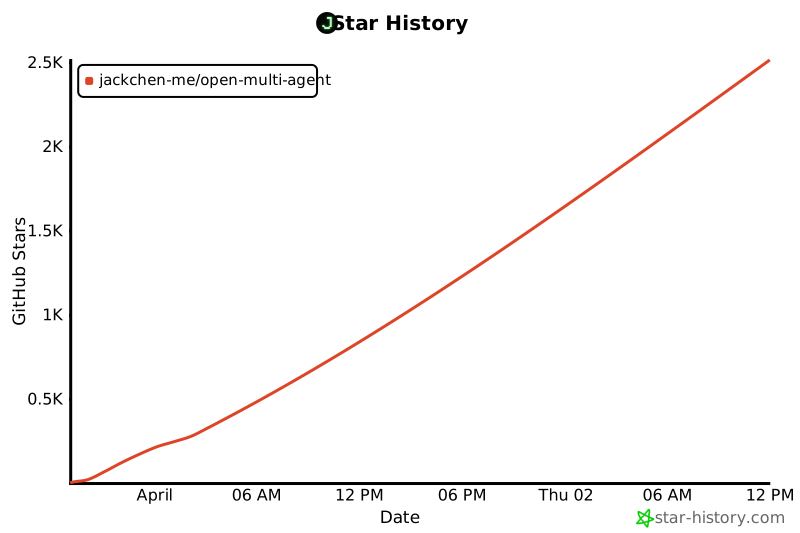](https://star-history.com/#JackChen-me/open-multi-agent&Date)
|
||
|
||
## 许可证
|
||
|
||
MIT
|