26 KiB






TradingAgents: Multi-Agents LLM Financial Trading Framework
🎉 TradingAgents officially released! We have received numerous inquiries about the work, and we would like to express our thanks for the enthusiasm in our community.
So we decided to fully open-source the framework. Looking forward to building impactful projects with you!
🚀 TradingAgents | ⚡ Installation & CLI | 🎬 Demo | 📦 Package Usage | 🤝 Contributing | 📄 Citation
TradingAgents Framework
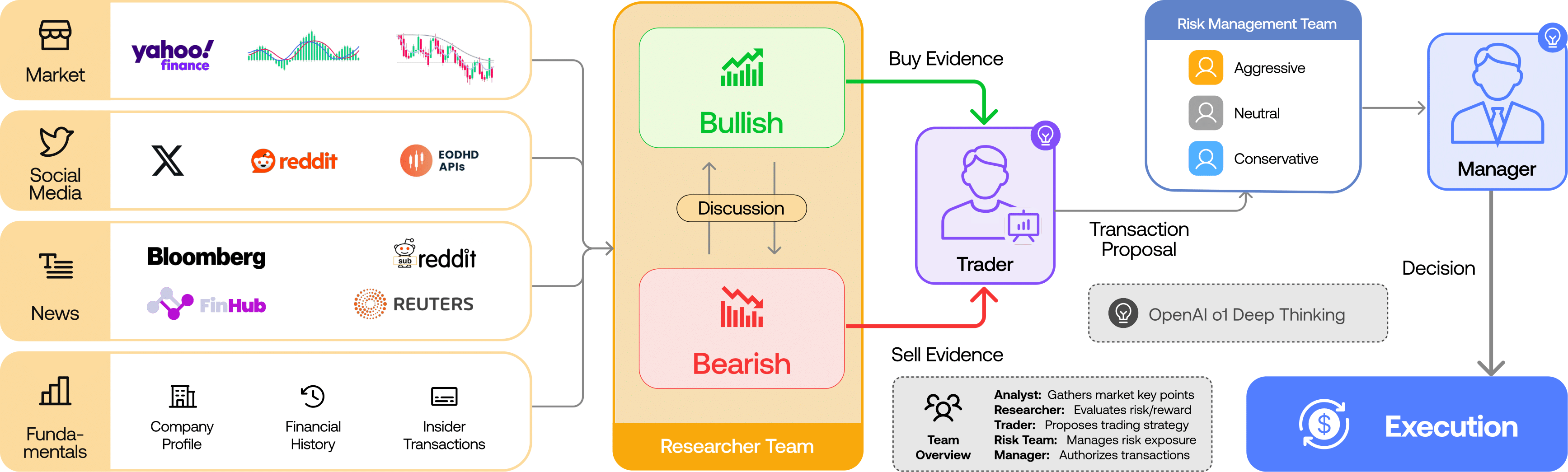
TradingAgents is a multi-agent trading framework that mirrors the dynamics of real-world trading firms. By deploying specialized LLM-powered agents: from fundamental analysts, sentiment experts, and technical analysts, to trader, risk management team, the platform collaboratively evaluates market conditions and informs trading decisions. Moreover, these agents engage in dynamic discussions to pinpoint the optimal strategy.
TradingAgents framework is designed for research purposes. Trading performance may vary based on many factors, including the chosen backbone language models, model temperature, trading periods, the quality of data, and other non-deterministic factors. It is not intended as financial, investment, or trading advice.
Our framework decomposes complex trading tasks into specialized roles. This ensures the system achieves a robust, scalable approach to market analysis and decision-making.
Analyst Team
- Fundamentals Analyst: Evaluates company financials and performance metrics, identifying intrinsic values and potential red flags.
- Sentiment Analyst: Analyzes social media and public sentiment using sentiment scoring algorithms to gauge short-term market mood.
- News Analyst: Monitors global news and macroeconomic indicators, interpreting the impact of events on market conditions.
- Technical Analyst: Utilizes technical indicators (like MACD and RSI) to detect trading patterns and forecast price movements.

Researcher Team
- Comprises both bullish and bearish researchers who critically assess the insights provided by the Analyst Team. Through structured debates, they balance potential gains against inherent risks.

Trader Agent
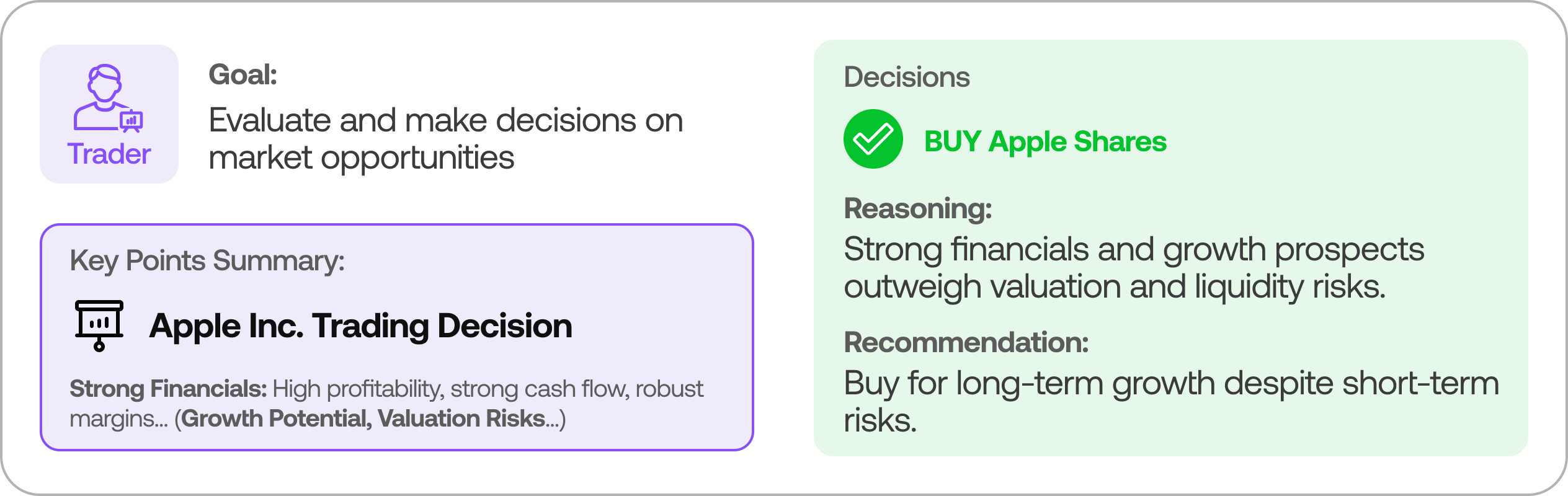
- Composes reports from the analysts and researchers to make informed trading decisions. It determines the timing and magnitude of trades based on comprehensive market insights.
Risk Management and Portfolio Manager
- Continuously evaluates portfolio risk by assessing market volatility, liquidity, and other risk factors. The risk management team evaluates and adjusts trading strategies, providing assessment reports to the Portfolio Manager for final decision.
- The Portfolio Manager approves/rejects the transaction proposal. If approved, the order will be sent to the simulated exchange and executed.
Installation and CLI
Installation
Clone TradingAgents:
git clone https://github.com/TauricResearch/TradingAgents.git
cd TradingAgents
Create a virtual environment in any of your favorite environment managers:
conda create -n tradingagents python=3.13
conda activate tradingagents
Install dependencies:
pip install -r requirements.txt
Required APIs
You will also need the FinnHub API for financial data. All of our code is implemented with the free tier.
export FINNHUB_API_KEY=$YOUR_FINNHUB_API_KEY
You will need the OpenAI API for all the agents.
export OPENAI_API_KEY=$YOUR_OPENAI_API_KEY
CLI Usage
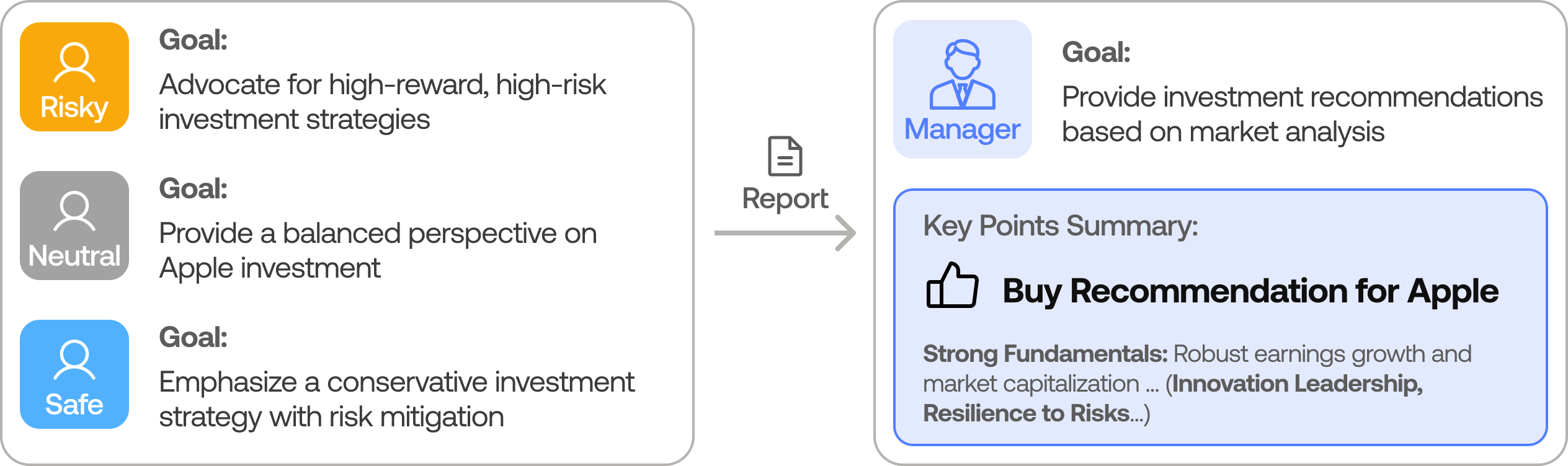
You can also try out the CLI directly by running:
python -m cli.main
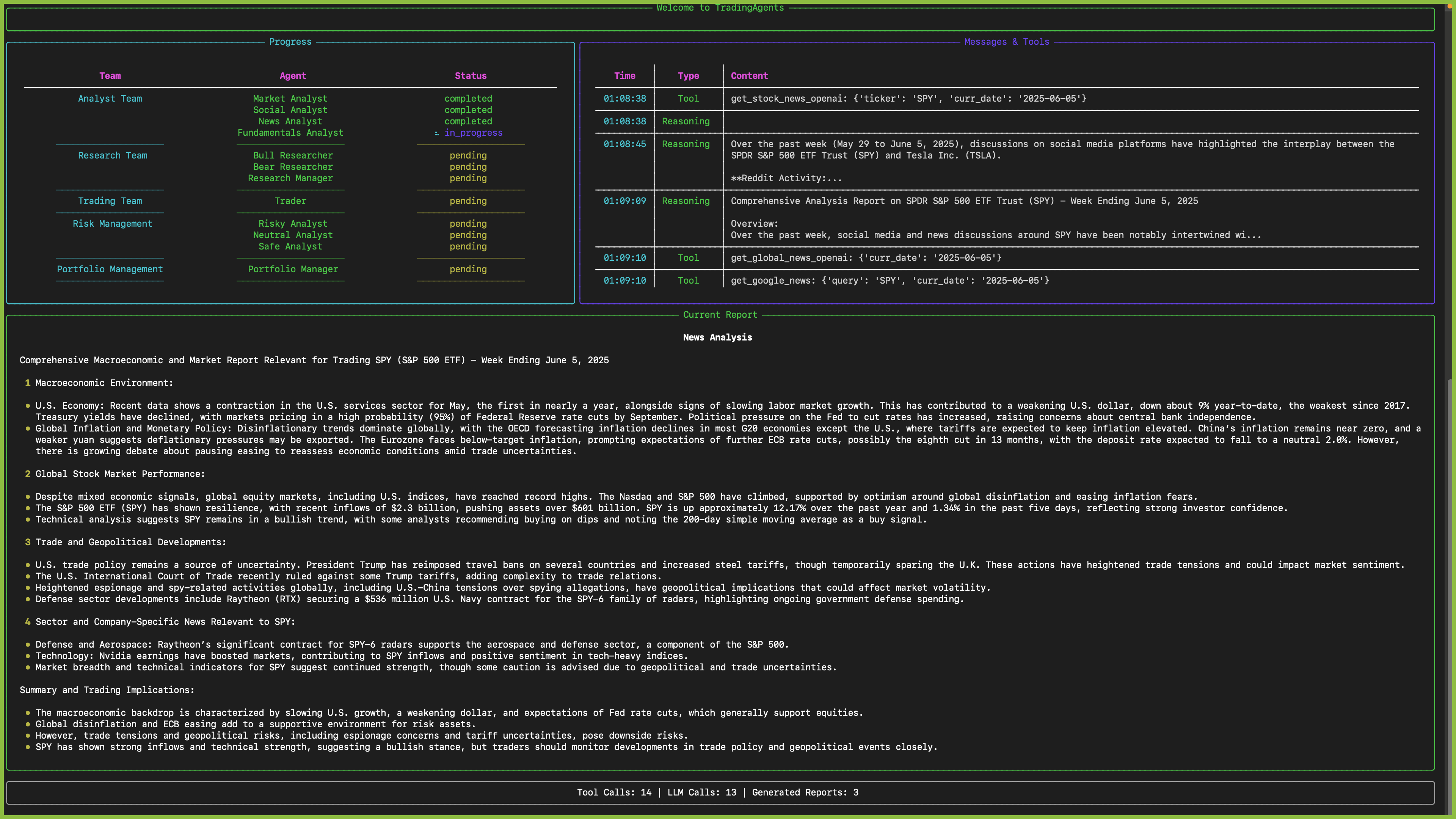
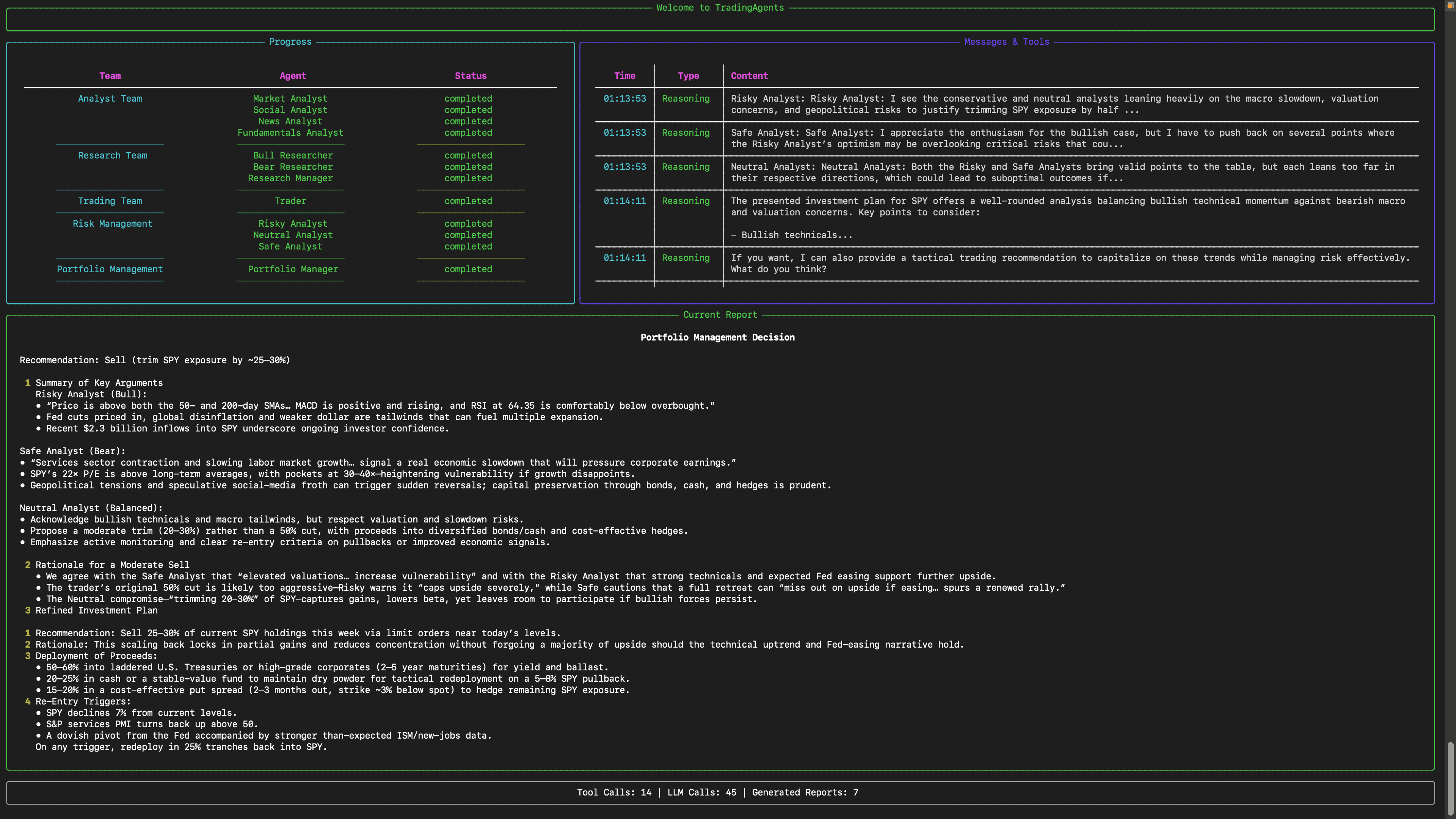
You will see a screen where you can select your desired tickers, date, LLMs, research depth, etc.
An interface will appear showing results as they load, letting you track the agent's progress as it runs.
TradingAgents Package
Implementation Details
We built TradingAgents with LangGraph to ensure flexibility and modularity. We utilize o1-preview and gpt-4o as our deep thinking and fast thinking LLMs for our experiments. However, for testing purposes, we recommend you use o4-mini and gpt-4.1-mini to save on costs as our framework makes lots of API calls.
Python Usage
To use TradingAgents inside your code, you can import the tradingagents module and initialize a TradingAgentsGraph() object. The .propagate() function will return a decision. You can run main.py, here's also a quick example:
from tradingagents.graph.trading_graph import TradingAgentsGraph
from tradingagents.default_config import DEFAULT_CONFIG

ta = TradingAgentsGraph(debug=True, config=DEFAULT_CONFIG.copy())

# forward propagate
_, decision = ta.propagate("NVDA", "2024-05-10")
print(decision)
You can also adjust the default configuration to set your own choice of LLMs, debate rounds, etc.
from tradingagents.graph.trading_graph import TradingAgentsGraph
from tradingagents.default_config import DEFAULT_CONFIG

# Create a custom config
config = DEFAULT_CONFIG.copy()
config["deep_think_llm"] = "gpt-4.1-nano"  # Use a different model
config["quick_think_llm"] = "gpt-4.1-nano"  # Use a different model
config["max_debate_rounds"] = 1  # Increase debate rounds
config["online_tools"] = True # Use online tools or cached data

# Initialize with custom config
ta = TradingAgentsGraph(debug=True, config=config)

# forward propagate
_, decision = ta.propagate("NVDA", "2024-05-10")
print(decision)
For
online_tools, we recommend enabling them for experimentation, as they provide access to real-time data. The agents' offline tools rely on cached data from our Tauric TradingDB, a curated dataset we use for backtesting. We're currently in the process of refining this dataset, and we plan to release it soon alongside our upcoming projects. Stay tuned!
You can view the full list of configurations in tradingagents/default_config.py.
Development Guide
This section provides comprehensive development guidance for contributors working on the TradingAgents codebase.
Common Development Commands
This project uses mise for tool and task management. All development tasks are managed through mise.
Initial Setup
- First-time setup:
mise run setup- Install tools and dependencies - Install tools only:
mise install- Install Python, uv, ruff, pyright - Install dependencies:
mise run install- Install project dependencies with uv
Development Workflow
- CLI Application:
mise run dev- Interactive CLI for running trading analysis - Direct Python Usage:
mise run run- Run main.py programmatically - Format code:
mise run format- Auto-format with ruff - Lint code:
mise run lint- Check code quality with ruff - Type checking:
mise run typecheck- Run pyright type checker - Fix lint issues:
mise run fix- Auto-fix linting issues - Run all checks:
mise run all- Format, lint, and typecheck - Clean artifacts:
mise run clean- Remove cache and build files
Testing
Running Tests
- Run all tests:
mise run test- Run tests with pytest - Run specific test file:
uv run pytest test_social_media_service.py- Run individual test file - Verbose output:
uv run pytest -v- Run tests with detailed output - Run with output:
uv run pytest -s- Show print statements and debug output - Test coverage:
uv run pytest --cov=tradingagents- Run tests with coverage report
Test Development (TDD Approach)
This project follows Test-Driven Development (TDD) for service layer development:
- Write test first: Create
{component}_service_test.pywith comprehensive test cases - Run test (should fail): Verify test fails with appropriate error messages
- Implement minimum code: Write just enough code to make the test pass
- Refactor: Improve code while keeping tests passing
- Repeat: Add more test cases and implement additional functionality
Test Structure and Conventions
- Test files: Named
{component}_service_test.pyand placed next to source code (not in separate tests/ directory) - Test functions: Named
test_{functionality}()and should not return values (useassertstatements) - Mock clients: Use
unittest.mock.Mock()objects for testing services - Real repositories: Use actual repository implementations (don't mock the repository layer)
- Test data: Use realistic mock data that matches expected API responses
- Date handling: Use fixed dates (e.g.,
datetime(2024, 1, 2)) in mocks for predictable filtering
Service Testing Pattern
Example test structure for services:
from unittest.mock import Mock, patch

def test_online_mode_with_mock_client():
    """Test service in online mode with mock client."""
    # Mock the client
    mock_client = Mock()
    mock_client.get_data.return_value = {"data": [{"symbol": "TEST", "price": 100.0}]}

    real_repo = ServiceRepository("test_data")

    service = ServiceClass(
        client=mock_client,
        repository=real_repo,
        online_mode=True
    )

    context = service.get_context("TEST", "2024-01-01", "2024-01-05")

    # Validate structure
    assert isinstance(context, ContextModel)
    assert context.symbol == "TEST"
    assert len(context.data) > 0

    # Test JSON serialization
    json_output = context.model_dump_json()
    assert len(json_output) > 0

    # Verify client was called
    mock_client.get_data.assert_called_once()
Mock Client Guidelines
- Use unittest.mock: Use
Mock()objects instead of custom mock classes - Realistic data: Return data structures that match actual API responses
- Date consistency: Use fixed dates that work with test date ranges
- Error simulation: Configure mocks to raise exceptions for testing error handling paths
- Multiple scenarios: Use different return values for different test cases
Configuration
- Environment Variables: Create
.envfile with API keys (see.env.example) - Config Class:
TradingAgentsConfigintradingagents/config.pyhandles all configuration - Tool Configuration:
.mise.tomlmanages Python 3.13, uv, ruff, pyright - Code Quality:
pyproject.tomlcontains ruff and pyright configurations
Required Environment Variables
Core LLM APIs (Choose One)
# For OpenAI (default)
export OPENAI_API_KEY="your_openai_api_key"

# For Anthropic Claude
export ANTHROPIC_API_KEY="your_anthropic_api_key"

# For Google Gemini
export GOOGLE_API_KEY="your_google_api_key"
Data Sources (Optional)
# For financial data
export FINNHUB_API_KEY="your_finnhub_api_key"

# For Reddit data
export REDDIT_CLIENT_ID="your_reddit_client_id"
export REDDIT_CLIENT_SECRET="your_reddit_client_secret"
export REDDIT_USER_AGENT="your_app_name"
Architecture Deep Dive
Multi-Agent Trading Framework
TradingAgents implements a sophisticated multi-agent system that mirrors real-world trading firms with specialized roles and structured workflows.
Core Architecture Components
1. Agent Teams (Sequential Workflow)
Analyst Team → Research Team → Trading Team → Risk Management Team
Analyst Team (tradingagents/agents/analysts/)
- Market Analyst: Technical analysis using Yahoo Finance and StockStats
- Fundamentals Analyst: Financial statements and company fundamentals via SimFin/Finnhub
- News Analyst: News sentiment analysis and world affairs impact
- Social Media Analyst: Reddit and social platform sentiment analysis
Research Team (tradingagents/agents/researchers/)
- Bull Researcher: Advocates for investment opportunities and growth potential
- Bear Researcher: Highlights risks and argues against investments
- Research Manager: Synthesizes debates and creates investment recommendations
Trading Team (tradingagents/agents/trader/)
- Trader: Converts investment plans into specific trading decisions
Risk Management Team (tradingagents/agents/risk_mgmt/)
- Aggressive/Conservative/Neutral Debators: Different risk perspectives
- Risk Manager: Final decision maker balancing risk and reward
2. Domain-Driven Architecture (tradingagents/domains/)
Domain-Driven Design (DDD) Architecture (Current): The system has been restructured using Domain-Driven Design principles with three main bounded contexts:
Domain Boundaries & Bounded Contexts:
- Financial Data Domain (
tradingagents/domains/marketdata/): Market prices, technical indicators, fundamentals, insider data - News Domain (
tradingagents/domains/news/): News articles, sentiment analysis, content aggregation - Social Media Domain (
tradingagents/domains/socialmedia/): Social media posts, engagement metrics, sentiment analysis
DDD Tactical Patterns per Domain:
- Domain Services: Business logic encapsulated in domain-specific services (
MarketDataService,NewsService,SocialMediaService) - Value Objects: Immutable data structures (
SentimentScore,TechnicalIndicatorData,PostMetadata) - Entities: Objects with identity and lifecycle (
NewsArticle,PostData) - Repository Pattern: Domain-specific data access with smart caching, deduplication, and gap detection
- Context Objects: Structured domain data containers (
MarketDataContext,NewsContext,SocialContext)
Domain Infrastructure per Bounded Context:
marketdata/
├── clients/          # YFinanceClient, FinnhubClient (domain-specific)
├── repos/           # MarketDataRepository, FundamentalRepository
├── services/        # MarketDataService, FundamentalDataService, InsiderDataService
└── models/          # Domain Value Objects and Entities

news/
├── clients/         # GoogleNewsClient (domain-specific)
├── repositories/    # NewsRepository with article deduplication
├── services/        # NewsService with sentiment analysis
└── models/          # NewsArticle, SentimentScore

socialmedia/
├── clients/         # RedditClient (domain-specific)
├── repositories/    # SocialMediaRepository with engagement tracking
├── services/        # SocialMediaService with sentiment analysis
└── models/          # PostData, EngagementMetrics
Agent Integration Strategy - Anti-Corruption Layer (ACL):
- AgentToolkit as ACL: Mediates between agents (string-based, procedural) and domains (object-oriented, rich models)
- Data Translation: Converts rich Pydantic domain models to structured JSON strings for LLM consumption
- Parameter Adaptation: Handles interface mismatches (single date → date ranges, etc.)
- Backward Compatibility: Preserves existing agent tool interface while providing domain service benefits
3. Graph Orchestration (tradingagents/graph/)
LangGraph-based workflow management:
- TradingAgentsGraph: Main orchestrator class
- State Management:
AgentState,InvestDebateState,RiskDebateStatetrack workflow progress - Conditional Logic: Dynamic routing based on tool usage and debate completion
- Memory System: ChromaDB-based vector memory for learning from past decisions
4. Configuration System
- TradingAgentsConfig: Centralized configuration with environment variable support
- Multi-LLM Support: OpenAI, Anthropic, Google, Ollama, OpenRouter
- Data Modes: Online (live APIs) vs offline (cached data)
Key Design Patterns
- Debate-Driven Decision Making: Critical decisions emerge from structured agent debates
- Memory-Augmented Learning: Agents learn from past similar situations using vector similarity
- Repository-First Data Strategy: Services always read from repositories with separate update operations
- Structured JSON Contexts: Replace error-prone string parsing with rich Pydantic models
- Factory Pattern: Agent creation via factory functions for flexible configuration
- Signal Processing: Final trading decisions processed into clean BUY/SELL/HOLD signals
- Quality-Aware Data: All contexts include quality metadata to help agents make better decisions
Code Style Guidelines
General Style
- Functions: Snake_case naming (e.g.,
fundamentals_analyst_node,create_fundamentals_analyst) - Classes: PascalCase (e.g.,
TradingAgentsGraph,MessageBuffer) - Variables: Snake_case (e.g.,
current_date,company_of_interest) - Constants: UPPER_CASE (e.g.,
DEFAULT_CONFIG) - Imports: Standard library first, third-party, then local imports (langchain, tradingagents modules)
Ruff Formatting & Linting Rules
Formatting (mise run format):
- Line length: 88 characters maximum
- Quote style: Double quotes (
"string") - Indentation: 4 spaces (no tabs)
- Trailing commas: Preserved for multi-line structures
- Line endings: Auto-detected based on platform
Linting (mise run lint):
-
Selected rules:
E,W: pycodestyle errors and warningsF: pyflakes (undefined names, unused imports)I: isort (import sorting)B: flake8-bugbear (common bugs)C4: flake8-comprehensions (list/dict comprehensions)UP: pyupgrade (Python syntax modernization)ARG: flake8-unused-argumentsSIM: flake8-simplify (code simplification)TCH: flake8-type-checking (type annotation imports)
-
Ignored rules:
E501: Line too long (handled by formatter)B008: Function calls in argument defaults (allowed for LangChain)C901: Complex functions (legacy code tolerance)ARG001,ARG002: Unused arguments (common in callbacks)
-
Import sorting:
tradingagentsandclitreated as first-party modules
Pyright Type Checking Rules
Configuration (mise run typecheck):
- Tool: pyright 1.1.390+ with standard type checking mode
- Python version: 3.10+ (configured for compatibility with modern syntax)
- Coverage: Includes
tradingagents/,cli/, andmain.py - Exclusions:
__pycache__,node_modules,.venv,venv,build,dist
Type Annotation Guidelines:
- Use modern Python 3.10+ union syntax:
str | Noneinstead ofOptional[str] - Use built-in generics:
list[str]instead ofList[str] - Use
dict[str, Any]for flexible dictionaries - Import
from typing import Anyfor untyped data structures - Prefer explicit return types on public functions
- Use
# type: ignoresparingly with explanatory comments
Development Guidelines
Working with Agents
Current Approach (AgentToolkit as Anti-Corruption Layer):
- Use
AgentToolkitfromtradingagents.agents.libs.agent_toolkit - Toolkit injects all domain services via dependency injection
- Provides LangChain
@tooldecorated methods for agent consumption - Returns rich Pydantic domain models directly to agents
- Handles parameter validation, date calculations, and error handling
Agent Integration Pattern:
from tradingagents.agents.libs.agent_toolkit import AgentToolkit

# AgentToolkit acts as Anti-Corruption Layer
toolkit = AgentToolkit(
    news_service=news_service,
    marketdata_service=marketdata_service,
    fundamentaldata_service=fundamentaldata_service,
    socialmedia_service=socialmedia_service,
    insiderdata_service=insiderdata_service
)

# Agents use toolkit tools that return rich domain contexts
@tool
def analyze_stock(symbol: str, date: str):
    # Get structured contexts from domain services via toolkit
    market_data = toolkit.get_market_data(symbol, start_date, end_date)
    social_data = toolkit.get_socialmedia_stock_info(symbol, date)
    news_data = toolkit.get_news(symbol, start_date, end_date)

    # Work with rich Pydantic models
    price = market_data.latest_price
    sentiment = social_data.sentiment_summary.score
    article_count = news_data.article_count
Working with Data Sources
Current Domain Service Approach:
- Repository-First: Services always read data from repositories (local storage)
- Separate Update Operations: Use dedicated update methods to fetch fresh data from APIs and store in repositories
- Clear Separation: Reading data vs updating data are separate concerns
- Structured Contexts: Services return rich Pydantic models with metadata
- Quality Awareness: All contexts include data quality and source information
Service Usage Pattern:
# Services use dependency injection
service = MarketDataService(
    yfin_client=YFinanceClient(),
    repo=MarketDataRepository("cache_dir")
)

# Always read from repository
context = service.get_market_data_context("AAPL", "2024-01-01", "2024-01-31")

# Separate update operation to refresh repository data
service.update_market_data("AAPL", "2024-01-01", "2024-01-31")
Configuration Management
- Use
TradingAgentsConfig.from_env()for environment-based configuration - Key settings:
max_debate_rounds,llm_provider,online_tools - Results are saved to
results_dir/{ticker}/{date}/with structured reports
CLI Development
- CLI uses Rich for terminal UI with live updating displays
- Agent progress tracking through
MessageBufferclass - Questionnaire-driven configuration collection
- Real-time streaming of analysis results
File Structure Context
cli/: Interactive command-line interfacetradingagents/agents/: All agent implementationslibs/agent_toolkit.py: AgentToolkit Anti-Corruption Layer with LangChain @tool decoratorslibs/context_helpers.py: Helper functions for parsing structured JSON datalibs/agent_utils.py: Legacy Toolkit (being phased out)
tradingagents/domains/: Domain-Driven Design bounded contextsmarketdata/: Financial data domain (prices, indicators, fundamentals, insider data)news/: News domain (articles, sentiment analysis)socialmedia/: Social media domain (posts, engagement, sentiment)
tradingagents/dataflows/: Legacy data source integrations (being phased out)tradingagents/graph/: LangGraph workflow orchestrationtradingagents/config.py: Configuration managementmain.py: Direct Python usage exampleAGENTS.md: Detailed agent documentation
Contributing
We welcome contributions from the community! Whether it's fixing a bug, improving documentation, or suggesting a new feature, your input helps make this project better. If you are interested in this line of research, please consider joining our open-source financial AI research community Tauric Research.
Citation
Please reference our work if you find TradingAgents provides you with some help :)
@misc{xiao2025tradingagentsmultiagentsllmfinancial,
      title={TradingAgents: Multi-Agents LLM Financial Trading Framework},
      author={Yijia Xiao and Edward Sun and Di Luo and Wei Wang},
      year={2025},
      eprint={2412.20138},
      archivePrefix={arXiv},
      primaryClass={q-fin.TR},
      url={https://arxiv.org/abs/2412.20138},
}