 64501bd41f
|
||
|---|---|---|
| .github/workflows | ||
| assets | ||
| cli | ||
| docs | ||
| scripts | ||
| tests | ||
| tradingagents | ||
| .dockerignore | ||
| .env.alpaca.example | ||
| .env.example | ||
| .gitignore | ||
| .python-version | ||
| Dockerfile | ||
| LICENSE | ||
| README.md | ||
| docker-compose.yml | ||
| main.py | ||
| pyproject.toml | ||
| requirements-dev.txt | ||
| requirements.txt | ||
| run_autopilot.sh | ||
| setup.py | ||
| test.py | ||
| uv.lock | ||
README.md






TradingAgents: Multi-Agents LLM Financial Trading Framework
🎉 TradingAgents officially released! We have received numerous inquiries about the work, and we would like to express our thanks for the enthusiasm in our community.
So we decided to fully open-source the framework. Looking forward to building impactful projects with you!
🚀 TradingAgents | ⚡ Installation & CLI | 🎬 Demo | 📦 Package Usage | 🤝 Contributing | 📄 Citation
TradingAgents Framework
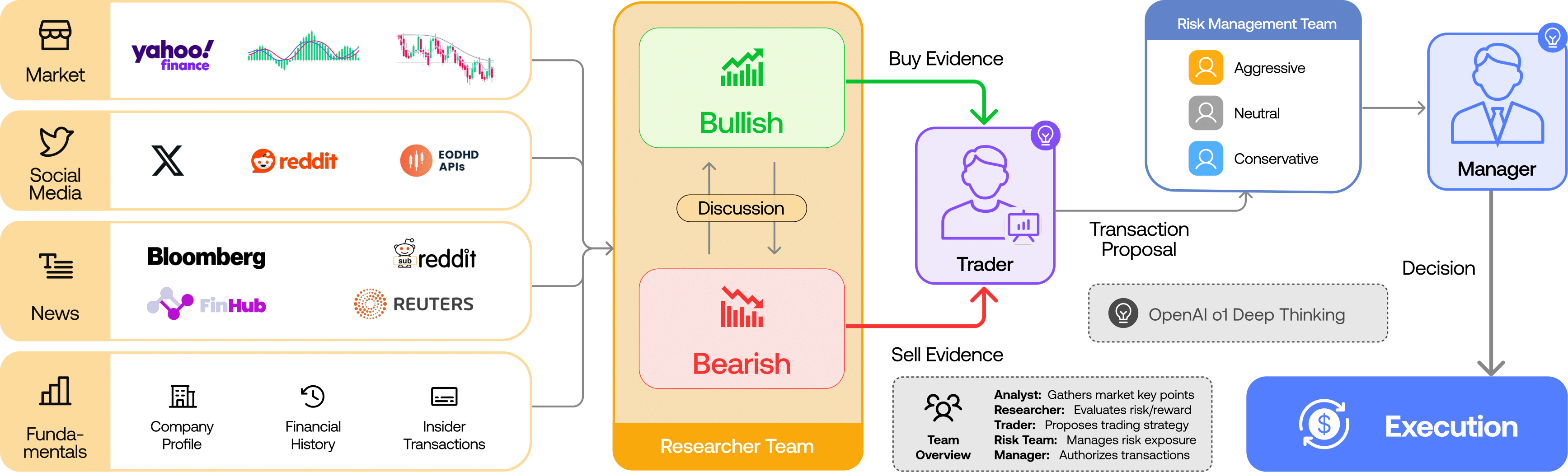
TradingAgents is a multi-agent trading framework that mirrors the dynamics of real-world trading firms. By deploying specialized LLM-powered agents: from fundamental analysts, sentiment experts, and technical analysts, to trader, risk management team, the platform collaboratively evaluates market conditions and informs trading decisions. Moreover, these agents engage in dynamic discussions to pinpoint the optimal strategy.
TradingAgents framework is designed for research purposes. Trading performance may vary based on many factors, including the chosen backbone language models, model temperature, trading periods, the quality of data, and other non-deterministic factors. It is not intended as financial, investment, or trading advice.
Our framework decomposes complex trading tasks into specialized roles. This ensures the system achieves a robust, scalable approach to market analysis and decision-making.
Analyst Team
- Fundamentals Analyst: Evaluates company financials and performance metrics, identifying intrinsic values and potential red flags.
- Sentiment Analyst: Analyzes social media and public sentiment using sentiment scoring algorithms to gauge short-term market mood.
- News Analyst: Monitors global news and macroeconomic indicators, interpreting the impact of events on market conditions.
- Technical Analyst: Utilizes technical indicators (like MACD and RSI) to detect trading patterns and forecast price movements.

Researcher Team
- Comprises both bullish and bearish researchers who critically assess the insights provided by the Analyst Team. Through structured debates, they balance potential gains against inherent risks.

Trader Agent
- Composes reports from the analysts and researchers to make informed trading decisions. It determines the timing and magnitude of trades based on comprehensive market insights.
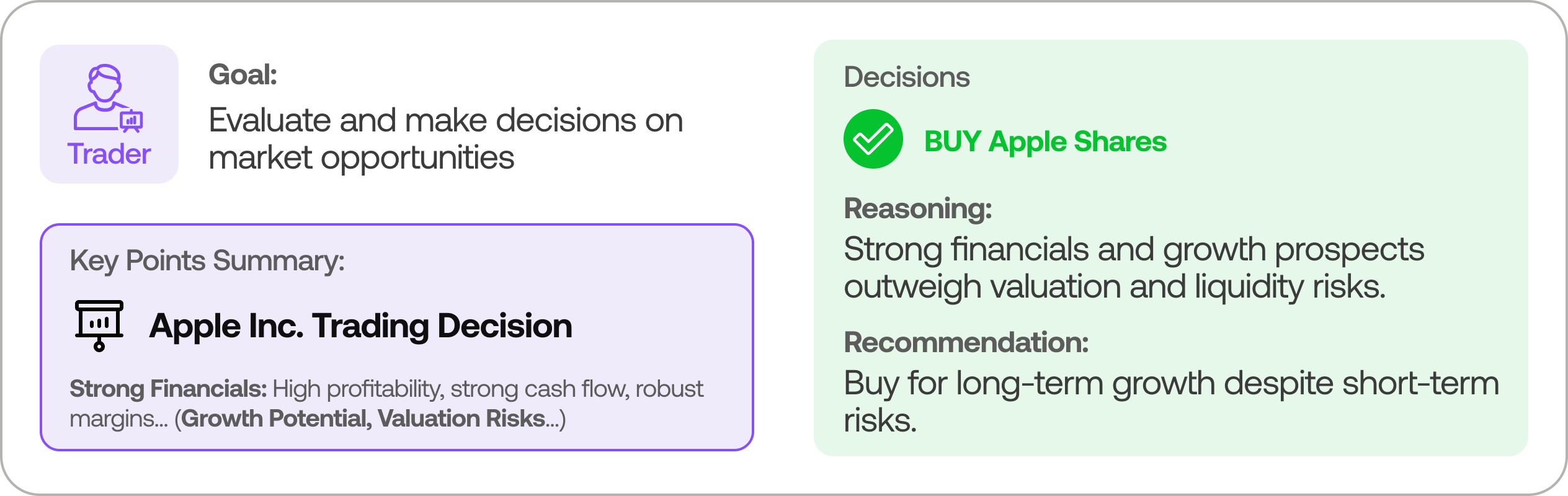
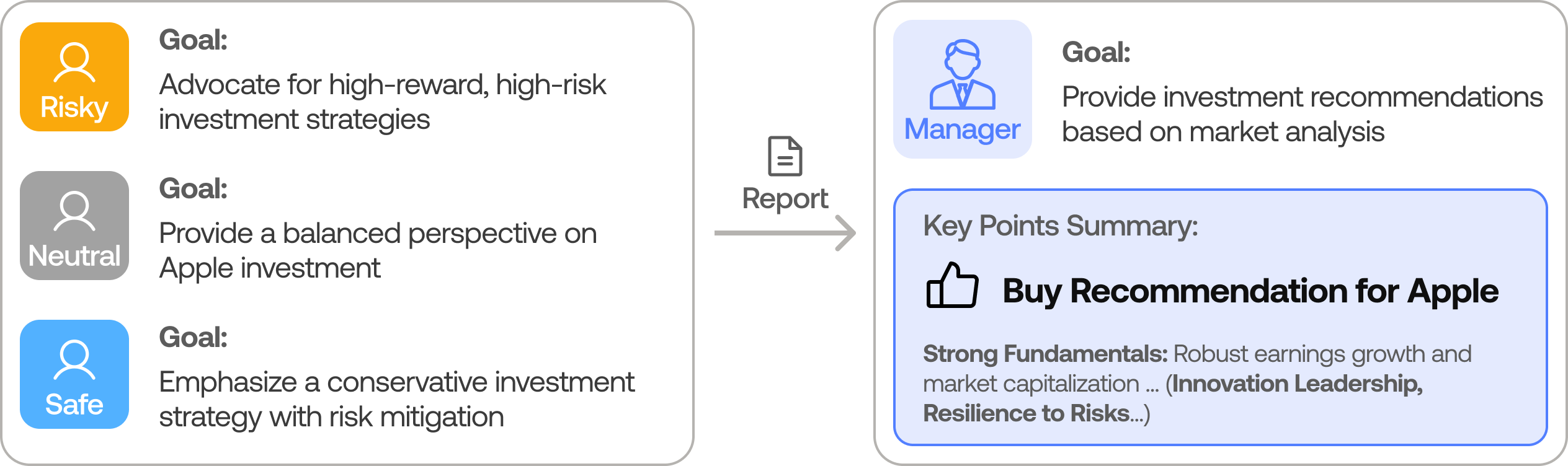
Risk Management and Portfolio Manager
- Continuously evaluates portfolio risk by assessing market volatility, liquidity, and other risk factors. The risk management team evaluates and adjusts trading strategies, providing assessment reports to the Portfolio Manager for final decision.
- The Portfolio Manager approves/rejects the transaction proposal. If approved, the order will be sent to the simulated exchange and executed.
Installation and CLI
Installation
Clone TradingAgents:
git clone https://github.com/TauricResearch/TradingAgents.git
cd TradingAgents
Create a virtual environment in any of your favorite environment managers:
conda create -n tradingagents python=3.13
conda activate tradingagents
Install dependencies:
pip install -r requirements.txt
Required APIs
You will need the OpenAI API for all the agents, and Alpha Vantage API for fundamental and news data (default configuration).
export OPENAI_API_KEY=$YOUR_OPENAI_API_KEY
export ALPHA_VANTAGE_API_KEY=$YOUR_ALPHA_VANTAGE_API_KEY
Alternatively, you can create a .env file in the project root with your API keys (see .env.example for reference):
cp .env.example .env
# Edit .env with your actual API keys
Run a quick preflight to verify env vars and writable result directories:
python scripts/preflight_check.py
Note: We are happy to partner with Alpha Vantage to provide robust API support for TradingAgents. You can get a free AlphaVantage API here, TradingAgents-sourced requests also have increased rate limits to 60 requests per minute with no daily limits. Typically the quota is sufficient for performing complex tasks with TradingAgents thanks to Alpha Vantage’s open-source support program. If you prefer to use OpenAI for these data sources instead, you can modify the data vendor settings in tradingagents/default_config.py.
CLI Usage
You can also try out the CLI directly by running:
python -m cli.main
You will see a screen where you can select your desired tickers, date, LLMs, research depth, etc.
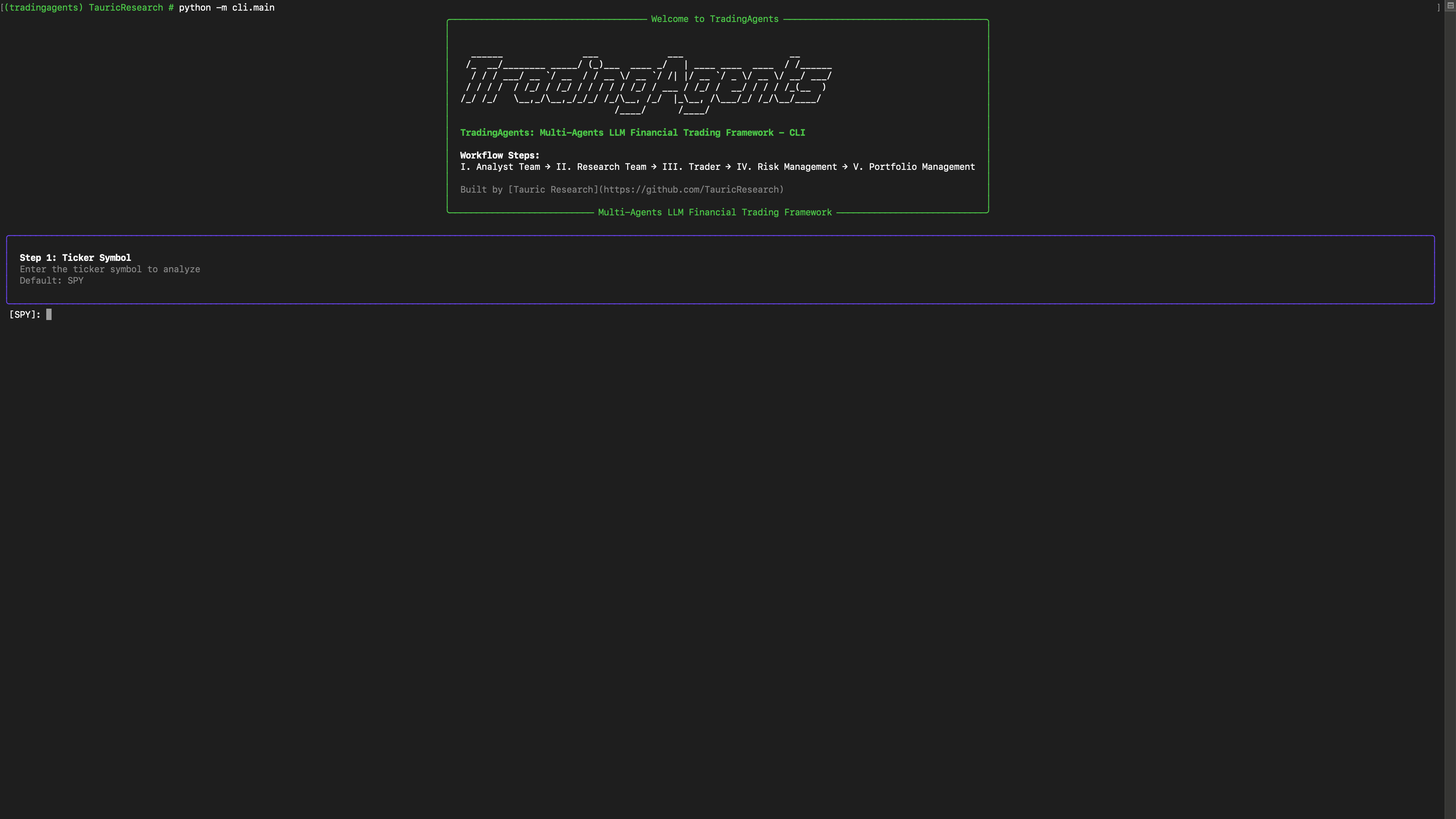
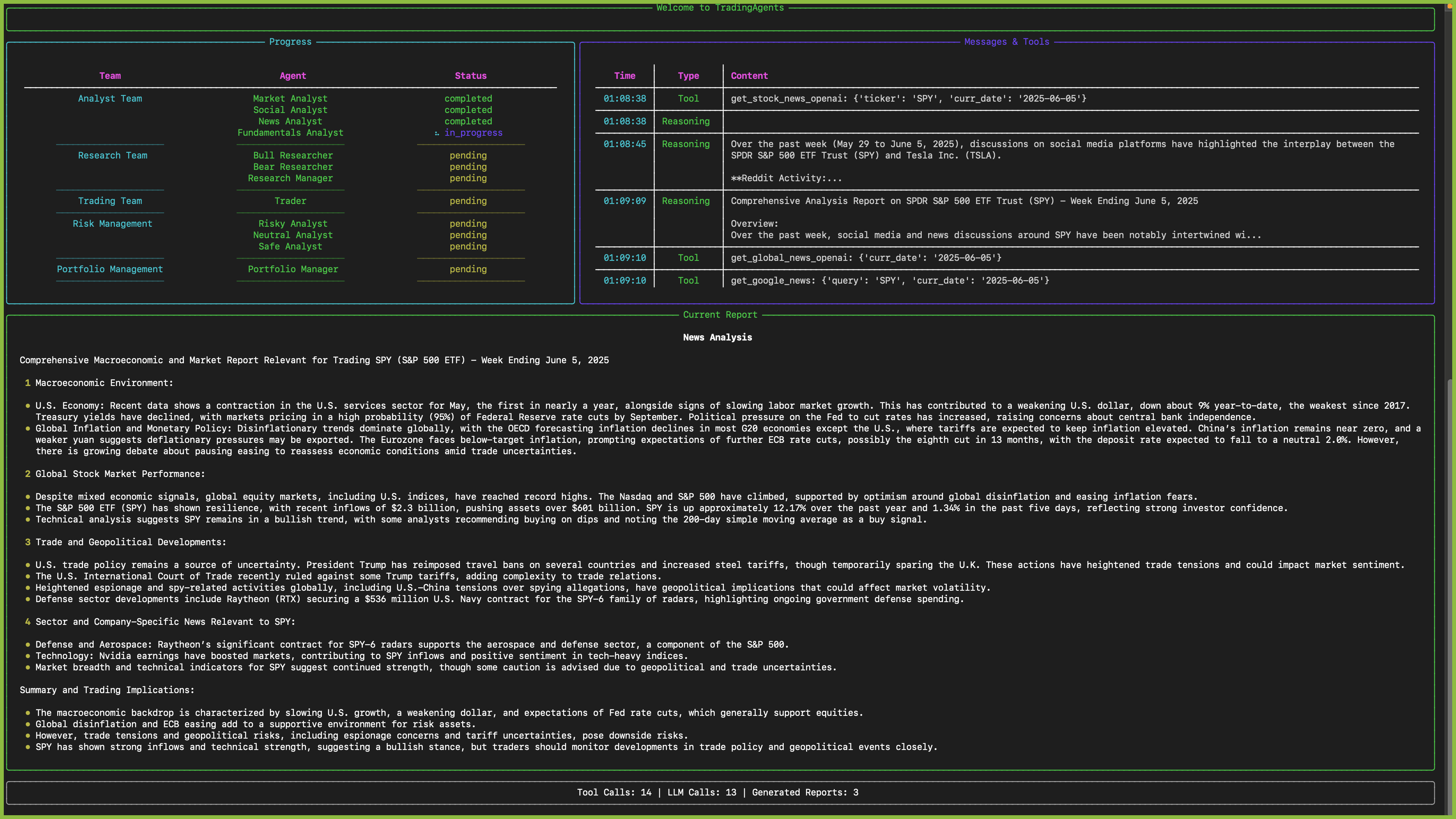
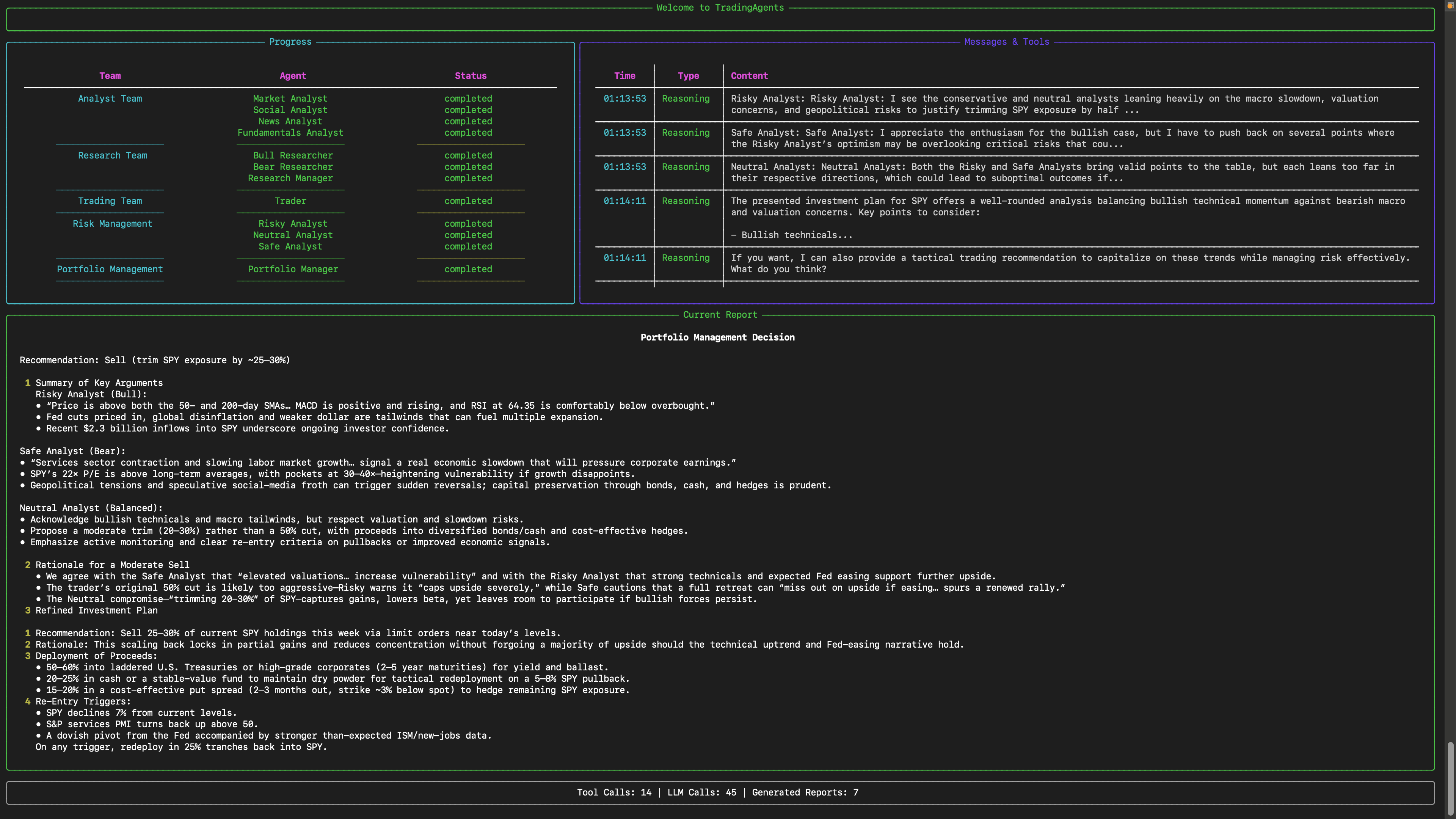
An interface will appear showing results as they load, letting you track the agent's progress as it runs.
TradingAgents Package
Implementation Details
We built TradingAgents with LangGraph to ensure flexibility and modularity. We utilize o1-preview and gpt-4o as our deep thinking and fast thinking LLMs for our experiments. However, for testing purposes, we recommend you use o4-mini and gpt-4.1-mini to save on costs as our framework makes lots of API calls.
Python Usage
Run python main.py to launch the interactive CLI. On startup TradingAgents connects to Alpaca MCP, caches the current account snapshot, and presents a menu:
- Refresh Alpaca snapshot – pull the latest account/position/order data.
- Show account summary / positions / recent orders – inspect the cached snapshot.
- Run auto-trade – execute the end-to-end workflow (market data fetch → hypothesis generation → sequential deep thinking per ticker) and display the reasoning trace for every ticker.
Each auto-trade run saves a JSON summary to results/auto_trade_<timestamp>.json, making it easy to schedule cron jobs or other entrypoints that call the same logic programmatically. The CLI uses the new AutoTradeService, so you can reuse it directly:
from tradingagents.default_config import DEFAULT_CONFIG
from tradingagents.graph.trading_graph import TradingAgentsGraph
from tradingagents.services.account import AccountService
from tradingagents.services.auto_trade import AutoTradeService

config = DEFAULT_CONFIG.copy()
account_service = AccountService(config["alpaca_mcp"])
snapshot = account_service.refresh()

graph = TradingAgentsGraph(config=config, skip_initial_probes=True)
auto_trader = AutoTradeService(config=config, graph=graph)
result = auto_trader.run(snapshot)

print(result.summary())
Responses-driven orchestration (experimental)
Set AUTO_TRADE_MODE=responses to let the OpenAI Responses API drive the run. The orchestrator narrates each step, calls the registered tools (snapshot, vendor data, order submission), and finishes with a JSON summary that the CLI renders. Configure the model via AUTO_TRADE_RESPONSES_MODEL (for example gpt-4.1-mini). If you are using a reasoning-capable model, you can optionally set AUTO_TRADE_RESPONSES_REASONING=medium; otherwise leave it blank. The guardrail AUTO_TRADE_SKIP_WHEN_MARKET_CLOSED still applies before the session is started, so you will not burn tokens while markets are closed unless you opt in.
To help the LLM build on past context, enable the ticker memory tool (default). After each run the agent stores a short history of decisions per ticker under AUTO_TRADE_MEMORY_DIR (default ./results/memory). On the next run it can call get_ticker_memory to recap recent actions. Control retention with AUTO_TRADE_MEMORY_MAX_ENTRIES.
The Responses orchestrator can also call the same research agents that power the LangGraph pipeline via tools (run_market_analyst, run_news_analyst, run_fundamentals_analyst). Encourage this by leaving AUTO_TRADE_MODE=responses and the prompt will request those tools before making final trade recommendations.
When the sequential-thinking planner promotes a ticker to trade or escalate, the CLI highlights the exact reasoning steps (confidence, capital checks, escalation path) so every decision is auditable.
Resetting autopilot state for testing
The autopilot loop reads hypotheses/memory from results/. When you want to start from a clean slate (no ticker memory) but still have a few ready-made hypotheses + triggers to exercise the realtime brokers, run the seeding helper:
python scripts/seed_autopilot_state.py --force
# optional knobs:
#   --skip-fixture      only wipe existing data
#   --auto-trade        run a fresh auto-trade after seeding (requires MCP)
#   --results-dir PATH  override results directory (default ./results)
#   --memory-dir  PATH  override AUTO_TRADE_MEMORY_DIR
#   --fixture     PATH  load a custom seed fixture instead of docs/fixtures/autopilot_seed.json
By default the script wipes results/hypotheses/, results/autopilot/, and the configured AUTO_TRADE_MEMORY_DIR, then loads docs/fixtures/autopilot_seed.json. The fixture provides three sample hypotheses (NVDA/AAPL/TSLA) with price + news triggers and a couple of seed events, so the realtime price/news brokers immediately subscribe and the heartbeat shows non-zero symbols. After seeding you can launch the CLI in autopilot mode (python main.py --autopilot) and watch the worker consume the pre-created history before you generate new hypotheses.
Each auto-trade decision now carries an explicit strategy directive. Configure the presets under trading_strategies in default_config.py (or via env vars such as TRADINGAGENTS_DEFAULT_STRATEGY, TRADINGAGENTS_DAYTRADE_TARGET, etc.). Strategies define horizon, target/stop percentages, urgency, and follow-up behavior, ensuring hypotheses always include measurable success/failure metrics and a deadline for reevaluation.
Autopilot is market-aware: when AUTO_TRADE_SKIP_WHEN_MARKET_CLOSED=true, the orchestrator will skip baseline runs while the exchange is closed, wake itself up a configurable number of minutes before the next open (AUTOPILOT_PREMARKET_MINUTES, default 30) to refresh research, and immediately re-run once the bell rings. Websocket listeners remain active 24/7, so breaking news still triggers focused research runs even outside trading hours, but actual order placement is deferred until the market opens again.
Portfolio Orchestrator & Alpaca Execution (Optional)
Set ALPACA_MCP_ENABLED=true and point the connection variables to your running Alpaca MCP server if you want the auto-trader to pull live account context. Most deployments expose the Model Context Protocol over JSON-RPC at /mcp, so in practice you will define:
ALPACA_MCP_ENABLED=true
ALPACA_MCP_BASE_URL=http://host.docker.internal:8000/mcp  # from inside Docker
You can omit ALPACA_MCP_HOST when a base_url is provided. The orchestrator scans its configured universe (PORTFOLIO_UNIVERSE), drafts hypotheses, and selectively schedules analysts before escalating to the trader. When TRADE_EXECUTION_ENABLED=true, the trader will attempt to place a market order through the MCP server (respecting TRADE_EXECUTION_DRY_RUN, TRADE_EXECUTION_DEFAULT_QTY, and TRADE_EXECUTION_TIF). Leave the flags at their defaults to run analysis-only mode.
Docker Quickstart
- Build the TradingAgents image:
docker build -t tradingagents:latest . - Prepare environment files:
.env– TradingAgents config (OpenAI key, portfolio settings,ALPACA_MCP_BASE_URL=http://host.docker.internal:8000/mcp, etc.).env.alpaca– Alpaca MCP credentials if you run the server locally (see.env.alpaca.example).
- Launch the Alpaca MCP + TradingAgents stack:
The orchestrator connects to Alpaca via thedocker compose up --build trading-agentsalpaca-mcpservice and uses the configured LLM to produce the sequential plan. - Results are written to
./resultson the host. ToggleTRADE_EXECUTION_DRY_RUNwhen you’re ready for real orders.
You can customise DEFAULT_CONFIG the same way as before (choice of LLMs, vendor overrides, trade thresholds). The CLI and AutoTradeService honour those settings. For example, to increase the market data window and the trade priority threshold:
from tradingagents.default_config import DEFAULT_CONFIG

config = DEFAULT_CONFIG.copy()
config["portfolio_orchestrator"]["market_data_lookback_days"] = 90
config["portfolio_orchestrator"]["trade_activation"]["priority_threshold"] = 0.85
The default configuration uses yfinance for stock price and technical data, and Alpha Vantage for fundamental and news data. For production use or if you encounter rate limits, consider upgrading to Alpha Vantage Premium for more stable and reliable data access. For offline experimentation, there's a local data vendor option that uses our Tauric TradingDB, a curated dataset for backtesting, though this is still in development. We're currently refining this dataset and plan to release it soon alongside our upcoming projects. Stay tuned!
You can view the full list of configurations in tradingagents/default_config.py.
Development & tests
Install dev extras to run the test suite:
pip install -r requirements-dev.txt
pytest
Contributing
We welcome contributions from the community! Whether it's fixing a bug, improving documentation, or suggesting a new feature, your input helps make this project better. If you are interested in this line of research, please consider joining our open-source financial AI research community Tauric Research.
Citation
Please reference our work if you find TradingAgents provides you with some help :)
@misc{xiao2025tradingagentsmultiagentsllmfinancial,
      title={TradingAgents: Multi-Agents LLM Financial Trading Framework},
      author={Yijia Xiao and Edward Sun and Di Luo and Wei Wang},
      year={2025},
      eprint={2412.20138},
      archivePrefix={arXiv},
      primaryClass={q-fin.TR},
      url={https://arxiv.org/abs/2412.20138},
}