---
# TradingAgents: Multi-Agents LLM Financial Trading Framework
> 🎉 **TradingAgents** officially released! We have received numerous inquiries about the work, and we would like to express our thanks for the enthusiasm in our community.
>
> So we decided to fully open-source the framework. Looking forward to building impactful projects with you!
🚀 [TradingAgents](#tradingagents-framework) | ⚡ [Installation & CLI](#installation-and-cli) | 🎬 [Demo](https://www.youtube.com/watch?v=90gr5lwjIho) | 📦 [Package Usage](#tradingagents-package) | 🤝 [Contributing](#contributing) | 📄 [Citation](#citation)
## TradingAgents Framework
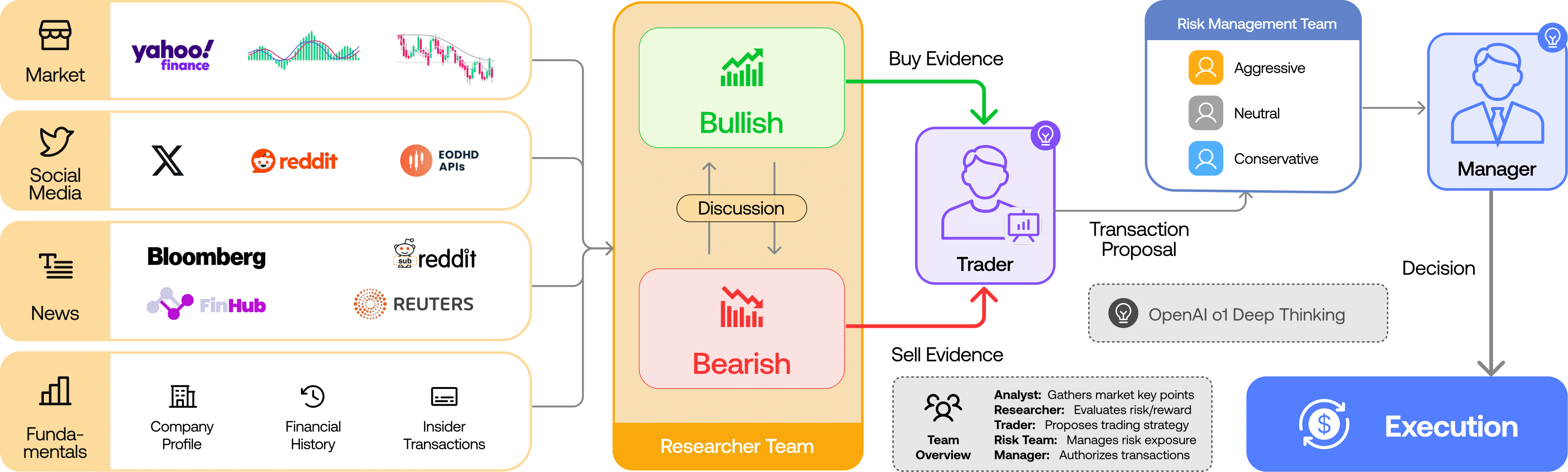
TradingAgents is a multi-agent trading framework that mirrors the dynamics of real-world trading firms. By deploying specialized LLM-powered agents: from fundamental analysts, sentiment experts, and technical analysts, to trader, risk management team, the platform collaboratively evaluates market conditions and informs trading decisions. Moreover, these agents engage in dynamic discussions to pinpoint the optimal strategy.
> TradingAgents framework is designed for research purposes. Trading performance may vary based on many factors, including the chosen backbone language models, model temperature, trading periods, the quality of data, and other non-deterministic factors. [It is not intended as financial, investment, or trading advice.](https://tauric.ai/disclaimer/)
Our framework decomposes complex trading tasks into specialized roles. This ensures the system achieves a robust, scalable approach to market analysis and decision-making.
### Analyst Team
- Fundamentals Analyst: Evaluates company financials and performance metrics, identifying intrinsic values and potential red flags.
- Sentiment Analyst: Analyzes social media and public sentiment using sentiment scoring algorithms to gauge short-term market mood.
- News Analyst: Monitors global news and macroeconomic indicators, interpreting the impact of events on market conditions.
- Technical Analyst: Utilizes technical indicators (like MACD and RSI) to detect trading patterns and forecast price movements.

### Researcher Team
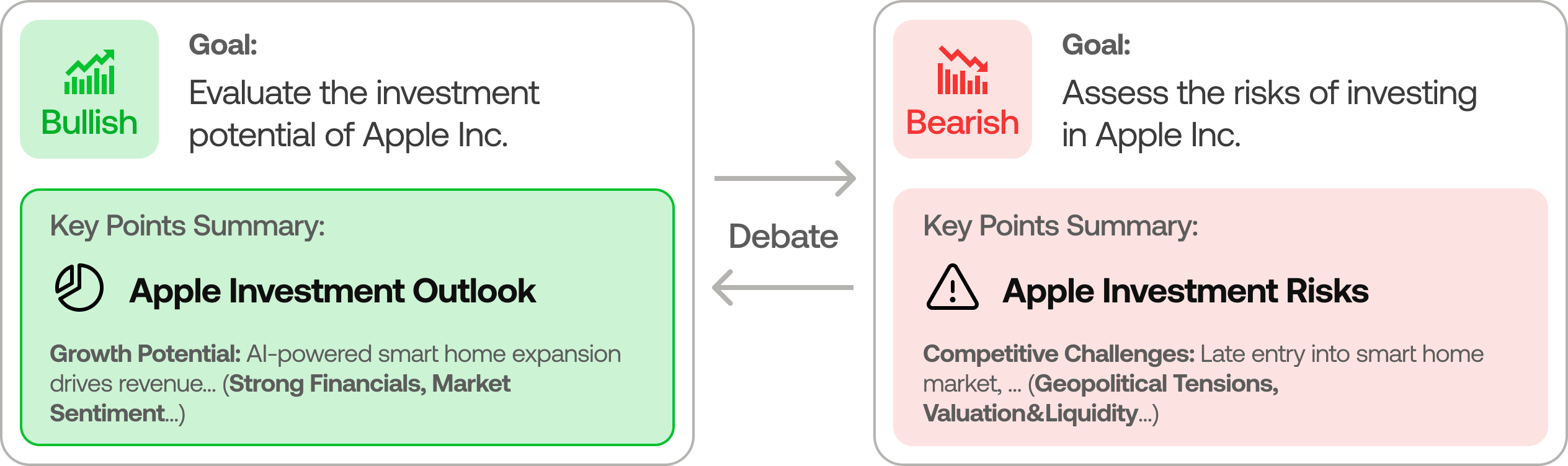
- Comprises both bullish and bearish researchers who critically assess the insights provided by the Analyst Team. Through structured debates, they balance potential gains against inherent risks.
### Trader Agent
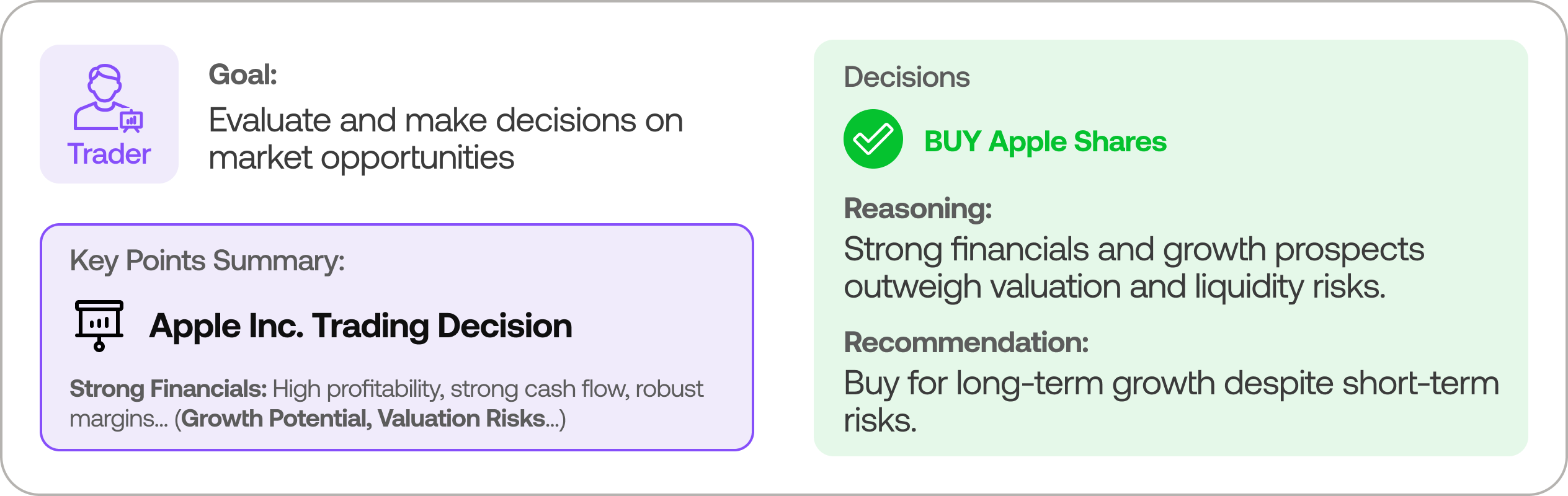
- Composes reports from the analysts and researchers to make informed trading decisions. It determines the timing and magnitude of trades based on comprehensive market insights.
### Risk Management and Portfolio Manager
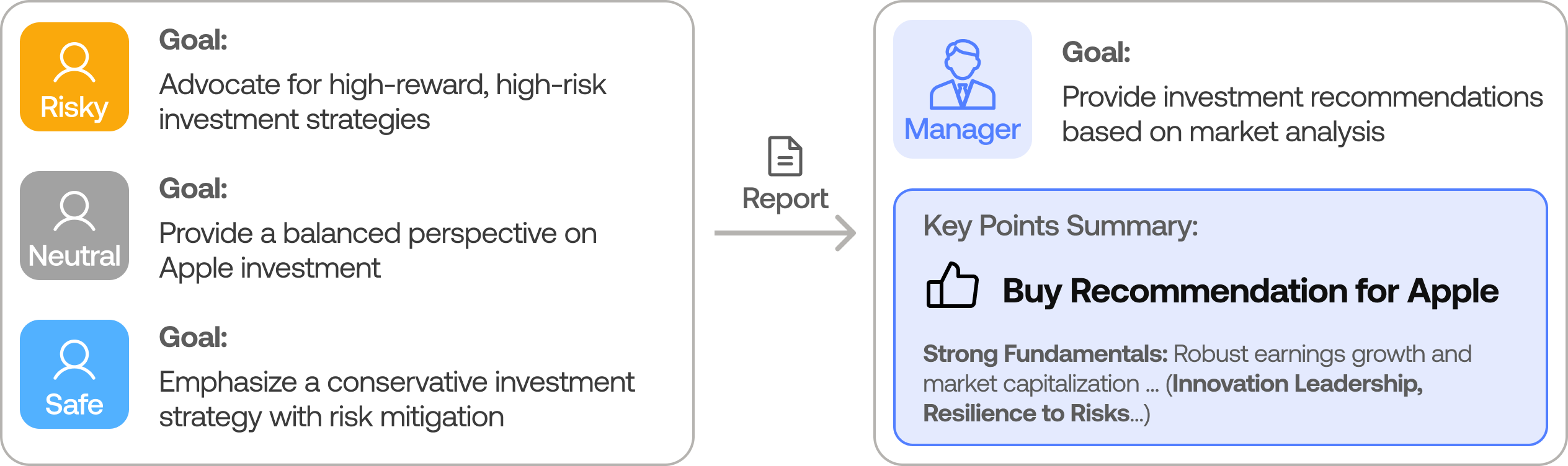
- Continuously evaluates portfolio risk by assessing market volatility, liquidity, and other risk factors. The risk management team evaluates and adjusts trading strategies, providing assessment reports to the Portfolio Manager for final decision.
- The Portfolio Manager approves/rejects the transaction proposal. If approved, the order will be sent to the simulated exchange and executed.
## Installation and CLI
### Installation
Clone TradingAgents:
```bash
git clone https://github.com/TauricResearch/TradingAgents.git
cd TradingAgents
```
Create a virtual environment in any of your favorite environment managers:
```bash
conda create -n tradingagents python=3.13
conda activate tradingagents
```
Install dependencies:
```bash
pip install -r requirements.txt
```
### Required APIs
You will need an LLM provider API key for all the agents, and [Alpha Vantage API](https://www.alphavantage.co/support/#api-key) for fundamental and news data (default configuration).
```bash
export OPENAI_API_KEY=$YOUR_OPENAI_API_KEY
export ALPHA_VANTAGE_API_KEY=$YOUR_ALPHA_VANTAGE_API_KEY
```
Alternatively, you can create a `.env` file in the project root with your API keys (see `.env.example` for reference):
```bash
cp .env.example .env
# Edit .env with your actual API keys
```
**Note:** We are happy to partner with Alpha Vantage to provide robust API support for TradingAgents. You can get a free AlphaVantage API [here](https://www.alphavantage.co/support/#api-key), TradingAgents-sourced requests also have increased rate limits to 60 requests per minute with no daily limits. Typically the quota is sufficient for performing complex tasks with TradingAgents thanks to Alpha Vantage's open-source support program. If you prefer to use OpenAI for these data sources instead, you can modify the data vendor settings in `tradingagents/default_config.py`.
#### LLM Provider Options
TradingAgents supports multiple LLM providers. Configure your choice in `main.py`:
**OpenAI** (default):
```python
config["llm_provider"] = "openai"
config["deep_think_llm"] = "o4-mini"
config["quick_think_llm"] = "gpt-4o-mini"
config["backend_url"] = "https://api.openai.com/v1"
# Requires: OPENAI_API_KEY environment variable
```
**Anthropic**:
```python
config["llm_provider"] = "anthropic"
config["deep_think_llm"] = "claude-sonnet-4-20250514"
config["quick_think_llm"] = "claude-sonnet-4-20250514"
config["backend_url"] = "https://api.anthropic.com"
# Requires: ANTHROPIC_API_KEY environment variable
```
**OpenRouter** (unified access to multiple models):
```python
config["llm_provider"] = "openrouter"
config["deep_think_llm"] = "anthropic/claude-sonnet-4.5"
config["quick_think_llm"] = "anthropic/claude-sonnet-4.5"
config["backend_url"] = "https://openrouter.ai/api/v1"
# Requires: OPENROUTER_API_KEY environment variable
```
Set your API key:
```bash
export OPENROUTER_API_KEY=$YOUR_OPENROUTER_API_KEY
```
Model names use the format `provider/model-name` (e.g., `anthropic/claude-sonnet-4.5`, `openai/gpt-4o`). See [OpenRouter models](https://openrouter.ai/docs/models) for available options.
**Important:** OpenRouter does not provide embeddings. If using OpenRouter for LLM inference, you must also set `OPENAI_API_KEY` for embedding functionality:
```bash
export OPENROUTER_API_KEY=$YOUR_OPENROUTER_API_KEY
export OPENAI_API_KEY=$YOUR_OPENAI_API_KEY # Used for embeddings only
```
**Google Generative AI**:
```python
config["llm_provider"] = "google"
config["deep_think_llm"] = "gemini-2.0-flash"
config["quick_think_llm"] = "gemini-2.0-flash"
# Requires: GOOGLE_API_KEY environment variable
```
**Ollama** (local inference):
```python
config["llm_provider"] = "ollama"
config["deep_think_llm"] = "mistral"
config["quick_think_llm"] = "mistral"
config["backend_url"] = "http://localhost:11434/v1"
# Requires: Local Ollama instance running
```
### CLI Usage
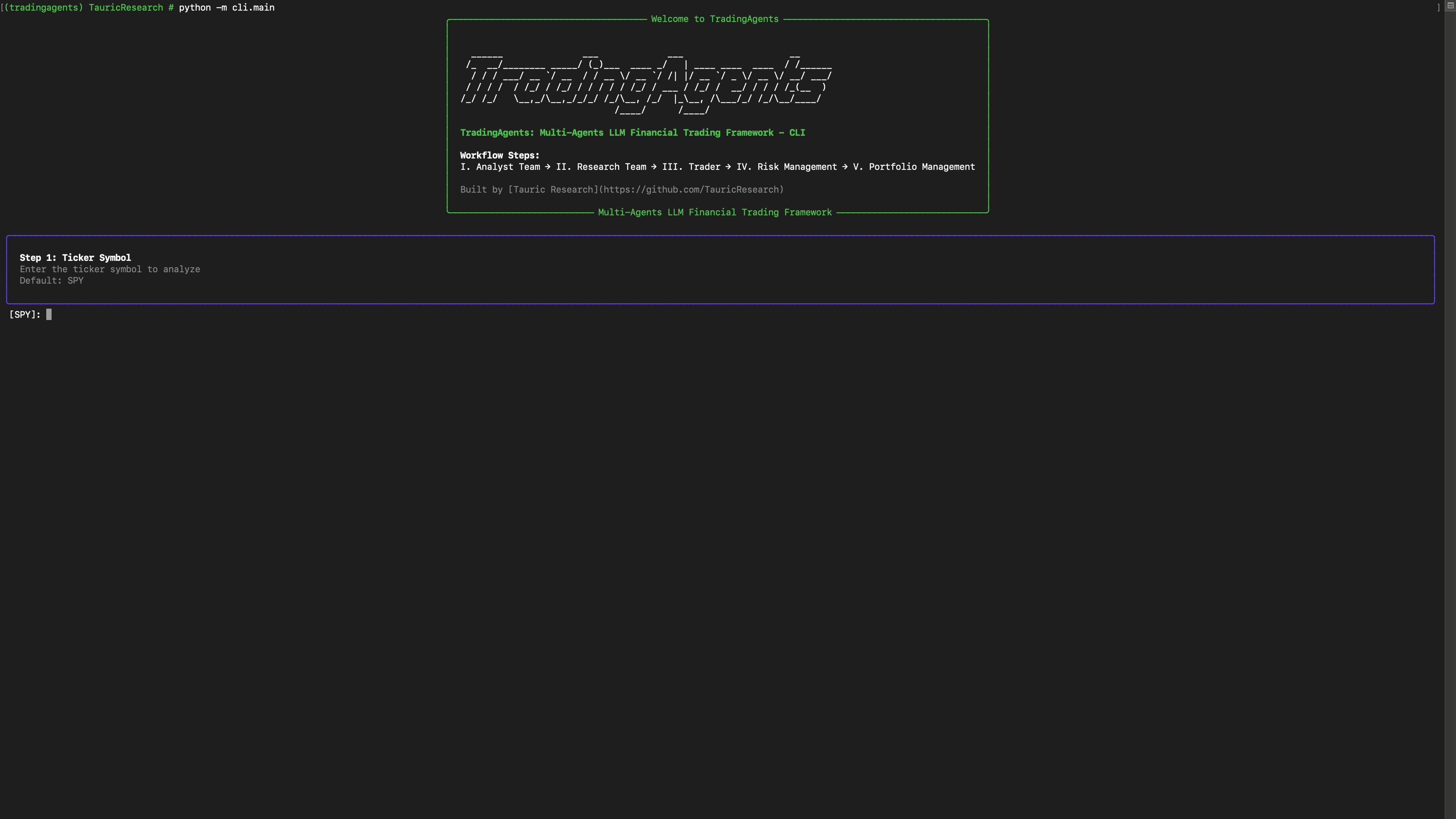
You can also try out the CLI directly by running:
```bash
python -m cli.main
```
You will see a screen where you can select your desired tickers, date, LLMs, research depth, etc.
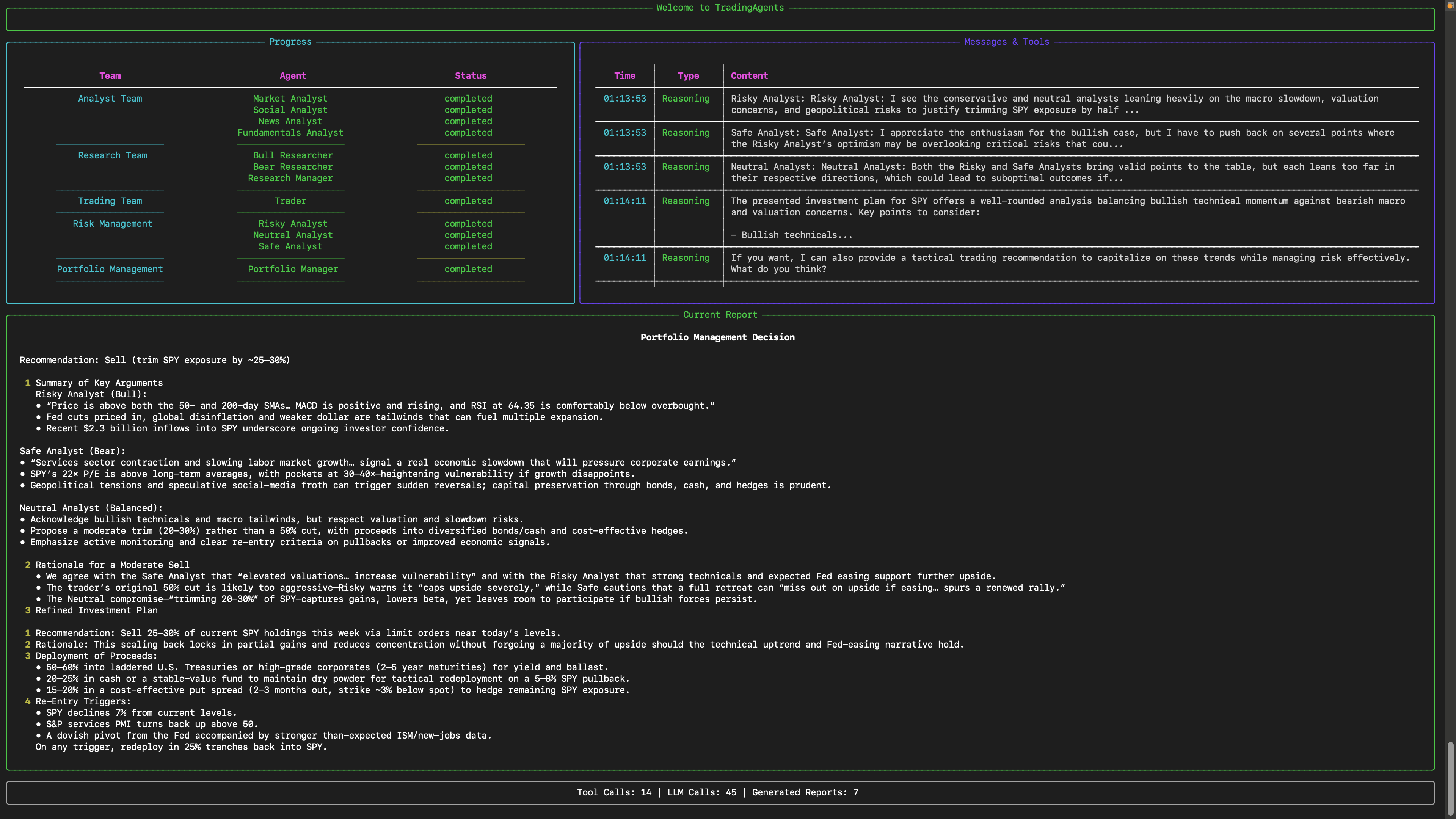
An interface will appear showing results as they load, letting you track the agent's progress as it runs.

## TradingAgents Package
### Implementation Details
We built TradingAgents with LangGraph to ensure flexibility and modularity. We utilize `o1-preview` and `gpt-4o` as our deep thinking and fast thinking LLMs for our experiments. However, for testing purposes, we recommend you use `o4-mini` and `gpt-4.1-mini` to save on costs as our framework makes **lots of** API calls.
### Python Usage
To use TradingAgents inside your code, you can import the `tradingagents` module and initialize a `TradingAgentsGraph()` object. The `.propagate()` function will return a decision. You can run `main.py`, here's also a quick example:
```python
from tradingagents.graph.trading_graph import TradingAgentsGraph
from tradingagents.default_config import DEFAULT_CONFIG
ta = TradingAgentsGraph(debug=True, config=DEFAULT_CONFIG.copy())
# forward propagate
_, decision = ta.propagate("NVDA", "2024-05-10")
print(decision)
```
You can also adjust the default configuration to set your own choice of LLMs, debate rounds, etc.
```python
from tradingagents.graph.trading_graph import TradingAgentsGraph
from tradingagents.default_config import DEFAULT_CONFIG
# Create a custom config
config = DEFAULT_CONFIG.copy()
config["deep_think_llm"] = "gpt-4o-mini" # Use a different model
config["quick_think_llm"] = "gpt-4o-mini" # Use a different model
config["max_debate_rounds"] = 1 # Increase debate rounds
# Configure data vendors (default uses yfinance and Alpha Vantage)
config["data_vendors"] = {
"core_stock_apis": "yfinance", # Options: yfinance, alpha_vantage, local
"technical_indicators": "yfinance", # Options: yfinance, alpha_vantage, local
"fundamental_data": "alpha_vantage", # Options: openai, alpha_vantage, local
"news_data": "alpha_vantage", # Options: openai, alpha_vantage, google, local
}
# Initialize with custom config
ta = TradingAgentsGraph(debug=True, config=config)
# forward propagate
_, decision = ta.propagate("NVDA", "2024-05-10")
print(decision)
```
**Using OpenRouter with different models:**
```python
from tradingagents.graph.trading_graph import TradingAgentsGraph
from tradingagents.default_config import DEFAULT_CONFIG
# Configure for OpenRouter with specified models
config = DEFAULT_CONFIG.copy()
config["llm_provider"] = "openrouter"
config["deep_think_llm"] = "anthropic/claude-sonnet-4.5" # Deep reasoning model
config["quick_think_llm"] = "openai/gpt-4o-mini" # Fast model
config["backend_url"] = "https://openrouter.ai/api/v1"
# Note: Ensure OPENROUTER_API_KEY is set in environment
# For embeddings, also set OPENAI_API_KEY
import os
if not os.getenv("OPENROUTER_API_KEY"):
raise ValueError("OPENROUTER_API_KEY not found in environment")
ta = TradingAgentsGraph(debug=True, config=config)
_, decision = ta.propagate("NVDA", "2024-05-10")
print(decision)
```
> The default configuration uses yfinance for stock price and technical data, and Alpha Vantage for fundamental and news data. For production use or if you encounter rate limits, consider upgrading to [Alpha Vantage Premium](https://www.alphavantage.co/premium/) for more stable and reliable data access. For offline experimentation, there's a local data vendor option that uses our **Tauric TradingDB**, a curated dataset for backtesting, though this is still in development. We're currently refining this dataset and plan to release it soon alongside our upcoming projects. Stay tuned!
You can view the full list of configurations in `tradingagents/default_config.py`.
## FastAPI Backend and REST API
TradingAgents includes a FastAPI backend with JWT authentication and a REST API for managing strategies and executing trades programmatically (Issue #48).
### API Server
Start the API server with:
```bash
# Using uvicorn directly
uvicorn tradingagents.api.main:app --host 0.0.0.0 --port 8000 --reload
# Or using Python
python -m tradingagents.api.main
```
The API documentation is automatically generated and available at:
- **Interactive API docs**: http://localhost:8000/docs (Swagger UI)
- **Alternative API docs**: http://localhost:8000/redoc (ReDoc)
- **Health check**: http://localhost:8000/health
### Authentication
The API uses JWT (JSON Web Tokens) with RS256 asymmetric signing for secure authentication. Passwords are hashed with Argon2.
**Login Endpoint:**
```bash
curl -X POST http://localhost:8000/api/v1/auth/login \
-H "Content-Type: application/json" \
-d '{"username": "user@example.com", "password": "your-password"}'
# Response
{
"access_token": "eyJhbGciOiJSUzI1NiIs...",
"token_type": "bearer",
"expires_in": 3600
}
```
Include the token in subsequent requests:
```bash
curl -X GET http://localhost:8000/api/v1/strategies \
-H "Authorization: Bearer "
```
### Strategies API
#### List Strategies
```bash
curl -X GET 'http://localhost:8000/api/v1/strategies?skip=0&limit=10' \
-H "Authorization: Bearer "
```
#### Create Strategy
```bash
curl -X POST http://localhost:8000/api/v1/strategies \
-H "Authorization: Bearer " \
-H "Content-Type: application/json" \
-d '{
"name": "My Strategy",
"description": "A test strategy",
"parameters": {"threshold": 0.7, "lookback": 20},
"is_active": true
}'
```
#### Get Strategy
```bash
curl -X GET http://localhost:8000/api/v1/strategies/{strategy_id} \
-H "Authorization: Bearer "
```
#### Update Strategy
```bash
curl -X PUT http://localhost:8000/api/v1/strategies/{strategy_id} \
-H "Authorization: Bearer " \
-H "Content-Type: application/json" \
-d '{"name": "Updated Name", "is_active": false}'
```
#### Delete Strategy
```bash
curl -X DELETE http://localhost:8000/api/v1/strategies/{strategy_id} \
-H "Authorization: Bearer "
```
### Database Configuration
The API uses SQLAlchemy with async support for database operations. Configure the database via environment variables:
```bash
# PostgreSQL (recommended for production)
export DATABASE_URL="postgresql+asyncpg://user:password@localhost/tradingagents"
# SQLite (default for development)
export DATABASE_URL="sqlite+aiosqlite:///./test.db"
```
Alembic handles schema migrations. Initialize and apply migrations with:
```bash
# Create migration
alembic revision --autogenerate -m "Description of changes"
# Apply migrations
alembic upgrade head
# Rollback
alembic downgrade -1
```
### Error Handling and Logging
TradingAgents includes robust error handling for rate limit errors and comprehensive logging capabilities to help you monitor and debug your trading analysis.
#### Rate Limit Error Handling
The framework automatically handles rate limit errors from LLM providers (OpenAI, Anthropic, OpenRouter) through a unified exception hierarchy. When a rate limit is encountered:
1. The error is caught and processed by `tradingagents/utils/exceptions.py`
2. Partial analysis state is automatically saved to allow resuming work
3. User-friendly error messages guide you on retry timing
```python
from tradingagents.utils.exceptions import LLMRateLimitError
try:
_, decision = ta.propagate("NVDA", "2024-05-10")
except LLMRateLimitError as e:
print(f"Rate limit: {e.message}")
if e.retry_after:
print(f"Retry after {e.retry_after} seconds")
```
#### Dual-Output Logging
TradingAgents logs to both terminal and rotating log files for comprehensive monitoring:
- **Terminal logging** at INFO level shows real-time progress
- **File logging** at DEBUG level provides detailed troubleshooting information
- **Log rotation** automatically manages files at 5MB with 3 backups
- **API key sanitization** automatically redacts sensitive credentials in logs
Logs are saved to the `TRADINGAGENTS_RESULTS_DIR` environment variable or `./logs` by default. Access logs with:
```bash
# View recent logs
tail -f ./logs/tradingagents.log
# Search for errors
grep ERROR ./logs/tradingagents.log
```
#### Partial Analysis Saving
If an error occurs during analysis, partial results are automatically saved, allowing you to inspect completed work and resume processing. Partial results are saved to the results directory in JSON format.
## Documentation
For comprehensive documentation, guides, and API references, please visit the [docs/](docs/) directory:
- **[Quick Start Guide](docs/QUICKSTART.md)** - Get up and running quickly
- **[Architecture Documentation](docs/architecture/)** - Understand system design and components
- **[API Reference](docs/api/)** - Detailed API documentation
- **[Developer Guides](docs/guides/)** - How-to guides for extending the framework
- **[Testing Guide](docs/testing/)** - Testing infrastructure and best practices
- **[Complete Documentation Index](docs/README.md)** - Full table of contents
## Contributing
We welcome contributions from the community! Whether it's fixing a bug, improving documentation, or suggesting a new feature, your input helps make this project better. If you are interested in this line of research, please consider joining our open-source financial AI research community [Tauric Research](https://tauric.ai/).
## Citation
Please reference our work if you find *TradingAgents* provides you with some help :)
```
@misc{xiao2025tradingagentsmultiagentsllmfinancial,
title={TradingAgents: Multi-Agents LLM Financial Trading Framework},
author={Yijia Xiao and Edward Sun and Di Luo and Wei Wang},
year={2025},
eprint={2412.20138},
archivePrefix={arXiv},
primaryClass={q-fin.TR},
url={https://arxiv.org/abs/2412.20138},
}
```